
Python has become one of the top choices for web development, thanks to its simplicity, power, and diverse frameworks like Flask and Django. However, developing a Python web application is only half the job — deploying it to a live environment is the key to making it accessible to users around the world.
This comprehensive guide covers everything from basic concepts of Python hosting to detailed deployment methods with hands-on examples and clear visual aids. Whether you’re deploying a small Flask app or a large Django project, this article equips you with the knowledge to launch and maintain your Python web applications successfully.
What Is Python Hosting?
Python hosting refers to the environment where Python web applications run and are accessible on the internet. Unlike static websites, Python applications require server-side execution, which means hosting providers must support the Python runtime and often accompanying databases and server configurations.
Hosting can be done on:
- Shared hosting with limited Python support
- Virtual Private Servers (VPS)
- Dedicated servers
- Cloud platforms like AWS, Azure, Heroku, and Google Cloud
- Platform-as-a-Service (PaaS) specialized for Python apps
Common Python Web Frameworks
Before deployment, knowing your framework’s specifics is important:
- Django: A full-stack framework that comes with admin panels and ORM.
- Flask: A micro-framework that is lightweight and flexible.
- FastAPI: Modern, fast (high-performance), ideal for APIs.
Key Components of Python Hosting
- Web Server Gateway Interface (WSGI): An interface between Python apps and web servers (e.g., Gunicorn, uWSGI).
- Web Server: Handles client HTTP requests (e.g., Nginx, Apache).
- Database: Stores persistent data (e.g., PostgreSQL, MySQL, SQLite).
- Environment: Virtual environments isolate package dependencies.
Step-by-Step Guide to Deploy a Simple Flask App
1. Your Sample Flask Application
from flask import Flask
app = Flask(__name__)

@app.route('/')
def home():
    return "Hello, Python hosting!"

if __name__ == '__main__':
    app.run(debug=True)
This application returns a simple greeting when accessed.
2. Prepare the Environment
- Install Python 3.x on your server.
- Set up a virtual environment using
python3 -m venv venv. - Activate the environment:
source venv/bin/activate. - Install Flask:
pip install Flask.
3. Use Gunicorn as WSGI Server
Gunicorn is widely used to serve Python apps in production.
pip install gunicorn
gunicorn --bind 0.0.0.0:8000 app:app
This command runs Gunicorn hosting your app on port 8000.
4. Configure Nginx as a Reverse Proxy
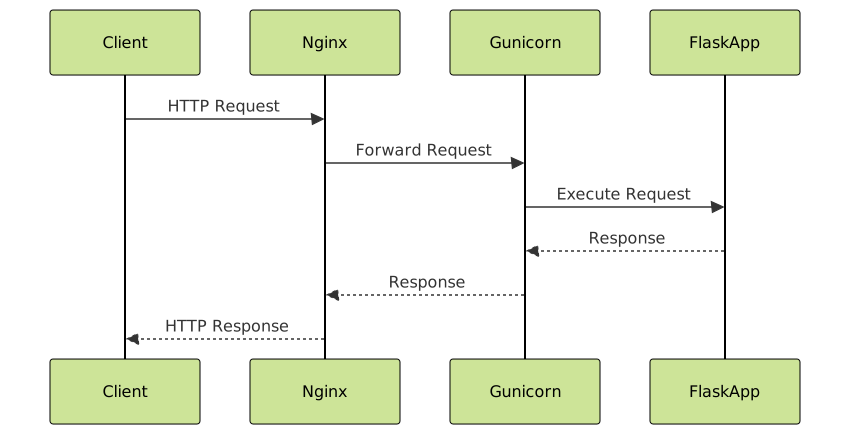
Nginx helps manage incoming traffic and forwards it to Gunicorn.
Typical Nginx config snippet:
server {
    listen 80;
    server_name your_domain.com;

    location / {
        proxy_pass http://127.0.0.1:8000;
        proxy_set_header Host $host;
        proxy_set_header X-Real-IP $remote_addr;
        proxy_set_header X-Forwarded-For $proxy_add_x_forwarded_for;
        proxy_set_header X-Forwarded-Proto $scheme;
    }
}
Deploying Django Applications
Django requires additional settings like static file handling and database migrations.
- Prepare your Django project and create a production-ready
settings.py. - Collect static files using
python manage.py collectstatic. - Configure Gunicorn similar to Flask.
- Use a database server like PostgreSQL for production.
- Set up Nginx as a reverse proxy and static file server.
Django Deployment Architecture

Hosting Platforms for Python Applications
Popular platforms simplify deployment of Python web apps with built-in Python and application server support:
- Heroku: Easy git-based deployment, integrated PostgreSQL service.
- AWS Elastic Beanstalk: Scalable, managed environment for Python.
- Google Cloud Platform: App Engine and Compute Engine options.
- PythonAnywhere: Shared Python hosting with web app support.
- DigitalOcean: VPS-based hosting ideal for custom setups.
Interactive Example: Running a Flask App Locally
To try a Flask app on your machine, save below code as app.py and run:
pip install flask
python app.py
Open browser at http://127.0.0.1:5000 to see the message.
Best Practices for Python Hosting and Deployment
- Security: Use HTTPS with certificates (Let’s Encrypt), keep dependencies updated.
- Virtual Environment: Always isolate package dependencies.
- Process Management: Use systemd or supervisor to keep Gunicorn running.
- Monitoring: Set up logging and monitoring for uptime and errors.
- Backups: Regularly backup databases and important data.
Conclusion
Deploying Python web applications requires coordinated setup of Python environments, WSGI servers, web servers, and sometimes databases. This article provided a detailed roadmap with practical examples for Flask and Django, plus architecture diagrams clarifying the request flow. Leveraging modern hosting platforms or custom servers, developers can launch scalable and secure Python applications accessible to users worldwide.
With these steps and insights, anyone can confidently deploy Python projects and maintain them for production use.





