What Are PowerShell Modules?
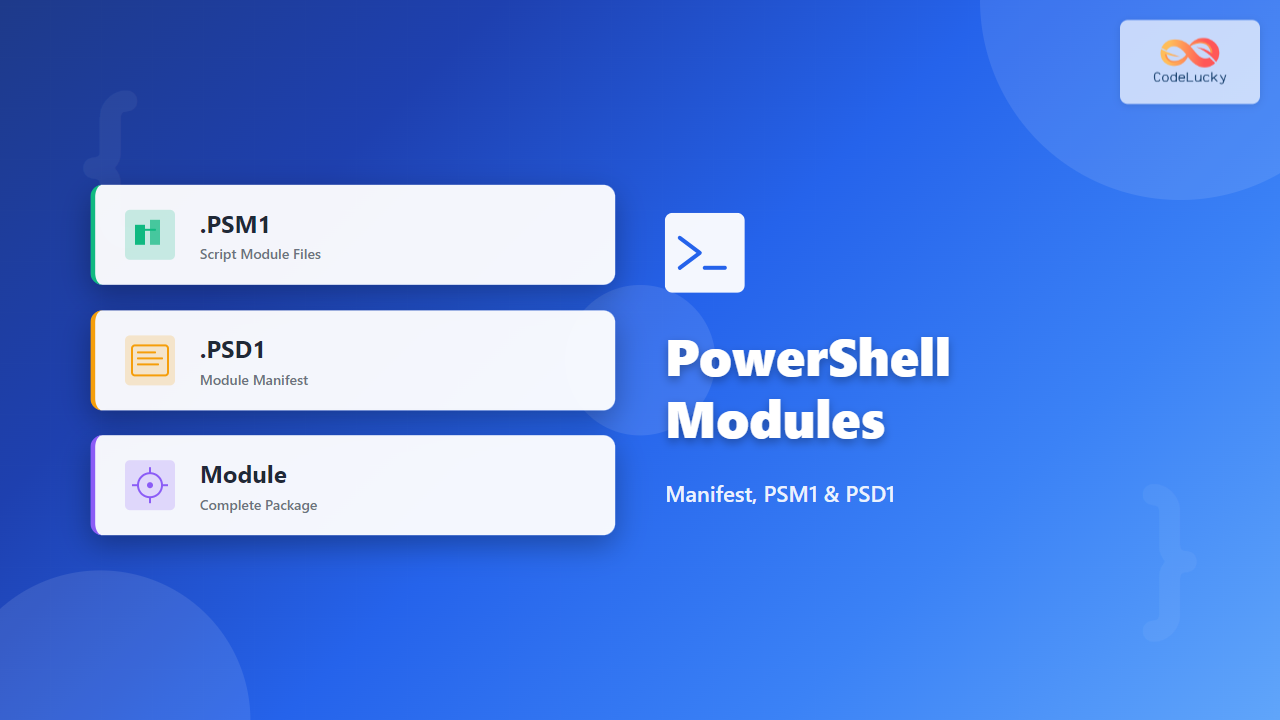
PowerShell modules are packages that contain cmdlets, functions, variables, and other resources organized into reusable components. They enable code organization, distribution, and reuse across scripts and environments. A module can be as simple as a single script file (.psm1) or a complex package with manifests (.psd1), nested modules, and type definitions.
Modules solve the problem of code duplication and provide a standardized way to share PowerShell functionality. Instead of copying functions between scripts, you import a module and access its exported commands instantly.

Types of PowerShell Modules
Script Modules (PSM1)
Script modules are PowerShell script files with a .psm1 extension containing functions, workflows, and variables. These are the most common type for custom development and learning.
# MyUtilities.psm1
function Get-SystemUptime {
    [CmdletBinding()]
    param()

    $os = Get-CimInstance Win32_OperatingSystem
    $uptime = (Get-Date) - $os.LastBootUpTime

    [PSCustomObject]@{
        Days    = $uptime.Days
        Hours   = $uptime.Hours
        Minutes = $uptime.Minutes
        Total   = $uptime.ToString()
    }
}

function Get-DiskSpace {
    [CmdletBinding()]
    param(
        [string]$DriveLetter = "C:"
    )

    Get-PSDrive $DriveLetter.TrimEnd(':') | Select-Object Name,
        @{N='UsedGB';E={[math]::Round($_.Used/1GB,2)}},
        @{N='FreeGB';E={[math]::Round($_.Free/1GB,2)}},
        @{N='TotalGB';E={[math]::Round(($_.Used+$_.Free)/1GB,2)}}
}

Export-ModuleMember -Function Get-SystemUptime, Get-DiskSpace
Module Manifests (PSD1)
A module manifest is a PowerShell data file (.psd1) containing metadata about the module including version, author, required modules, and what gets exported. Manifests are optional but strongly recommended for production modules.
Binary Modules (DLL)
Binary modules are compiled .NET assemblies containing cmdlets written in C# or other .NET languages. These offer better performance for computationally intensive operations.
Creating Your First Script Module
Basic Module Structure
Create a directory for your module and a .psm1 file with the same name:
# Create module directory
$modulePath = "$HOME\Documents\PowerShell\Modules\DataProcessor"
New-Item -ItemType Directory -Path $modulePath -Force

# Create the module file
$moduleContent = @'
function ConvertTo-Uppercase {
    [CmdletBinding()]
    param(
        [Parameter(Mandatory, ValueFromPipeline)]
        [string]$Text
    )

    process {
        $Text.ToUpper()
    }
}

function Get-StringStats {
    [CmdletBinding()]
    param(
        [Parameter(Mandatory)]
        [string]$Text
    )

    [PSCustomObject]@{
        Length = $Text.Length
        Words = ($Text -split '\s+').Count
        Vowels = ([regex]::Matches($Text, '[aeiouAEIOU]')).Count
        Consonants = ([regex]::Matches($Text, '[bcdfghjklmnpqrstvwxyzBCDFGHJKLMNPQRSTVWXYZ]')).Count
    }
}

Export-ModuleMember -Function ConvertTo-Uppercase, Get-StringStats
'@

Set-Content -Path "$modulePath\DataProcessor.psm1" -Value $moduleContent
Output:
Directory: C:\Users\YourName\Documents\PowerShell\Modules

Mode                 LastWriteTime         Length Name
----                 -------------         ------ ----
d----          10/22/2025   3:04 PM                DataProcessor
Using the Module
# Import the module
Import-Module DataProcessor

# Use the functions
"hello world" | ConvertTo-Uppercase

Get-StringStats -Text "PowerShell modules are powerful"
Output:
HELLO WORLD

Length     : 32
Words      : 4
Vowels     : 11
Consonants : 18
Understanding Module Manifests (PSD1)
Module manifests provide structure and metadata for your modules. They control versioning, dependencies, and exports while documenting authorship and compatibility.

Creating a Module Manifest
# Generate manifest for DataProcessor module
$manifestParams = @{
    Path = "$HOME\Documents\PowerShell\Modules\DataProcessor\DataProcessor.psd1"
    RootModule = 'DataProcessor.psm1'
    ModuleVersion = '1.0.0'
    Author = 'CodeLucky Team'
    CompanyName = 'CodeLucky.com'
    Description = 'Data processing utilities for text manipulation'
    PowerShellVersion = '5.1'
    FunctionsToExport = @('ConvertTo-Uppercase', 'Get-StringStats')
    CmdletsToExport = @()
    VariablesToExport = @()
    AliasesToExport = @()
    Tags = @('Data', 'Text', 'Utility')
    ProjectUri = 'https://codelucky.com/modules/dataprocessor'
}

New-ModuleManifest @manifestParams
Manifest File Structure
# DataProcessor.psd1 (generated content)
@{
    RootModule = 'DataProcessor.psm1'
    ModuleVersion = '1.0.0'
    GUID = 'a1b2c3d4-e5f6-7890-abcd-ef1234567890'
    Author = 'CodeLucky Team'
    CompanyName = 'CodeLucky.com'
    Copyright = '(c) 2025 CodeLucky.com. All rights reserved.'
    Description = 'Data processing utilities for text manipulation'

    PowerShellVersion = '5.1'

    FunctionsToExport = @('ConvertTo-Uppercase', 'Get-StringStats')
    CmdletsToExport = @()
    VariablesToExport = @()
    AliasesToExport = @()

    PrivateData = @{
        PSData = @{
            Tags = @('Data', 'Text', 'Utility')
            ProjectUri = 'https://codelucky.com/modules/dataprocessor'
        }
    }
}
Advanced Module Development
Module with Multiple Files
Organize larger modules with separate files for different function categories:
# Create organized module structure
$moduleName = "NetworkTools"
$modulePath = "$HOME\Documents\PowerShell\Modules\$moduleName"

New-Item -ItemType Directory -Path "$modulePath\Public" -Force
New-Item -ItemType Directory -Path "$modulePath\Private" -Force

# Public\Get-PublicIP.ps1
$publicFunction = @'
function Get-PublicIP {
    [CmdletBinding()]
    param()

    try {
        $response = Invoke-RestMethod -Uri 'https://api.ipify.org?format=json' -TimeoutSec 5
        [PSCustomObject]@{
            IPAddress = $response.ip
            TimeStamp = Get-Date
        }
    }
    catch {
        Write-Error "Failed to retrieve public IP: $_"
    }
}
'@

Set-Content -Path "$modulePath\Public\Get-PublicIP.ps1" -Value $publicFunction

# Private\Write-Log.ps1
$privateFunction = @'
function Write-Log {
    param([string]$Message)
    $timestamp = Get-Date -Format 'yyyy-MM-dd HH:mm:ss'
    Write-Verbose "[$timestamp] $Message"
}
'@

Set-Content -Path "$modulePath\Private\Write-Log.ps1" -Value $privateFunction

# NetworkTools.psm1 (root module)
$rootModule = @'
# Import private functions
Get-ChildItem -Path $PSScriptRoot\Private\*.ps1 | ForEach-Object {
    . $_.FullName
}

# Import public functions
Get-ChildItem -Path $PSScriptRoot\Public\*.ps1 | ForEach-Object {
    . $_.FullName
}

# Export only public functions
Export-ModuleMember -Function (Get-ChildItem -Path $PSScriptRoot\Public\*.ps1).BaseName
'@

Set-Content -Path "$modulePath\$moduleName.psm1" -Value $rootModule

Module Dependencies
Specify required modules in your manifest to ensure dependencies are available:
# Creating a manifest with dependencies
$manifestParams = @{
    Path = "$modulePath\NetworkTools.psd1"
    RootModule = 'NetworkTools.psm1'
    ModuleVersion = '1.0.0'
    RequiredModules = @(
        @{ModuleName='Microsoft.PowerShell.Management'; ModuleVersion='3.0.0.0'}
    )
    FunctionsToExport = @('Get-PublicIP')
}

New-ModuleManifest @manifestParams
Module Discovery and Installation
Module Paths
PowerShell searches for modules in directories specified by $env:PSModulePath:
# View module paths
$env:PSModulePath -split ';'

# Add custom path (temporary - current session)
$env:PSModulePath += ";C:\CustomModules"

# Add custom path (permanent)
[Environment]::SetEnvironmentVariable(
    'PSModulePath',
    $env:PSModulePath + ";C:\CustomModules",
    'User'
)
Output:
C:\Users\YourName\Documents\PowerShell\Modules
C:\Program Files\PowerShell\Modules
C:\WINDOWS\system32\WindowsPowerShell\v1.0\Modules
Listing and Finding Modules
# List all available modules
Get-Module -ListAvailable

# Find specific module
Get-Module -ListAvailable -Name DataProcessor

# View module details
Get-Module DataProcessor | Format-List *

# Check if module is imported
Get-Module DataProcessor
Output:
    Directory: C:\Users\YourName\Documents\PowerShell\Modules

ModuleType Version    Name                ExportedCommands
---------- -------    ----                ----------------
Script     1.0.0      DataProcessor       {ConvertTo-Uppercase, Get-StringStats}
Export Control and Visibility
Explicit Exports in PSM1
# Module with explicit exports
function Public-Function {
    Write-Output "This is exported"
}

function Private-Helper {
    Write-Output "This is internal"
}

# Only export what's needed
Export-ModuleMember -Function Public-Function

# Export functions and aliases
Export-ModuleMember -Function Public-Function -Alias pf
Manifest-Level Export Control
# In the .psd1 manifest
@{
    FunctionsToExport = @('Get-Data', 'Set-Data')  # Specific functions
    CmdletsToExport = @()                          # No cmdlets
    VariablesToExport = @()                        # No variables
    AliasesToExport = @('gd', 'sd')               # Specific aliases
}

Working with Module Commands
Importing Modules
# Import with auto-loading (PowerShell 3.0+)
Get-SystemUptime  # Automatically imports module if in PSModulePath

# Explicit import
Import-Module DataProcessor

# Import with prefix to avoid naming conflicts
Import-Module DataProcessor -Prefix DP
Get-DPSystemUptime  # Function now has DP prefix

# Import specific version
Import-Module DataProcessor -RequiredVersion 1.0.0

# Force reimport (refresh)
Import-Module DataProcessor -Force
Removing Modules
# Remove module from current session
Remove-Module DataProcessor

# Remove all versions
Get-Module DataProcessor | Remove-Module

# Verify removal
Get-Module DataProcessor  # Returns nothing
Module Versioning Best Practices
Semantic Versioning
Follow semantic versioning (MAJOR.MINOR.PATCH) in your manifest:
# Update manifest version
Update-ModuleManifest -Path ".\DataProcessor.psd1" -ModuleVersion "1.1.0"

# Version breakdown:
# 1.0.0 - Initial release
# 1.1.0 - Added new function (minor)
# 1.1.1 - Bug fix (patch)
# 2.0.0 - Breaking changes (major)
Managing Multiple Versions
# Install multiple versions
$modulePath = "$HOME\Documents\PowerShell\Modules\DataProcessor"
New-Item -ItemType Directory -Path "$modulePath\1.0.0" -Force
New-Item -ItemType Directory -Path "$modulePath\1.1.0" -Force

# List all versions
Get-Module DataProcessor -ListAvailable | Select-Object Name, Version, Path

# Import specific version
Import-Module DataProcessor -RequiredVersion 1.0.0
Testing and Validation
Test Module Manifest
# Validate manifest syntax
Test-ModuleManifest -Path ".\DataProcessor.psd1"

# Check for errors
$manifest = Test-ModuleManifest -Path ".\DataProcessor.psd1"
$manifest | Format-List Name, Version, ExportedFunctions
Output:
Name              : DataProcessor
Version           : 1.0.0
ExportedFunctions : {ConvertTo-Uppercase, Get-StringStats}
Module Testing Template
# Create test script
$testScript = @'
Import-Module DataProcessor -Force

# Test 1: Function exists
$function = Get-Command ConvertTo-Uppercase -ErrorAction SilentlyContinue
if ($function) {
    Write-Host "✓ ConvertTo-Uppercase exists" -ForegroundColor Green
} else {
    Write-Host "✗ ConvertTo-Uppercase not found" -ForegroundColor Red
}

# Test 2: Function works correctly
$result = "test" | ConvertTo-Uppercase
if ($result -eq "TEST") {
    Write-Host "✓ ConvertTo-Uppercase works correctly" -ForegroundColor Green
} else {
    Write-Host "✗ ConvertTo-Uppercase failed" -ForegroundColor Red
}

# Test 3: Get-StringStats accuracy
$stats = Get-StringStats -Text "Hello"
if ($stats.Length -eq 5 -and $stats.Vowels -eq 2) {
    Write-Host "✓ Get-StringStats accurate" -ForegroundColor Green
} else {
    Write-Host "✗ Get-StringStats inaccurate" -ForegroundColor Red
}

Remove-Module DataProcessor
'@

Invoke-Expression $testScript
Advanced Manifest Features
Nested Modules
# Manifest with nested modules
@{
    RootModule = 'MainModule.psm1'
    ModuleVersion = '1.0.0'

    # Additional modules to load
    NestedModules = @(
        'Helpers\StringHelpers.psm1',
        'Helpers\FileHelpers.psm1'
    )

    FunctionsToExport = @('*')  # Export all from all modules
}
Scripts to Process
# Run initialization scripts on import
@{
    RootModule = 'MyModule.psm1'
    ModuleVersion = '1.0.0'

    # Scripts run before module loads
    ScriptsToProcess = @('Initialize.ps1')
}

# Initialize.ps1 example
Write-Verbose "Initializing MyModule..."
$script:ModuleConfig = @{
    CachePath = "$env:TEMP\MyModule"
    LogLevel = 'Info'
}
Real-World Module Example
Complete FileManager Module
# FileManager.psm1
function Get-LargeFiles {
    [CmdletBinding()]
    param(
        [Parameter(Mandatory)]
        [string]$Path,

        [int]$MinSizeMB = 100
    )

    if (-not (Test-Path $Path)) {
        throw "Path not found: $Path"
    }

    Get-ChildItem -Path $Path -File -Recurse -ErrorAction SilentlyContinue |
        Where-Object { $_.Length -gt ($MinSizeMB * 1MB) } |
        Select-Object Name, Directory,
            @{N='SizeMB';E={[math]::Round($_.Length/1MB,2)}},
            LastWriteTime |
        Sort-Object SizeMB -Descending
}

function Remove-OldFiles {
    [CmdletBinding(SupportsShouldProcess)]
    param(
        [Parameter(Mandatory)]
        [string]$Path,

        [int]$DaysOld = 30
    )

    $cutoffDate = (Get-Date).AddDays(-$DaysOld)
    $files = Get-ChildItem -Path $Path -File -Recurse |
        Where-Object { $_.LastWriteTime -lt $cutoffDate }

    foreach ($file in $files) {
        if ($PSCmdlet.ShouldProcess($file.FullName, "Delete")) {
            Remove-Item $file.FullName -Force
            Write-Verbose "Deleted: $($file.FullName)"
        }
    }

    [PSCustomObject]@{
        FilesProcessed = $files.Count
        CutoffDate = $cutoffDate
    }
}

function Get-DirectorySize {
    [CmdletBinding()]
    param(
        [Parameter(Mandatory, ValueFromPipeline)]
        [string]$Path
    )

    process {
        if (Test-Path $Path) {
            $size = Get-ChildItem -Path $Path -Recurse -File -ErrorAction SilentlyContinue |
                Measure-Object -Property Length -Sum

            [PSCustomObject]@{
                Path = $Path
                SizeMB = [math]::Round($size.Sum/1MB,2)
                SizeGB = [math]::Round($size.Sum/1GB,2)
                FileCount = $size.Count
            }
        }
    }
}

Export-ModuleMember -Function Get-LargeFiles, Remove-OldFiles, Get-DirectorySize
FileManager Manifest
# FileManager.psd1
@{
    RootModule = 'FileManager.psm1'
    ModuleVersion = '1.2.0'
    GUID = 'f9e7d6c5-b4a3-4928-9e7f-8d6c5b4a3928'
    Author = 'CodeLucky Team'
    CompanyName = 'CodeLucky.com'
    Copyright = '(c) 2025 CodeLucky.com'
    Description = 'File management utilities for PowerShell'

    PowerShellVersion = '5.1'

    FunctionsToExport = @(
        'Get-LargeFiles',
        'Remove-OldFiles',
        'Get-DirectorySize'
    )