PowerShell has become an indispensable tool in modern DevOps practices, bridging the gap between development and operations teams. Its cross-platform capabilities, robust scripting features, and extensive integration options make it ideal for implementing CI/CD pipelines, managing infrastructure, and automating deployment workflows.
PowerShell’s Role in DevOps
DevOps practices emphasize automation, consistency, and rapid delivery. PowerShell excels in these areas by providing:
- Cross-platform compatibility (Windows, Linux, macOS)
- Native integration with Azure, AWS, and other cloud platforms
- Object-oriented pipeline processing
- Extensive module ecosystem for various DevOps tools
- Version control friendly scripting

Building CI/CD Pipelines with PowerShell
Azure DevOps Pipeline Integration
PowerShell scripts integrate seamlessly into Azure DevOps pipelines. Here’s a complete example of a build and deployment pipeline:
# azure-pipelines.yml
trigger:
  - main

pool:
  vmImage: 'windows-latest'

stages:
  - stage: Build
    jobs:
      - job: BuildJob
        steps:
          - task: PowerShell@2
            displayName: 'Build Application'
            inputs:
              targetType: 'inline'
              script: |
                Write-Host "Starting build process..."
                dotnet build --configuration Release
                Write-Host "Build completed successfully"
# Build.ps1 - Standalone build script
param(
    [string]$Configuration = "Release",
    [string]$OutputPath = "./artifacts"
)

$ErrorActionPreference = "Stop"

Write-Host "Building solution..." -ForegroundColor Cyan

# Restore dependencies
dotnet restore
if ($LASTEXITCODE -ne 0) {
    throw "Restore failed"
}

# Build project
dotnet build --configuration $Configuration --output $OutputPath
if ($LASTEXITCODE -ne 0) {
    throw "Build failed"
}

# Run tests
dotnet test --no-build --configuration $Configuration
if ($LASTEXITCODE -ne 0) {
    throw "Tests failed"
}

Write-Host "Build completed successfully!" -ForegroundColor Green
Output:
Building solution...
  Determining projects to restore...
  Restored successfully
  MyApp -> /artifacts/MyApp.dll
Build succeeded.
    0 Warning(s)
    0 Error(s)
Test Run Successful.
Total tests: 25
     Passed: 25
Build completed successfully!
GitHub Actions with PowerShell
PowerShell scripts work perfectly in GitHub Actions workflows:
# .github/workflows/deploy.yml
name: Deploy Application

on:
  push:
    branches: [ main ]

jobs:
  deploy:
    runs-on: windows-latest

    steps:
    - uses: actions/checkout@v3

    - name: Deploy to Azure
      shell: pwsh
      run: |
        ./scripts/Deploy-ToAzure.ps1 -Environment Production
      env:
        AZURE_CREDENTIALS: ${{ secrets.AZURE_CREDENTIALS }}
# Deploy-ToAzure.ps1
param(
    [Parameter(Mandatory)]
    [ValidateSet('Development', 'Staging', 'Production')]
    [string]$Environment
)

# Configuration based on environment
$config = @{
    Development = @{
        ResourceGroup = "rg-dev-app"
        AppServiceName = "app-dev-myapp"
        Slot = "dev"
    }
    Production = @{
        ResourceGroup = "rg-prod-app"
        AppServiceName = "app-prod-myapp"
        Slot = "production"
    }
}

$settings = $config[$Environment]

Write-Host "Deploying to $Environment environment..." -ForegroundColor Yellow

# Connect to Azure
Connect-AzAccount -Identity

# Deploy application
Publish-AzWebApp `
    -ResourceGroupName $settings.ResourceGroup `
    -Name $settings.AppServiceName `
    -ArchivePath "./artifacts/app.zip" `
    -Slot $settings.Slot

Write-Host "Deployment to $Environment completed!" -ForegroundColor Green
Infrastructure as Code with PowerShell
Azure Resource Management
PowerShell enables declarative infrastructure management through ARM templates and Azure modules:
# Deploy-Infrastructure.ps1
param(
    [string]$ResourceGroupName = "rg-myapp-prod",
    [string]$Location = "eastus",
    [string]$TemplateFile = "./infrastructure/main.bicep"
)

# Create resource group if it doesn't exist
$rg = Get-AzResourceGroup -Name $ResourceGroupName -ErrorAction SilentlyContinue
if (-not $rg) {
    Write-Host "Creating resource group: $ResourceGroupName" -ForegroundColor Cyan
    New-AzResourceGroup -Name $ResourceGroupName -Location $Location
}

# Deploy infrastructure
Write-Host "Deploying infrastructure..." -ForegroundColor Cyan
$deployment = New-AzResourceGroupDeployment `
    -ResourceGroupName $ResourceGroupName `
    -TemplateFile $TemplateFile `
    -Verbose

# Output deployment results
Write-Host "`nDeployment Results:" -ForegroundColor Green
$deployment.Outputs.GetEnumerator() | ForEach-Object {
    Write-Host "  $($_.Key): $($_.Value.Value)"
}
Output:
Creating resource group: rg-myapp-prod
Deploying infrastructure...
VERBOSE: Performing the operation "Creating Deployment" on target "rg-myapp-prod"
VERBOSE: Template deployment 'main-20251022-161245' started
VERBOSE: Resource Microsoft.Web/serverfarms 'asp-myapp' provisioning
VERBOSE: Resource Microsoft.Web/sites 'app-myapp' provisioning
VERBOSE: Template deployment completed successfully

Deployment Results:
  appServiceUrl: https://app-myapp.azurewebsites.net
  resourceGroupId: /subscriptions/.../resourceGroups/rg-myapp-prod

Managing Multiple Environments
# Deploy-MultiEnvironment.ps1
$environments = @(
    @{
        Name = "Development"
        ResourceGroup = "rg-dev"
        Location = "eastus"
        Sku = "B1"
    },
    @{
        Name = "Staging"
        ResourceGroup = "rg-staging"
        Location = "eastus"
        Sku = "S1"
    },
    @{
        Name = "Production"
        ResourceGroup = "rg-prod"
        Location = "eastus"
        Sku = "P1V2"
    }
)

foreach ($env in $environments) {
    Write-Host "`nDeploying $($env.Name) environment..." -ForegroundColor Magenta

    # Create deployment parameters
    $parameters = @{
        environmentName = $env.Name.ToLower()
        appServiceSku = $env.Sku
        location = $env.Location
    }

    # Deploy infrastructure
    New-AzResourceGroupDeployment `
        -ResourceGroupName $env.ResourceGroup `
        -TemplateFile "./infrastructure/main.bicep" `
        -TemplateParameterObject $parameters `
        -ErrorAction Stop

    Write-Host "$($env.Name) deployment completed" -ForegroundColor Green
}
Container and Kubernetes Management
Docker Integration
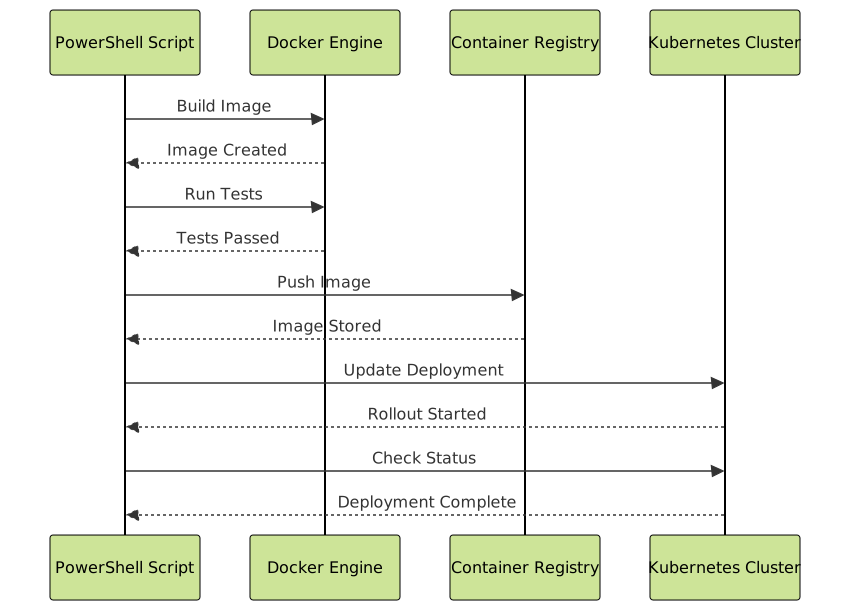
# Build-DockerImage.ps1
param(
    [string]$ImageName = "myapp",
    [string]$Tag = "latest",
    [string]$Registry = "myregistry.azurecr.io"
)

$fullImageName = "$Registry/${ImageName}:${Tag}"

Write-Host "Building Docker image: $fullImageName" -ForegroundColor Cyan

# Build image
docker build -t $fullImageName .
if ($LASTEXITCODE -ne 0) {
    throw "Docker build failed"
}

# Run tests in container
Write-Host "Running container tests..." -ForegroundColor Cyan
docker run --rm $fullImageName npm test
if ($LASTEXITCODE -ne 0) {
    throw "Container tests failed"
}

# Push to registry
Write-Host "Pushing image to registry..." -ForegroundColor Cyan
docker push $fullImageName
if ($LASTEXITCODE -ne 0) {
    throw "Docker push failed"
}

Write-Host "Image published successfully: $fullImageName" -ForegroundColor Green
Kubernetes Deployments
# Deploy-ToKubernetes.ps1
param(
    [string]$Namespace = "production",
    [string]$DeploymentName = "myapp",
    [string]$ImageTag = "latest"
)

# Update deployment image
kubectl set image deployment/$DeploymentName `
    $DeploymentName=myregistry.azurecr.io/myapp:$ImageTag `
    --namespace=$Namespace `
    --record

# Wait for rollout
Write-Host "Waiting for rollout to complete..." -ForegroundColor Cyan
kubectl rollout status deployment/$DeploymentName --namespace=$Namespace

# Verify deployment
$pods = kubectl get pods --namespace=$Namespace -l app=$DeploymentName -o json | ConvertFrom-Json

Write-Host "`nDeployment Status:" -ForegroundColor Green
foreach ($pod in $pods.items) {
    $status = $pod.status.phase
    $name = $pod.metadata.name
    Write-Host "  Pod: $name - Status: $status"
}
Output:
Waiting for rollout to complete...
Waiting for deployment "myapp" rollout to finish: 1 old replicas are pending termination...
Waiting for deployment "myapp" rollout to finish: 1 old replicas are pending termination...
deployment "myapp" successfully rolled out

Deployment Status:
  Pod: myapp-7d4f8c9b5-xk2mp - Status: Running
  Pod: myapp-7d4f8c9b5-9hn4q - Status: Running
  Pod: myapp-7d4f8c9b5-2vw8k - Status: Running
Configuration Management and Secrets
Azure Key Vault Integration
# Get-SecretsFromKeyVault.ps1
param(
    [string]$KeyVaultName = "kv-myapp-prod",
    [string]$ConfigFile = "./appsettings.json"
)

# Retrieve secrets from Key Vault
$secrets = @{
    "ConnectionStrings__Database" = Get-AzKeyVaultSecret `
        -VaultName $KeyVaultName `
        -Name "DatabaseConnectionString" `
        -AsPlainText

    "ApiKeys__ExternalService" = Get-AzKeyVaultSecret `
        -VaultName $KeyVaultName `
        -Name "ExternalApiKey" `
        -AsPlainText
}

# Load existing configuration
$config = Get-Content $ConfigFile | ConvertFrom-Json

# Update with secrets
foreach ($key in $secrets.Keys) {
    $parts = $key.Split("__")
    if ($parts.Count -eq 2) {
        if (-not $config.PSObject.Properties[$parts[0]]) {
            $config | Add-Member -NotePropertyName $parts[0] -NotePropertyValue @{}
        }
        $config.($parts[0]).($parts[1]) = $secrets[$key]
    }
}

# Save updated configuration
$config | ConvertTo-Json -Depth 10 | Set-Content $ConfigFile

Write-Host "Configuration updated with secrets from Key Vault" -ForegroundColor Green
Environment-Specific Configuration
# Set-EnvironmentConfig.ps1
param(
    [Parameter(Mandatory)]
    [ValidateSet('dev', 'staging', 'prod')]
    [string]$Environment
)

$configMap = @{
    dev = @{
        ApiUrl = "https://api-dev.myapp.com"
        LogLevel = "Debug"
        FeatureFlags = @{
            EnableBetaFeatures = $true
            EnableAnalytics = $false
        }
    }
    staging = @{
        ApiUrl = "https://api-staging.myapp.com"
        LogLevel = "Information"
        FeatureFlags = @{
            EnableBetaFeatures = $true
            EnableAnalytics = $true
        }
    }
    prod = @{
        ApiUrl = "https://api.myapp.com"
        LogLevel = "Warning"
        FeatureFlags = @{
            EnableBetaFeatures = $false
            EnableAnalytics = $true
        }
    }
}

$config = $configMap[$Environment]

# Set environment variables
$config.GetEnumerator() | ForEach-Object {
    if ($_.Value -is [hashtable]) {
        $_.Value.GetEnumerator() | ForEach-Object {
            $envName = "APP_$($_.Key)".ToUpper()
            [Environment]::SetEnvironmentVariable($envName, $_.Value, "Process")
            Write-Host "Set $envName = $($_.Value)" -ForegroundColor Cyan
        }
    } else {
        $envName = "APP_$($_.Key)".ToUpper()
        [Environment]::SetEnvironmentVariable($envName, $_.Value, "Process")
        Write-Host "Set $envName = $($_.Value)" -ForegroundColor Cyan
    }
}
Testing and Quality Assurance
Automated Testing in Pipelines
# Invoke-Tests.ps1
param(
    [string]$TestPath = "./tests",
    [string]$OutputFormat = "NUnitXml",
    [string]$OutputFile = "./test-results.xml"
)

# Install Pester if not available
if (-not (Get-Module -ListAvailable Pester)) {
    Install-Module -Name Pester -Force -SkipPublisherCheck
}

# Run tests
$testResults = Invoke-Pester `
    -Path $TestPath `
    -OutputFormat $OutputFormat `
    -OutputFile $OutputFile `
    -PassThru

# Analyze results
Write-Host "`nTest Results Summary:" -ForegroundColor Cyan
Write-Host "  Total Tests: $($testResults.TotalCount)"
Write-Host "  Passed: $($testResults.PassedCount)" -ForegroundColor Green
Write-Host "  Failed: $($testResults.FailedCount)" -ForegroundColor Red
Write-Host "  Skipped: $($testResults.SkippedCount)" -ForegroundColor Yellow

if ($testResults.FailedCount -gt 0) {
    Write-Host "`nFailed Tests:" -ForegroundColor Red
    $testResults.Failed | ForEach-Object {
        Write-Host "  - $($_.Name): $($_.FailureMessage)"
    }
    exit 1
}

Write-Host "`nAll tests passed successfully!" -ForegroundColor Green
Infrastructure Validation
# Test-Infrastructure.ps1
param(
    [string]$ResourceGroupName = "rg-myapp-prod"
)

$tests = @()

# Test 1: Resource Group exists
$tests += @{
    Name = "Resource Group Exists"
    Test = {
        $null -ne (Get-AzResourceGroup -Name $ResourceGroupName -ErrorAction SilentlyContinue)
    }
}

# Test 2: App Service is running
$tests += @{
    Name = "App Service Running"
    Test = {
        $app = Get-AzWebApp -ResourceGroupName $ResourceGroupName
        $app.State -eq "Running"
    }
}

# Test 3: SSL certificate is valid
$tests += @{
    Name = "SSL Certificate Valid"
    Test = {
        $app = Get-AzWebApp -ResourceGroupName $ResourceGroupName
        $hostname = $app.DefaultHostName
        $cert = [Net.ServicePointManager]::ServerCertificateValidationCallback = {$true}
        $request = [Net.WebRequest]::Create("https://$hostname")
        try {
            $request.GetResponse() | Out-Null
            $true
        } catch {
            $false
        }
    }
}

# Execute tests
$results = @{
    Passed = 0
    Failed = 0
    Total = $tests.Count
}

Write-Host "Running Infrastructure Tests..." -ForegroundColor Cyan
Write-Host ("=" * 50)

foreach ($test in $tests) {
    Write-Host "`nTest: $($test.Name)" -ForegroundColor Yellow
    try {
        $result = & $test.Test
        if ($result) {
            Write-Host "  ✓ PASSED" -ForegroundColor Green
            $results.Passed++
        } else {
            Write-Host "  ✗ FAILED" -ForegroundColor Red
            $results.Failed++
        }
    } catch {
        Write-Host "  ✗ ERROR: $($_.Exception.Message)" -ForegroundColor Red
        $results.Failed++
    }
}

Write-Host "`n" ("=" * 50)
Write-Host "Results: $($results.Passed)/$($results.Total) tests passed" `
    -ForegroundColor $(if ($results.Failed -eq 0) { "Green" } else { "Red" })

if ($results.Failed -gt 0) {
    exit 1
}
Output:
Running Infrastructure Tests...
==================================================

Test: Resource Group Exists
  ✓ PASSED

Test: App Service Running
  ✓ PASSED

Test: SSL Certificate Valid
  ✓ PASSED

==================================================
Results: 3/3 tests passed
Monitoring and Logging
Application Insights Integration
# Send-CustomMetric.ps1
param(
    [string]$InstrumentationKey = $env:APPINSIGHTS_INSTRUMENTATIONKEY,
    [string]$MetricName,
    [double]$MetricValue,
    [hashtable]$Properties = @{}
)

$telemetryUrl = "https://dc.services.visualstudio.com/v2/track"

$body = @{
    name = "Microsoft.ApplicationInsights.Metric"
    time = (Get-Date).ToUniversalTime().ToString("o")
    iKey = $InstrumentationKey
    data = @{
        baseType = "MetricData"
        baseData = @{
            metrics = @(
                @{
                    name = $MetricName
                    value = $MetricValue
                    count = 1
                }
            )
            properties = $Properties
        }
    }
} | ConvertTo-Json -Depth 10

$response = Invoke-RestMethod `
    -Uri $telemetryUrl `
    -Method Post `
    -Body $body `
    -ContentType "application/json"

Write-Host "Metric sent: $MetricName = $MetricValue" -ForegroundColor Green
Pipeline Monitoring and Alerting
# Monitor-PipelineHealth.ps1
param(
    [string]$Organization = "myorg",
    [string]$Project = "myproject",
    [string]$PAT = $env:AZURE_DEVOPS_PAT
)

$base64PAT = [Convert]::ToBase64String([Text.Encoding]::ASCII.GetBytes(":$PAT"))
$headers = @{
    Authorization = "Basic $base64PAT"
}

$apiUrl = "https://dev.azure.com/$Organization/$Project/_apis/build/builds"
$params = @{
    '$top' = 10
    'api-version' = '7.0'
}

$builds = Invoke-RestMethod `
    -Uri $apiUrl `
    -Headers $headers `
    -Body $params `
    -Method Get

$healthMetrics = @{
    TotalBuilds = $builds.count
    SuccessfulBuilds = ($builds.value | Where-Object { $_.result -eq 'succeeded' }).Count
    FailedBuilds = ($builds.value | Where-Object { $_.result -eq 'failed' }).Count
    SuccessRate = 0
}

if ($healthMetrics.TotalBuilds -gt 0) {
    $healthMetrics.SuccessRate = [math]::Round(
        ($healthMetrics.SuccessfulBuilds / $healthMetrics.TotalBuilds) * 100, 2
    )
}

Write-Host "`nPipeline Health Metrics:" -ForegroundColor Cyan
Write-Host "  Success Rate: $($healthMetrics.SuccessRate)%"
Write-Host "  Successful: $($healthMetrics.SuccessfulBuilds)"
Write-Host "  Failed: $($healthMetrics.FailedBuilds)"

if ($healthMetrics.SuccessRate -lt 80) {
    Write-Host "`n⚠ WARNING: Success rate below 80%" -ForegroundColor Yellow
    # Send alert
}

Advanced DevOps Patterns
Blue-Green Deployment
# Deploy-BlueGreen.ps1
param(
    [string]$ResourceGroupName = "rg-myapp-prod",
    [string]$AppServiceName = "app-myapp",
    [string]$ArtifactPath = "./artifacts/app.zip"
)

$slots = @{
    Blue = "blue"
    Green = "green"
}

# Determine current production slot
$app = Get-AzWebApp -ResourceGroupName $ResourceGroupName -Name $AppServiceName
$currentSlot = if ($app.DefaultHostName -match "blue") { "blue" } else { "green" }
$targetSlot = if ($currentSlot -eq "blue") { "green" } else { "blue" }

Write-Host "Current production slot: $currentSlot" -ForegroundColor Cyan
Write-Host "Deploying to slot: $targetSlot" -ForegroundColor Yellow

# Deploy to target slot
Publish-AzWebApp `
    -ResourceGroupName $ResourceGroupName `
    -Name $AppServiceName `
    -ArchivePath $ArtifactPath `
    -Slot $targetSlot

# Warm up the target slot
Write-Host "Warming up $targetSlot slot..." -ForegroundColor Cyan
$slotUrl = "https://$AppServiceName-$targetSlot.azurewebsites.net"
$response = Invoke-WebRequest -Uri "$slotUrl/health" -UseBasicParsing

if ($response.StatusCode -eq 200) {
    Write-Host "Health check passed" -ForegroundColor Green

    # Swap slots
    Write-Host "Swapping slots..." -ForegroundColor Yellow
    Switch-AzWebAppSlot `
        -ResourceGroupName $ResourceGroupName `
        -Name $AppServiceName `
        -SourceSlotName $targetSlot `
        -DestinationSlotName "production"

    Write-Host "Deployment completed successfully!" -ForegroundColor Green
    Write-Host "New production slot: $targetSlot" -ForegroundColor Cyan
} else {
    Write-Host "Health check failed. Deployment cancelled." -ForegroundColor Red
    exit 1
}
Rollback Automation
# Invoke-Rollback.ps1
param(
    [string]$ResourceGroupName = "rg-myapp-prod",
    [string]$AppServiceName = "app-myapp",
    [int]$RollbackToVersion
)

Write-Host "Initiating rollback to version $RollbackToVersion..." -ForegroundColor Yellow

# Get deployment history
$deployments = Get-AzResourceGroupDeployment `
    -ResourceGroupName $ResourceGroupName `
    | Sort-Object Timestamp -Descending `
    | Select-Object -First 10

# Find target deployment
$targetDeployment = $deployments | Where-Object {
    $_.Outputs.version.Value -eq $RollbackToVersion
} | Select-Object -First 1

if (-not $targetDeployment) {
    Write-Host "Version $RollbackToVersion not found in deployment history" -ForegroundColor Red
    exit 1
}

# Execute rollback
Write-Host "Rolling back to deployment: $($targetDeployment.DeploymentName)" -ForegroundColor Cyan

New-AzResourceGroupDeployment `
    -ResourceGroupName $ResourceGroupName `
    -TemplateFile $targetDeployment.TemplateLink.Uri `
    -TemplateParameterObject $targetDeployment.Parameters `
    -Mode Incremental

Write-Host "Rollback completed successfully!" -ForegroundColor Green
Best Practices for PowerShell in DevOps
Error Handling and Resilience
# Deploy-WithRetry.ps1
function Invoke-WithRetry {
    param(
        [scriptblock]$ScriptBlock,
        [int]$MaxAttempts = 3,
        [int]$DelaySeconds = 5
    )

    $attempt = 1
    while ($attempt -le $MaxAttempts) {
        try {
            Write-Host "Attempt $attempt of $MaxAttempts..." -ForegroundColor Cyan
            & $ScriptBlock
            Write-Host "Operation succeeded" -ForegroundColor Green
            return
        } catch {
            Write-Host "Attempt $attempt failed: $($_.Exception.Message)" -ForegroundColor Yellow

            if ($attempt -eq $MaxAttempts) {
                Write-Host "All attempts failed" -ForegroundColor Red
                throw
            }

            Write-Host "Waiting $DelaySeconds seconds before retry..." -ForegroundColor Yellow
            Start-Sleep -Seconds $DelaySeconds
            $attempt++
        }
    }
}

# Usage example
Invoke-WithRetry -ScriptBlock {
    Publish-AzWebApp `
        -ResourceGroupName "rg-myapp" `
        -Name "app-myapp" `
        -ArchivePath "./app.zip"
} -MaxAttempts 3 -DelaySeconds 10
Idempotent Operations
# Ensure-ResourceConfiguration.ps1
param(
    [string]$ResourceGroupName = "rg-myapp-prod",
    [string]$StorageAccountName = "stmyapp"
)

# Idempotent resource creation
$rg = Get-AzResourceGroup -Name $ResourceGroupName -ErrorAction SilentlyContinue
if (-not $rg) {
    Write-Host "Creating resource group..." -ForegroundColor Cyan
    New-AzResourceGroup -Name $ResourceGroupName -Location "eastus"
} else {
    Write-Host "Resource group exists" -ForegroundColor Green
}

# Idempotent storage account configuration
$storage = Get-AzStorageAccount `
    -ResourceGroupName $ResourceGroupName `
    -Name $StorageAccountName `
    -ErrorAction SilentlyContinue

if (-not $storage) {
    Write-Host "Creating storage account..." -ForegroundColor Cyan
    $storage = New-AzStorageAccount `
        -ResourceGroupName $ResourceGroupName `
        -Name $StorageAccountName `
        -Location "eastus" `
        -SkuName "Standard_LRS"
}

# Ensure desired configuration (idempotent)
$desiredConfig = @{
    EnableHttpsTrafficOnly = $true
    MinimumTlsVersion = "TLS1_2"
}

$updateNeeded = $false
foreach ($key in $desiredConfig.Keys) {
    if ($storage.$key -ne $desiredConfig[$key]) {
        $updateNeeded = $true
        break
    }
}

if ($updateNeeded) {
    Write-Host "Updating storage account configuration..." -ForegroundColor Cyan
    Set-AzStorageAccount `
        -ResourceGroupName $ResourceGroupName `
        -Name $StorageAccountName `
        -EnableHttpsTrafficOnly $true `
        -MinimumTlsVersion "TLS1_2"
} else {
    Write-Host "Storage account configuration is correct" -ForegroundColor Green
}
Real-World Complete Pipeline Example
# Complete-Pipeline.ps1
[CmdletBinding()]
param(
    [Parameter(Mandatory)]
    [ValidateSet('Development', 'Staging', 'Production')]
    [string]$Environment,

    [string]$Version = (Get-Date -Format "yyyyMMdd.HHmmss")
)

$ErrorActionPreference = "Stop"

# Configuration
$config = @{
    Development = @{
        ResourceGroup = "rg-dev-myapp"
        AppService = "app-dev-myapp"
        RunTests = $true
    }
    Staging = @{
        ResourceGroup = "rg-staging-myapp"
        AppService = "app-staging-myapp"
        RunTests = $true
    }
    Production = @{
        ResourceGroup = "rg-prod-myapp"
        AppService = "app-prod-myapp"
        RunTests = $false
    }
}

$settings = $config[$Environment]

Write-Host "Starting deployment pipeline for $Environment" -ForegroundColor Magenta
Write-Host "Version: $Version" -ForegroundColor Cyan

# Step 1: Build
Write-Host "`n[1/6] Building application..." -ForegroundColor Yellow
dotnet build --configuration Release
if ($LASTEXITCODE -ne 0) { throw "Build failed" }

# Step 2: Run Tests (if configured)
if ($settings.RunTests) {
    Write-Host "`n[2/6] Running tests..." -ForegroundColor Yellow
    dotnet test --no-build --configuration Release
    if ($LASTEXITCODE -ne 0) { throw "Tests failed" }
} else {
    Write-Host "`n[2/6] Skipping tests for Production" -ForegroundColor Gray
}

# Step 3: Publish
Write-Host "`n[3/6] Publishing application..." -ForegroundColor Yellow
$publishPath = "./publish"
dotnet publish --configuration Release --output $publishPath
if ($LASTEXITCODE -ne 0) { throw "Publish failed" }

# Step 4: Create deployment package
Write-Host "`n[4/6] Creating deployment package..." -ForegroundColor Yellow
$zipPath = "./artifacts/app-$Version.zip"
Compress-Archive -Path "$publishPath/*" -DestinationPath $zipPath -Force

# Step 5: Deploy to Azure
Write-Host "`n[5/6] Deploying to Azure..." -ForegroundColor Yellow
Publish-AzWebApp `
    -ResourceGroupName $settings.ResourceGroup `
    -Name $settings.AppService `
    -ArchivePath $zipPath

# Step 6: Verify deployment
Write-Host "`n[6/6] Verifying deployment..." -ForegroundColor Yellow
$app = Get-AzWebApp -ResourceGroupName $settings.ResourceGroup -Name $settings.AppService
$appUrl = "https://$($app.DefaultHostName)/health"

$healthCheck = Invoke-WebRequest -Uri $appUrl -UseBasicParsing
if ($healthCheck.StatusCode -eq 200) {
    Write-Host "`nDeployment successful!" -ForegroundColor Green
    Write-Host "Application URL: https://$($app.DefaultHostName)" -ForegroundColor Cyan
    Write-Host "Version: $Version" -ForegroundColor Cyan
} else {
    throw "Health check failed with status: $($healthCheck.StatusCode)"
}
PowerShell has become an essential tool for modern DevOps practices, offering powerful capabilities for automation, infrastructure management, and CI/CD implementation. By leveraging PowerShell’s cross-platform support, extensive module ecosystem, and integration with popular DevOps tools, teams can build robust, maintainable, and efficient deployment pipelines that scale with their organization’s needs.
The examples provided demonstrate real-world scenarios from basic pipeline automation to advanced patterns like blue-green deployments and infrastructure validation. By following best practices such as idempotent operations, proper error handling, and comprehensive testing, you can create reliable DevOps workflows that improve deployment frequency while maintaining quality and stability.