
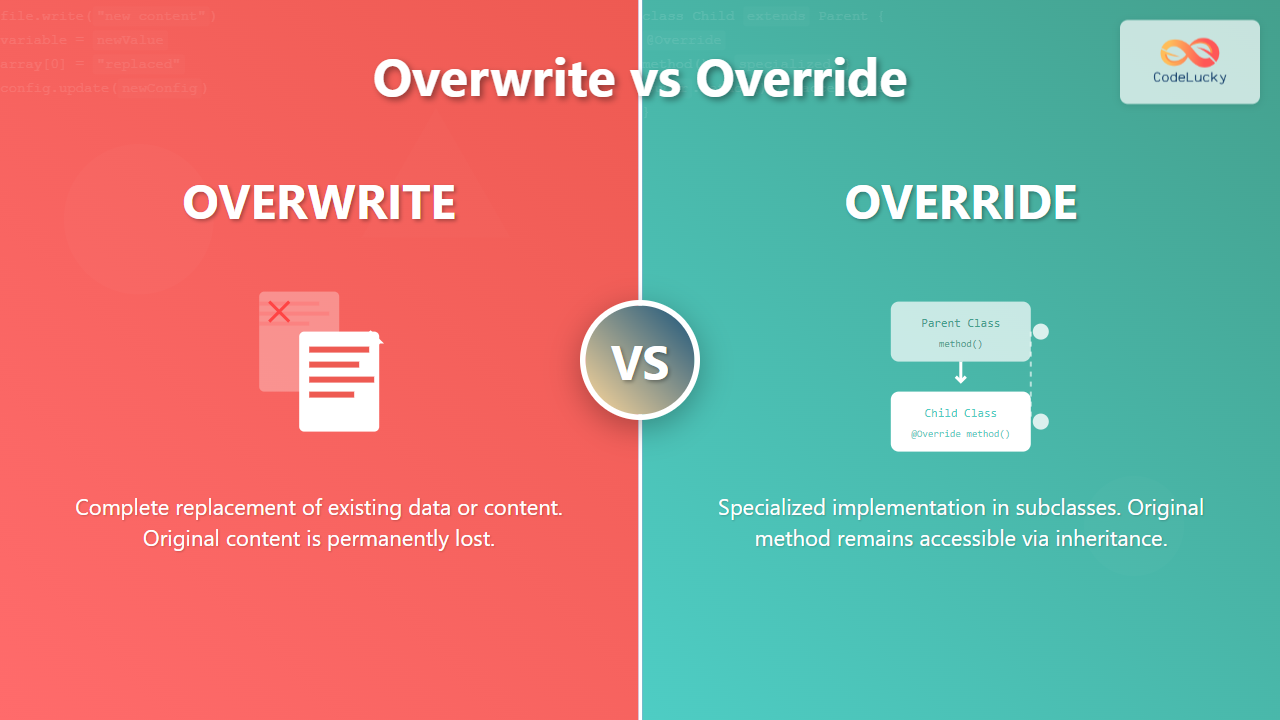
In the world of programming, two terms that often cause confusion among developers are “overwrite” and “override”. While they may sound similar, these concepts serve entirely different purposes and are used in distinct contexts. Understanding their differences is crucial for writing clean, maintainable code and avoiding common programming pitfalls.
What is Overwrite?
Overwrite refers to the process of replacing existing data or content completely. When you overwrite something, the original content is permanently lost and replaced with new content. This concept is most commonly encountered in:
- File operations – replacing file contents
- Variable assignments – changing variable values
- Memory operations – replacing data in memory locations
- Database operations – updating records
File Overwrite Example
# Python example of file overwrite
# Original file content: "Hello World"

# This will completely replace the file content
with open("example.txt", "w") as file:
    file.write("New content replaces everything")

# After execution: "New content replaces everything"
# Original "Hello World" is completely lost
Variable Overwrite Example
// JavaScript example
let userScore = 100;        // Original value
console.log(userScore);     // Output: 100

userScore = 250;            // Overwrite the value
console.log(userScore);     // Output: 250
// Original value 100 is completely replaced

What is Override?
Override is an object-oriented programming concept where a subclass provides a specific implementation of a method that already exists in its parent class. The original method isn’t destroyed; instead, the child class’s version takes precedence when called on objects of that class.
Key characteristics of method override:
- Maintains the original method signature
- Provides polymorphic behavior
- Original method remains accessible via super/parent references
- Enables runtime method resolution
Method Override Example in Java
// Parent class
class Vehicle {
    public void start() {
        System.out.println("Vehicle is starting...");
    }

    public void displayType() {
        System.out.println("This is a generic vehicle");
    }
}

// Child class overriding parent methods
class Car extends Vehicle {
    @Override
    public void start() {
        System.out.println("Car engine is starting with ignition key");
    }

    @Override
    public void displayType() {
        System.out.println("This is a car");
    }
}

// Usage
public class Main {
    public static void main(String[] args) {
        Vehicle myVehicle = new Car();
        myVehicle.start();        // Output: "Car engine is starting with ignition key"
        myVehicle.displayType();  // Output: "This is a car"

        // Original method still exists and can be called
        Vehicle genericVehicle = new Vehicle();
        genericVehicle.start();   // Output: "Vehicle is starting..."
    }
}
Method Override Example in Python
class Animal:
    def make_sound(self):
        return "Some generic animal sound"

    def move(self):
        return "The animal moves"

class Dog(Animal):
    def make_sound(self):  # Override parent method
        return "Woof! Woof!"

    def move(self):        # Override parent method
        return "The dog runs and wags its tail"

# Usage
generic_animal = Animal()
my_dog = Dog()

print(generic_animal.make_sound())  # Output: "Some generic animal sound"
print(my_dog.make_sound())          # Output: "Woof! Woof!"

# Original method still accessible via super()
class Cat(Animal):
    def make_sound(self):
        parent_sound = super().make_sound()
        return f"Meow! ({parent_sound})"

my_cat = Cat()
print(my_cat.make_sound())  # Output: "Meow! (Some generic animal sound)"

Key Differences: Overwrite vs Override
| Aspect | Overwrite | Override |
|---|---|---|
| Context | File operations, variable assignments, data replacement | Object-oriented programming, inheritance |
| Original Content | Permanently lost/destroyed | Preserved, can be accessed via super/parent |
| Purpose | Complete data replacement | Provide specialized behavior while maintaining interface |
| Reversibility | Usually irreversible (unless backed up) | Original method remains accessible |
| Scope | System-wide, affects all references | Class-specific, affects only instances of that class |
| Implementation | Direct assignment or file operations | Method redefinition in subclasses |
Advanced Override Concepts
Virtual Methods and Polymorphism
Method overriding enables polymorphism, allowing objects of different types to be treated uniformly while exhibiting their specific behaviors:
// C# example demonstrating polymorphism
public abstract class Shape
{
    public abstract double CalculateArea();
    public virtual void Display()
    {
        Console.WriteLine("This is a generic shape");
    }
}

public class Circle : Shape
{
    private double radius;

    public Circle(double r) { radius = r; }

    public override double CalculateArea()
    {
        return Math.PI * radius * radius;
    }

    public override void Display()
    {
        Console.WriteLine($"Circle with radius {radius}");
    }
}

public class Rectangle : Shape
{
    private double width, height;

    public Rectangle(double w, double h)
    {
        width = w;
        height = h;
    }

    public override double CalculateArea()
    {
        return width * height;
    }

    public override void Display()
    {
        Console.WriteLine($"Rectangle {width}x{height}");
    }
}

// Polymorphic usage
Shape[] shapes = {
    new Circle(5.0),
    new Rectangle(4.0, 6.0)
};

foreach (Shape shape in shapes)
{
    shape.Display();                    // Calls overridden method
    Console.WriteLine($"Area: {shape.CalculateArea()}"); // Calls overridden method
}

Override Best Practices
- Maintain Method Contracts – Overridden methods should honor the parent class’s contract
- Use Proper Annotations – Always use
@Overridein Java or similar annotations - Call Super When Appropriate – Use
super()to extend rather than completely replace functionality - Preserve Return Types – Keep compatible return types (covariant return types are acceptable)
Common Overwrite Scenarios
Configuration File Management
import json

# Original config
config = {
    "database": {
        "host": "localhost",
        "port": 5432,
        "name": "myapp"
    },
    "cache": {
        "enabled": True,
        "ttl": 3600
    }
}

# Overwrite specific sections
def update_config(config_dict, updates):
    """Overwrites existing configuration with new values"""
    for key, value in updates.items():
        if isinstance(value, dict) and key in config_dict:
            # Recursively overwrite nested dictionaries
            update_config(config_dict[key], value)
        else:
            # Overwrite the value completely
            config_dict[key] = value

# Usage
updates = {
    "database": {
        "host": "production-server.com",
        "port": 5433
        # 'name' remains unchanged
    },
    "logging": {  # This will be added as new key
        "level": "INFO",
        "file": "app.log"
    }
}

update_config(config, updates)
print(json.dumps(config, indent=2))
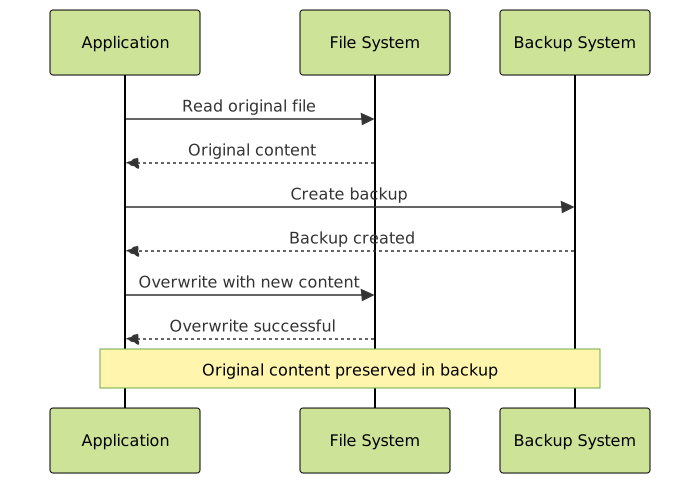
Safe Overwrite with Backup
// JavaScript example of safe file overwrite
const fs = require('fs').promises;
const path = require('path');

async function safeOverwrite(filePath, newContent) {
    const backupPath = `${filePath}.backup`;

    try {
        // Create backup of original file
        const originalContent = await fs.readFile(filePath, 'utf8');
        await fs.writeFile(backupPath, originalContent);

        // Overwrite original file
        await fs.writeFile(filePath, newContent);

        console.log(`File ${filePath} successfully overwritten`);
        console.log(`Backup created at ${backupPath}`);

        return true;
    } catch (error) {
        console.error(`Failed to overwrite file: ${error.message}`);

        // Attempt to restore from backup if overwrite failed
        try {
            const backupContent = await fs.readFile(backupPath, 'utf8');
            await fs.writeFile(filePath, backupContent);
            console.log('Original file restored from backup');
        } catch (restoreError) {
            console.error(`Failed to restore backup: ${restoreError.message}`);
        }

        return false;
    }
}

// Usage
safeOverwrite('important-config.json', '{"newConfig": true}');
When to Use Overwrite vs Override
Use Overwrite When:
- Replacing file contents completely
- Updating configuration values
- Resetting variable states
- Clearing and replacing data structures
- Database record updates where history isn’t needed
Use Override When:
- Implementing polymorphic behavior in OOP
- Customizing inherited functionality
- Creating specialized versions of methods
- Following the Liskov Substitution Principle
- Building extensible frameworks and APIs
Memory and Performance Considerations
Overwrite Impact
Overwriting operations can have significant performance implications:
import time
import sys

# Performance comparison: overwrite vs append
def test_overwrite_performance():
    large_string = "x" * 1000000  # 1MB string

    # Overwrite method - recreates entire string
    start_time = time.time()
    for i in range(100):
        large_string = "y" * 1000000  # Complete overwrite each time
    overwrite_time = time.time() - start_time

    # Append method - builds incrementally
    result = ""
    start_time = time.time()
    for i in range(100):
        result += "y" * 10000  # Incremental building
    append_time = time.time() - start_time

    print(f"Overwrite time: {overwrite_time:.4f} seconds")
    print(f"Append time: {append_time:.4f} seconds")
    print(f"Memory usage difference: significant due to object recreation")

test_overwrite_performance()
Override Performance
Method overriding introduces minimal performance overhead due to dynamic dispatch:
// Java example showing virtual method call overhead
public class PerformanceTest {
    static class BaseClass {
        public int calculate(int x) {
            return x * 2;
        }
    }

    static class DerivedClass extends BaseClass {
        @Override
        public int calculate(int x) {
            return x * 3;
        }
    }

    public static void main(String[] args) {
        BaseClass direct = new BaseClass();
        BaseClass polymorphic = new DerivedClass();

        // Direct call - fastest
        long start = System.nanoTime();
        for (int i = 0; i < 1000000; i++) {
            direct.calculate(i);
        }
        long directTime = System.nanoTime() - start;

        // Polymorphic call - slight overhead
        start = System.nanoTime();
        for (int i = 0; i < 1000000; i++) {
            polymorphic.calculate(i);
        }
        long polymorphicTime = System.nanoTime() - start;

        System.out.println("Direct call time: " + directTime + " ns");
        System.out.println("Polymorphic call time: " + polymorphicTime + " ns");
        System.out.println("Overhead: " + (polymorphicTime - directTime) + " ns");
    }
}

Error Handling and Best Practices
Overwrite Error Handling
import os
import shutil
from pathlib import Path

class SafeOverwriteManager:
    def __init__(self, file_path):
        self.file_path = Path(file_path)
        self.backup_path = None
        self.temp_path = None

    def __enter__(self):
        """Context manager for safe overwrite operations"""
        if self.file_path.exists():
            # Create backup
            self.backup_path = self.file_path.with_suffix(
                self.file_path.suffix + '.backup'
            )
            shutil.copy2(self.file_path, self.backup_path)

        # Create temporary file for atomic write
        self.temp_path = self.file_path.with_suffix('.tmp')
        return self

    def write(self, content):
        """Write content to temporary file"""
        with open(self.temp_path, 'w') as f:
            f.write(content)

    def __exit__(self, exc_type, exc_val, exc_tb):
        """Finalize overwrite or restore backup on error"""
        try:
            if exc_type is None:
                # Success: move temp file to final location
                shutil.move(self.temp_path, self.file_path)
                # Clean up backup after successful write
                if self.backup_path and self.backup_path.exists():
                    self.backup_path.unlink()
            else:
                # Error: restore from backup if exists
                if self.backup_path and self.backup_path.exists():
                    shutil.move(self.backup_path, self.file_path)
                # Clean up temp file
                if self.temp_path and self.temp_path.exists():
                    self.temp_path.unlink()
        except Exception as cleanup_error:
            print(f"Cleanup error: {cleanup_error}")

        return False  # Don't suppress exceptions

# Usage
try:
    with SafeOverwriteManager("important_file.txt") as manager:
        manager.write("New content that might fail")
        # If any exception occurs, original file is restored
except Exception as e:
    print(f"Overwrite failed: {e}")
Override Error Prevention
// TypeScript example with proper override validation
abstract class Shape {
    abstract calculateArea(): number;
    abstract getPerimeter(): number;

    // Template method that uses overridden methods
    public displayInfo(): string {
        return `Area: ${this.calculateArea()}, Perimeter: ${this.getPerimeter()}`;
    }
}

class Circle extends Shape {
    constructor(private radius: number) {
        super();
        if (radius <= 0) {
            throw new Error("Radius must be positive");
        }
    }

    // Override with proper validation
    calculateArea(): number {
        return Math.PI * this.radius * this.radius;
    }

    getPerimeter(): number {
        return 2 * Math.PI * this.radius;
    }

    // Additional method specific to Circle
    getDiameter(): number {
        return this.radius * 2;
    }
}

class Rectangle extends Shape {
    constructor(private width: number, private height: number) {
        super();
        if (width <= 0 || height <= 0) {
            throw new Error("Width and height must be positive");
        }
    }

    calculateArea(): number {
        return this.width * this.height;
    }

    getPerimeter(): number {
        return 2 * (this.width + this.height);
    }
}

// Usage with error handling
function processShape(shape: Shape): void {
    try {
        console.log(shape.displayInfo());
    } catch (error) {
        console.error(`Error processing shape: ${error.message}`);
    }
}

// Test with various shapes
const shapes: Shape[] = [
    new Circle(5),
    new Rectangle(4, 6),
    // new Circle(-1) // Would throw error
];

shapes.forEach(processShape);
Conclusion
Understanding the distinction between overwrite and override is fundamental for every developer. While overwrite deals with complete data replacement and is primarily concerned with storage and memory operations, override is a powerful object-oriented programming concept that enables polymorphism and code reusability.
Overwrite should be used when you need to completely replace existing data, files, or variable values. Always consider implementing safety measures like backups when overwriting important data.
Override should be used when you want to provide specialized behavior in subclasses while maintaining the ability to treat objects polymorphically. It’s a cornerstone of object-oriented design that promotes code flexibility and maintainability.
By mastering both concepts, you’ll write more robust applications, avoid common pitfalls, and create more maintainable codebases. Remember that the choice between overwriting and overriding depends entirely on your specific use case and the level of data preservation required.





