The onBackPressed() method in Android activities has long been the standard way to handle the device’s back button press. However, with Android’s continuous evolution, particularly with the upcoming Android 36+ versions, developers are increasingly asking: Can I leave the onBackPressed() method call in my Android activity for future compatibility?
Understanding onBackPressed() in Android
The onBackPressed() method was introduced early in Android to allow activities to intercept back button presses. Overridden in your Activity, it lets you define custom behavior such as closing dialogs, navigating fragments, or confirming exit. The default implementation simply finishes the current activity.
@Override
public void onBackPressed() {
    // Custom back press handling
    if (shouldInterceptBack()) {
        // Handle back press manually
    } else {
        super.onBackPressed();  // Calls the default behavior
    }
}
Calling super.onBackPressed() triggers the system’s default handling, which historically included activity stack management.
Android Back Navigation Evolution & Future Changes in Android 36+
In recent years, Android has shifted toward system navigation gestures and modular navigation architectures. New APIs like OnBackInvokedCallback introduced in Android 13 (API 33) offer enhanced, lifecycle-aware back event handling that integrates better with gesture navigation.
The upcoming Android 36+ versions are expected to further refine back navigation behaviors for consistency and security. This includes deprecating legacy back-handling methods and encouraging the use of the new back dispatcher APIs.
Can You Leave onBackPressed() Calls for Android 36+?
Technically, yes, your existing onBackPressed() overrides will continue to work in Android 36+ for backward compatibility, but it’s not recommended to rely solely on it for future-proof Android apps.
Reasons include:
- Deprecation Risk: Android 33+ already marks
onBackPressed()as deprecated, signaling a shift away from it. - Gesture Interference: The new system-level gesture navigation overrides legacy methods and integrates with the new back dispatcher.
- Improved Lifecycle Awareness: New APIs offer cleaner, safer handling tied to lifecycle events, reducing memory leaks and bugs.
Recommended Approach for Android 36+ Compatibility
Android now recommends using the OnBackInvokedCallback API, which works with the OnBackInvokedDispatcher. This approach replaces onBackPressed() and offers:
- Seamless integration with gesture navigation
- Lifecycle-aware event callback registration/unregistration
- Explicit control over back handling per component
// Register back callback in onCreate or onStart
OnBackInvokedCallback callback = () -> {
    // Custom back press handling logic
    finish();  // or handle fragment pop, etc.
};

@Override
protected void onStart() {
    super.onStart();
    getOnBackInvokedDispatcher().registerOnBackInvokedCallback(
        OnBackInvokedDispatcher.PRIORITY_DEFAULT, callback);
}

@Override
protected void onStop() {
    super.onStop();
    getOnBackInvokedDispatcher().unregisterOnBackInvokedCallback(callback);
}
Visual Comparison: Legacy vs New Back Handling
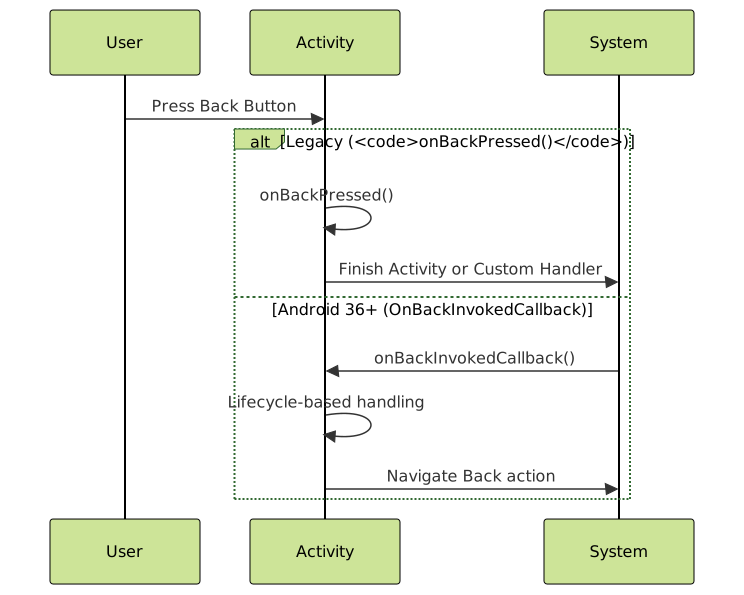
Should You Remove onBackPressed() Now?
It is not compulsory to remove onBackPressed() right away because your app needs to run on a wide range of Android versions. However, it’s highly encouraged to begin migrating to the OnBackInvokedCallback API with fallback support for older devices.
Here is a safe migration pattern:
if (Build.VERSION.SDK_INT >= Build.VERSION_CODES.TIRAMISU) {
    // Use OnBackInvokedCallback for API 33+
} else {
    // Fallback to onBackPressed() for earlier APIs
}
Example: Hybrid Back Handling for Broad Compatibility
public class MainActivity extends AppCompatActivity {

    private OnBackInvokedCallback backCallback = () -> {
        // Handle back logic for Android 33+
        finish();
    };

    @Override
    protected void onCreate(Bundle savedInstanceState) {
        super.onCreate(savedInstanceState);
        setContentView(R.layout.activity_main);

        if (Build.VERSION.SDK_INT >= Build.VERSION_CODES.TIRAMISU) {
            getOnBackInvokedDispatcher().registerOnBackInvokedCallback(
                OnBackInvokedDispatcher.PRIORITY_DEFAULT, backCallback);
        }
    }

    @Override
    protected void onDestroy() {
        super.onDestroy();
        if (Build.VERSION.SDK_INT >= Build.VERSION_CODES.TIRAMISU) {
            getOnBackInvokedDispatcher().unregisterOnBackInvokedCallback(backCallback);
        }
    }

    @Override
    @Deprecated
    public void onBackPressed() {
        if (Build.VERSION.SDK_INT < Build.VERSION_CODES.TIRAMISU) {
            // Handle back press for older Android versions
            super.onBackPressed();
        }
    }
}
Key Takeaways
- Do not rely solely on
onBackPressed()for Android 36+ compatibility. - Adopt the new
OnBackInvokedCallbackAPI starting API 33+ for future-proof back navigation. - Maintain backward compatibility with a hybrid approach supporting both legacy and new APIs.
- Test thoroughly on gesture navigation systems to ensure seamless user experience.
Summary Diagram: Back Navigation Strategy
While you can leave existing onBackPressed() calls intact for now, transitioning to OnBackInvokedCallback is the best practice to prepare your app for Android 36+ and beyond, ensuring smooth user navigation and compliance with evolving platform guidelines.