
.NET Hosting is a critical concept for developers and organizations deploying applications built on Microsoft’s popular framework ecosystem. This guide breaks down everything from types of hosting available, configuration best practices, deployment techniques, and example setups with live output illustrations. Whether you’re hosting ASP.NET Web Forms, MVC, or .NET Core applications, understanding the nuances of .NET hosting ensures your application runs securely, efficiently, and scales appropriately.
Understanding .NET Hosting
Hosting in the .NET ecosystem refers to the environment where applications based on Microsoft’s .NET Framework or .NET Core run. This includes the web servers, cloud platforms, or on-premises servers responsible for managing the lifecycle, processing requests, and serving content.
Common .NET hosting environments include:
- Internet Information Services (IIS)
- Azure App Service
- Self-hosting with Kestrel (for .NET Core)
- Containers (Docker)
- Third-party shared or dedicated hosting providers
Types of .NET Hosting Explained
The choice of hosting depends on the application architecture, resources, budget, and scaling needs.
- IIS Hosting: Traditional and reliable, IIS (Internet Information Services) is a Windows-based web server widely used for hosting ASP.NET applications. It offers robust security, process management, and scalability options.
- Azure App Service: Microsoft’s cloud platform optimized for .NET applications, offering auto-scaling, seamless deployment, and integrations with DevOps pipelines.
- Self-Hosting with Kestrel: With .NET Core and later .NET versions, the Kestrel web server can run standalone or behind a reverse proxy, providing a lightweight and fast hosting environment.
- Docker Containers: Containerizing .NET applications abstracts the environment, making deployments consistent and portable across different infrastructures.
- Shared Hosting Providers: Providers supporting ASP.NET offer cost-effective hosting but with limited control and scalability.

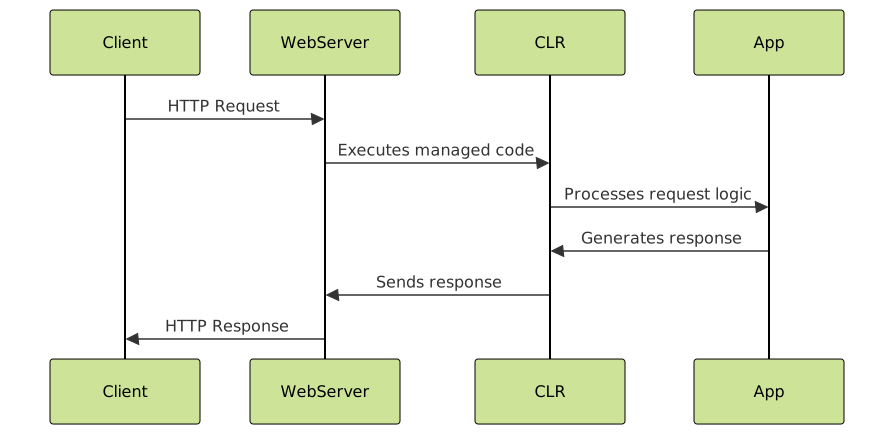
How .NET Hosting Works: Key Components
Hosting a .NET application involves several layers:
- Web Server: Handles incoming requests (e.g., IIS, Kestrel).
- CLR (Common Language Runtime): Executes the managed code for .NET applications.
- Application Pool: Isolates applications and manages process recycling in IIS for stability.
- Configuration (web.config/appsettings.json): Contains hosting, connection strings, and environment-specific information.
Example: Hosting a Simple ASP.NET MVC Application with IIS
This example demonstrates how to host a simple MVC application:
public class HomeController : Controller
{
    public ActionResult Index()
    {
        ViewBag.Message = "Welcome to .NET Hosting on IIS!";
        return View();
    }
}
Output on browser:
Welcome to .NET Hosting on IIS!
Steps for IIS hosting:
- Publish application in Visual Studio, generate file package.
- Copy the published files to IIS server physical path.
- In IIS Manager, create a new Application Pool and set .NET version.
- Create a new website or application, point to the physical path.
- Configure permissions and set bindings (port, hostname).
- Start the site and access through browser.
Hosting .NET Core Applications: Kestrel and Reverse Proxy Setup
With .NET Core apps, Kestrel web server is used internally. Common practice is to use a reverse proxy such as IIS or Nginx to handle client requests and forward them to Kestrel.
Basic hosting code snippet for .NET Core Web API (Program.cs):
var builder = WebApplication.CreateBuilder(args);
var app = builder.Build();

app.MapGet("/", () => "Hosted on .NET Core Kestrel!");

app.Run();
Output in browser:
Hosted on .NET Core Kestrel!
Deploying to Azure App Service
Azure App Service provides managed hosting with easy integration:
- Publish directly from Visual Studio or via Azure DevOps pipelines.
- Supports Linux and Windows hosting environments.
- Offers scaling, backups, monitoring, and security features out of the box.
Tips for Optimized .NET Hosting
- Use the appropriate application pool settings for better memory management in IIS.
- Enable HTTPS and configure SSL certificates for secure hosting.
- Leverage environment variables and separate config files for different environments (dev, staging, prod).
- Monitor logs and set up alerts for runtime errors or performance bottlenecks.
- For high-traffic apps, consider load balancing and horizontal scaling strategies.
Summary
Hosting .NET applications can be accomplished through multiple environments based on the application’s architecture, performance needs, and budget. Knowing the pros and cons of IIS, Azure, self-hosted Kestrel, and containerized environments is key to delivering a seamless experience. With clear deployment steps, configuration practices, and example code, every developer can confidently manage .NET hosting for Microsoft Framework applications.





