
In today’s connected world, multi-language website hosting has become essential for businesses and content creators aiming to reach a global audience. Managing content across languages and regions effectively not only enhances user engagement but also boosts SEO and brand trust internationally. This detailed guide dives into the technical and strategic aspects of hosting multi-language websites and managing global content efficiently.
What Is Multi-Language Website Hosting?
Multi-language website hosting involves configuring your web infrastructure, content management system (CMS), and domain strategy to support different languages, regional preferences, and cultural contexts. It ensures visitors from around the world receive content tailored to their language and locale, improving accessibility and conversion rates.
Key Challenges in Global Content Management
- Localization vs. Translation: Adapting content culturally and contextually, beyond mere language translation.
- SEO Considerations: Handling hreflang tags, duplicate content, and geo-targeting.
- Performance Optimization: Using CDNs and regional servers to ensure fast load times worldwide.
- Content Synchronization: Keeping translated content up to date and consistent across languages.
Architectures for Multi-Language Website Hosting
Choosing the right hosting architecture is vital. These are commonly used architectures:
- Single Domain with Subdirectories (example.com/en, example.com/fr): Easier to manage SEO and unified domain authority.
- Subdomains per Language (en.example.com, fr.example.com): Allows separation of content and server configurations.
- Separate Domains or ccTLDs (example.com, example.fr): Best for country-specific targeting but requires more resources.
Implementing Multi-Language Content Management
Modern CMS platforms like WordPress, Drupal, and headless CMSs provide multi-language plugins or native solutions. Key features to look for:
- Support for language switching & automatic redirects based on browser preferences
- Translation workflows and content versioning
- Integration with Static Site Generators for performance
- API-based content delivery for headless setups
Example: Hosting a Multi-Language Website with Subdirectories
This example uses the subdirectory approach, showcasing Nginx server configuration, and content organization structures.
Directory Structure
/
|-- en/
|   |-- index.html
|-- fr/
|   |-- index.html
|-- de/
    |-- index.html
Nginx Configuration Snippet
server {
    listen 80;
    server_name example.com;

    root /var/www/html;

    location /en/ {
        alias /var/www/html/en/;
        index index.html;
    }
    location /fr/ {
        alias /var/www/html/fr/;
        index index.html;
    }
    location /de/ {
        alias /var/www/html/de/;
        index index.html;
    }
}
Sample HTML Language Switcher Code
<nav>
  <ul>
    <li><a href="/en/" hreflang="en" lang="en">English</a></li>
    <li><a href="/fr/" hreflang="fr" lang="fr">Français</a></li>
    <li><a href="/de/" hreflang="de" lang="de">Deutsch</a></li>
  </ul>
</nav>
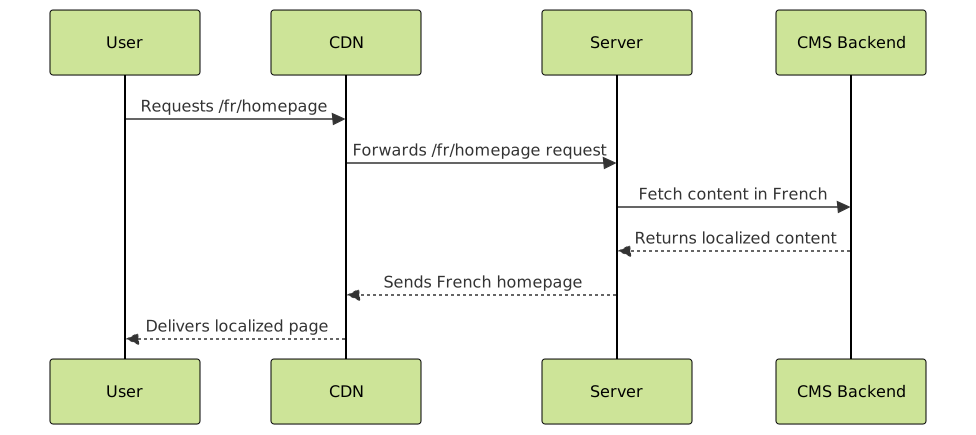
Visualizing Content Flow and User Request Handling
SEO Best Practices for Multi-Language Websites
Boost global visibility by following these SEO essentials:
- Use
hreflangtags correctly to signal language and regional targeting to search engines. - Ensure each language version has unique URLs with consistent structure and sitemaps.
- Localize metadata (titles, descriptions) and structured data schema.
- Leverage geo-targeting in Google Search Console when using separate domains or subdomains.
Sample hreflang Tag Implementation
<link rel="alternate" hreflang="en" href="https://example.com/en/" />
<link rel="alternate" hreflang="fr" href="https://example.com/fr/" />
<link rel="alternate" hreflang="de" href="https://example.com/de/" />
Performance Optimization Techniques
Global users expect fast load times. Employ these tactics for optimal performance:
- Utilize Content Delivery Networks (CDNs) with edge caching near user locations.
- Optimize images and assets per locale (e.g., region-specific formats or sizes).
- Enable HTTP/2 or HTTP/3 to speed up multi-request fetching.
- Leverage lazy loading for non-critical content across languages.
Advanced: Interactive Language Toggle Widget
Enhance UX with an interactive language toggle that remembers preferences and auto-switches based on browser language:
<select id="lang-select">
  <option value="en" selected>English</option>
  <option value="fr">Français</option>
  <option value="de">Deutsch</option>
</select>

<script>
  const select = document.getElementById('lang-select');
  select.addEventListener('change', e => {
    const lang = e.target.value;
    window.location.href = '/' + lang + '/';
    localStorage.setItem('preferredLang', lang);
  });

  window.addEventListener('load', () => {
    const savedLang = localStorage.getItem('preferredLang');
    if (!savedLang) {
      const userLang = navigator.language.substr(0,2);
      if (['en','fr','de'].includes(userLang)) {
        window.location.href = '/' + userLang + '/';
      }
    }
  });
</script>
Summary
Hosting a multi-language website with efficient global content management requires thoughtful architecture, SEO strategies, and performance considerations. Whether using subdirectories, subdomains, or separate domains, the key is delivering localized, fast, and SEO-optimized content to international users seamlessly. Leveraging modern CMS tools, CDN technology, and structured data will empower any site to achieve true global reach.





