Mobile optimization has become critical for web success, with over 54% of global web traffic coming from mobile devices. Fast loading times aren’t just nice to have—they’re essential for user experience, search rankings, and business success.
Mobile users expect websites to load in under 3 seconds. Even a 1-second delay can result in a 7% reduction in conversions. Google’s mobile-first indexing means your mobile performance directly impacts search rankings.
Core Mobile Optimization Strategies
1. Responsive Design Implementation
Start with a mobile-first approach using CSS Grid and Flexbox for flexible layouts:
Implement performance tracking for continuous optimization:
// Performance monitoring
function trackCoreWebVitals() {
  new PerformanceObserver((list) => {
    for (const entry of list.getEntries()) {
      const metricName = entry.name;
      const metricValue = entry.value;

      // Send to analytics
      gtag('event', 'web_vital', {
        metric_name: metricName,
        metric_value: Math.round(metricValue),
        device_type: 'mobile'
      });
    }
  }).observe({ entryTypes: ['largest-contentful-paint', 'first-input', 'layout-shift'] });
}
Testing Strategy
Regular testing ensures consistent performance:
Real Device Testing: Test on actual mobile devices
Network Throttling: Simulate slow connections
Automated Testing: Lighthouse CI in deployment pipeline
A/B Testing: Compare optimization strategies
Implementation Checklist
Follow this comprehensive checklist for mobile optimization:
Technical Optimization
✅ Implement responsive design with mobile-first approach
✅ Optimize images with WebP format and lazy loading
✅ Minimize HTTP requests through bundling
✅ Enable Gzip compression
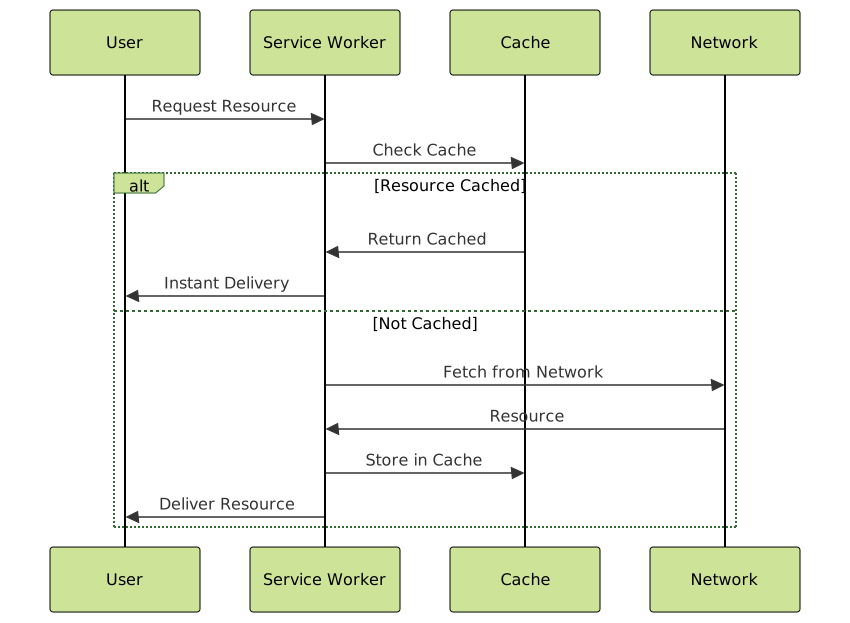
✅ Implement service worker caching
✅ Defer non-critical JavaScript
✅ Inline critical CSS
User Experience
✅ Ensure 44px minimum touch targets
✅ Optimize font loading with font-display: swap
✅ Implement smooth scrolling
✅ Prevent layout shifts
✅ Add loading indicators
✅ Test across different devices and networks
Performance Monitoring
✅ Set up Core Web Vitals tracking
✅ Implement real user monitoring
✅ Configure performance budgets
✅ Schedule regular audits
Common Pitfalls to Avoid
Oversized Images: Always compress and serve appropriate sizes for mobile screens. A desktop hero image shouldn’t be served to mobile users.
Blocking JavaScript: Heavy JavaScript execution can freeze mobile browsers. Always prioritize critical functionality.
Ignoring Network Conditions: Mobile users often have slower, unstable connections. Design for offline-first experiences.
Fixed Viewport: Never use fixed viewport widths. Always use responsive units and flexible layouts.
Future-Proofing Your Mobile Strategy
Stay ahead of mobile optimization trends:
Progressive Web Apps (PWAs): Native-like experiences on the web
HTTP/3 and QUIC: Next-generation protocols for faster loading
Edge Computing: Reduced latency through geographic distribution
AI-Powered Optimization: Machine learning for personalized performance
Mobile optimization is an ongoing process requiring constant attention to emerging technologies and user behavior patterns. By implementing these strategies systematically and monitoring performance continuously, you’ll ensure your website delivers exceptional experiences across all mobile devices.
Remember: every millisecond matters in mobile performance. Start with the basics, measure everything, and optimize iteratively for sustained success in the mobile-first world.