When choosing a hosting solution for your website or application, one of the most critical decisions you’ll face is selecting between managed and unmanaged hosting. This choice directly impacts your server maintenance responsibilities, costs, and the level of technical expertise required to keep your services running smoothly.

What is Managed Hosting?
Managed hosting is a service where the hosting provider takes full responsibility for server maintenance, security updates, monitoring, and technical support. Think of it as having a dedicated IT team managing your infrastructure without the overhead of hiring one internally.
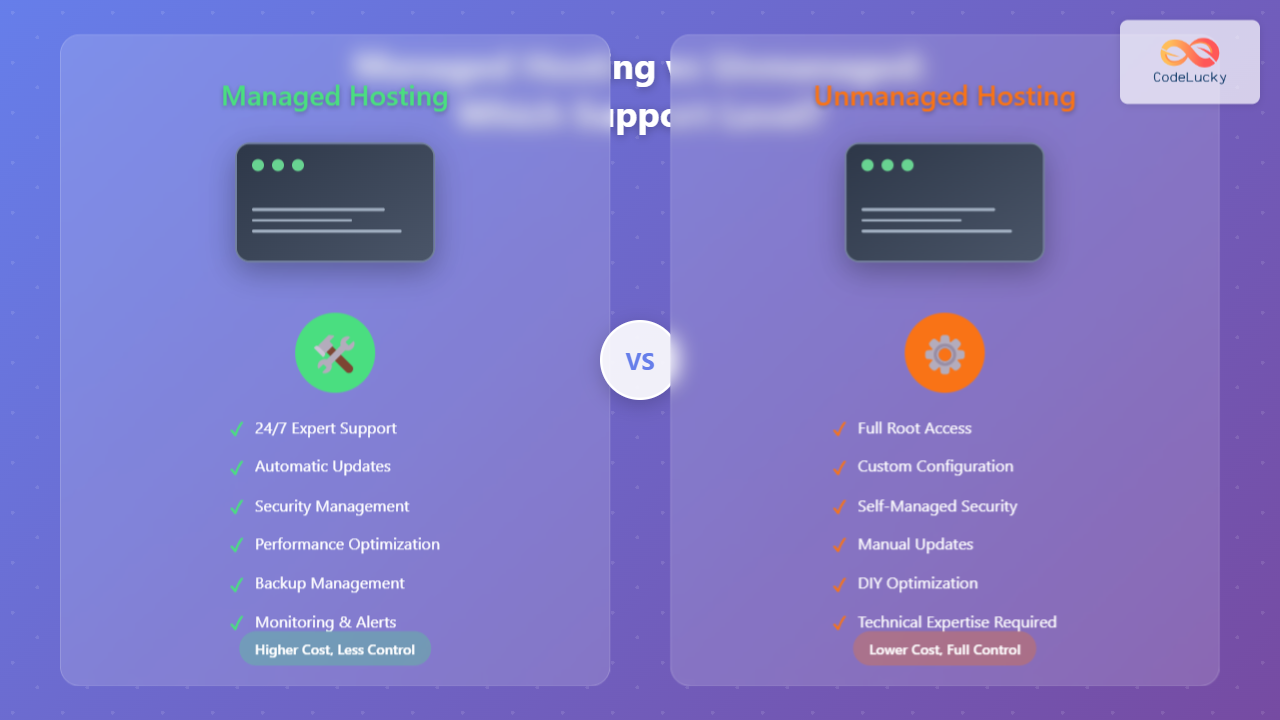
Key Features of Managed Hosting
- 24/7 monitoring and support – Professional team watches your servers around the clock
- Automatic updates – Operating system and software patches applied automatically
- Security management – Firewall configuration, malware scanning, and threat protection
- Performance optimization – Server tuning and resource allocation
- Backup management – Regular automated backups with easy restoration
- Technical troubleshooting – Expert assistance with server-related issues
Managed Hosting Example Scenario
Consider Sarah, who runs an e-commerce website. With managed hosting, her typical day looks like this:
“I focus entirely on my business and customers. When my site experienced a traffic spike during Black Friday, my hosting provider automatically scaled resources and notified me of the changes. I didn’t need to worry about server configuration or performance optimization.”
What is Unmanaged Hosting?
Unmanaged hosting provides you with raw server resources and basic network connectivity, but you’re responsible for all server administration tasks. It’s like renting an empty office space – you get the infrastructure, but you must handle everything else yourself.
Key Features of Unmanaged Hosting
- Full root access – Complete control over server configuration
- Custom software installation – Install any compatible software or applications
- Self-managed security – You configure firewalls, security policies, and access controls
- Manual updates – You schedule and apply all system updates
- Performance tuning – You optimize server settings for your specific needs
- Cost efficiency – Lower monthly costs due to reduced provider services
Unmanaged Hosting Example Scenario
Meet Alex, a DevOps engineer managing multiple applications:
“I prefer unmanaged hosting because I need specific server configurations for my applications. I’ve automated my deployment pipeline, set up custom monitoring, and optimized the server exactly how I want it. The cost savings allow me to allocate budget to other development tools.”
Detailed Comparison: Managed vs Unmanaged Hosting

| Aspect | Managed Hosting | Unmanaged Hosting |
|---|---|---|
| Initial Setup | Provider configures server | You configure everything from scratch |
| Security Updates | Automatic security patches | Manual update management |
| Monitoring | 24/7 professional monitoring | Self-implemented monitoring solutions |
| Backup Management | Automated backup systems | Custom backup strategies |
| Performance Optimization | Provider-managed tuning | Self-optimized configurations |
| Problem Resolution | Expert support team assistance | Self-troubleshooting required |
| Cost Structure | Higher monthly fees | Lower base costs, potential hidden expenses |
When to Choose Managed Hosting
Managed hosting is ideal for specific scenarios where convenience and reliability outweigh cost considerations:
Perfect for Business-Focused Users
- Small to medium businesses without dedicated IT staff
- E-commerce websites requiring maximum uptime and security
- Content creators and bloggers who want to focus on content creation
- Agencies managing multiple client websites
- Startups prioritizing product development over infrastructure management
Technical Requirements That Favor Managed Hosting

Real-World Managed Hosting Benefits
Consider this practical example of managed hosting value:
A WordPress site on managed hosting typically includes:
- Automatic WordPress core and plugin updates
- Daily malware scanning and removal
- Performance caching configuration
- SSL certificate management
- Database optimization
- Expert WordPress support
When to Choose Unmanaged Hosting
Unmanaged hosting excels in scenarios where control, customization, and cost optimization are priorities:
Ideal for Technical Users
- Developers and DevOps engineers with server administration skills
- Companies with in-house IT teams capable of server management
- Custom application deployments requiring specific server configurations
- High-traffic applications needing performance optimization
- Budget-conscious projects where cost reduction is critical
Technical Scenarios Favoring Unmanaged Hosting
- Custom software stacks – Specific versions of languages, databases, or frameworks
- Microservices architecture – Complex deployment patterns requiring full control
- Development environments – Testing different configurations and setups
- High-performance applications – Custom kernel tuning and optimization
- Multi-server orchestration – Load balancers, database clusters, caching layers
Unmanaged Hosting Setup Example
Here’s what a typical unmanaged VPS setup process looks like:
# Initial server setup on unmanaged VPS
# 1. Update system packages
sudo apt update && sudo apt upgrade -y

# 2. Configure firewall
sudo ufw enable
sudo ufw allow ssh
sudo ufw allow 80
sudo ufw allow 443

# 3. Install web server
sudo apt install nginx -y
sudo systemctl enable nginx

# 4. Set up SSL with Let's Encrypt
sudo apt install certbot python3-certbot-nginx -y
sudo certbot --nginx -d yourdomain.com

# 5. Configure automatic backups
sudo crontab -e
# Add: 0 2 * * * /usr/local/bin/backup-script.sh
Cost Analysis: Managed vs Unmanaged Hosting

Hidden Costs in Unmanaged Hosting
While unmanaged hosting appears cheaper, consider these additional expenses:
| Service | Unmanaged Cost | Time Investment |
|---|---|---|
| Monitoring Tools | $10-50/month | Setup and maintenance |
| Backup Solutions | $5-25/month | Configuration and testing |
| Security Software | $15-40/month | Regular updates and tuning |
| SSL Certificates | $0-100/year | Installation and renewal |
| Performance Tools | $20-100/month | Analysis and optimization |
Migration Considerations
Understanding migration paths between hosting types helps in making informed long-term decisions:
Moving from Unmanaged to Managed
- Business growth – When technical management becomes a bottleneck
- Compliance requirements – Meeting strict security and availability standards
- Team changes – Loss of technical expertise or shifting priorities
- Cost justification – When management overhead exceeds managed hosting premiums
Moving from Managed to Unmanaged
- Technical team growth – Acquiring in-house server administration skills
- Custom requirements – Need for specific configurations not offered by managed services
- Cost optimization – Budget constraints requiring expense reduction
- Control needs – Requirement for complete infrastructure control
Hybrid Approaches and Alternatives
Modern hosting solutions often blur the lines between managed and unmanaged hosting:
Semi-Managed Hosting
Some providers offer semi-managed solutions that combine elements of both approaches:
- Basic server maintenance and security updates
- Optional add-on services for specific management tasks
- Self-service control panels with managed backend infrastructure
- Pay-as-needed expert support
Cloud Platform Services
Cloud providers like AWS, Google Cloud, and Azure offer managed services that provide infrastructure automation:
- Managed databases – RDS, Cloud SQL, Azure Database
- Serverless computing – Lambda, Cloud Functions, Azure Functions
- Managed Kubernetes – EKS, GKE, AKS
- Platform-as-a-Service – App Engine, Azure App Service
Making the Right Choice: Decision Framework
Use this decision framework to determine which hosting approach aligns with your requirements:
Assess Your Technical Capabilities
**Technical Skills Assessment:**
□ Linux command line proficiency
□ Server security configuration experience
□ Database administration knowledge
□ Web server (Apache/Nginx) management
□ Monitoring and troubleshooting skills
□ Backup and disaster recovery planning

**Score: 0-2 → Managed | 3-4 → Semi-Managed | 5-6 → Unmanaged**
Evaluate Business Requirements
- Budget constraints – Can you afford managed hosting premiums?
- Time availability – Do you have time for server administration?
- Growth trajectory – Will your needs change significantly?
- Risk tolerance – How critical is maximum uptime?
- Compliance needs – Are there regulatory requirements?
Best Practices for Each Approach
Managed Hosting Best Practices
- Choose reputable providers with proven track records and SLAs
- Understand service boundaries – What’s included vs. additional costs
- Test support quality – Response times and technical expertise
- Review backup policies – Frequency, retention, and restoration procedures
- Monitor performance – Even with managed hosting, track your metrics
Unmanaged Hosting Best Practices
- Implement comprehensive monitoring – Server health, performance, security
- Automate routine tasks – Updates, backups, security scans
- Document your configurations – Enable quick recovery and troubleshooting
- Plan for disasters – Regular backup testing and recovery procedures
- Stay updated – Security patches and software updates
Future-Proofing Your Hosting Decision
Consider how your hosting needs might evolve:
- Scalability requirements – Will you need to handle traffic growth?
- Team development – Will you gain or lose technical expertise?
- Business focus shifts – Will priorities change over time?
- Technology evolution – How will new tools and services affect your needs?
The choice between managed and unmanaged hosting ultimately depends on your specific situation, technical capabilities, and business priorities. Managed hosting excels when you need reliability, support, and want to focus on your core business activities. Unmanaged hosting provides maximum control and cost efficiency for technically capable teams with specific requirements.
Consider starting with managed hosting if you’re unsure – you can always transition to unmanaged hosting as your technical skills and requirements evolve. The key is choosing a solution that aligns with your current needs while maintaining flexibility for future growth.