
Load testing is an essential step in preparing your website or application for unexpected traffic surges that can cause crashes, slowdowns, or poor user experiences. As digital traffic grows and fluctuates unpredictably, ensuring your site can handle heavy loads without breaking down is critical to maintaining reputation, conversions, and uptime.
This article dives deep into load testing—what it is, why it matters, how to conduct it, practical examples with clear visual output, and interactive diagrams to simplify understanding. By the end, you will be equipped to prepare your site confidently for traffic spikes using industry-standard tools and best practices.
What is Load Testing?
Load testing is a type of performance testing that simulates real-world traffic on a website or application to measure how it behaves under varying levels of load. The primary goal is to identify performance bottlenecks and ensure that the system remains stable and responsive when subjected to high user traffic or data processing.
Unlike stress testing, which pushes beyond limits to break the system, load testing replicates expected peak loads to validate capacity and performance.

Why Load Testing is Crucial
- Identify bottlenecks: Spot database, server, or network weaknesses before real users do.
- Enhance user experience: Maintain fast load times and responsiveness even during traffic surge.
- Prevent crashes: Avoid costly outages by knowing your site’s capacity limits.
- Cost optimization: Right-size your infrastructure to meet demand without overpaying.
How to Prepare for Load Testing
- Define performance goals: Set clear benchmarks like max users, acceptable response time, throughput.
- Analyze traffic patterns: Understand typical and peak traffic baselines from analytics.
- Choose tools: Select from popular load testing tools like Apache JMeter, Locust, k6, or Gatling.
- Create test scenarios: Imitate real user journeys including login, search, checkout, API calls.
- Set up monitoring: Capture server CPU, memory usage, network traffic, and application logs.
Step-by-Step Load Testing Example with Apache JMeter
Apache JMeter is a powerful open-source tool widely used for load testing web applications. Here’s a basic example to simulate a traffic spike and analyze response times.
Test Plan Setup
- Thread Group: Simulate 100 virtual users (threads) ramping up over 2 minutes.
- HTTP Request: Target your website’s homepage or a specific API endpoint.
- Listeners: Add View Results in Table and Summary Report for real-time feedback.
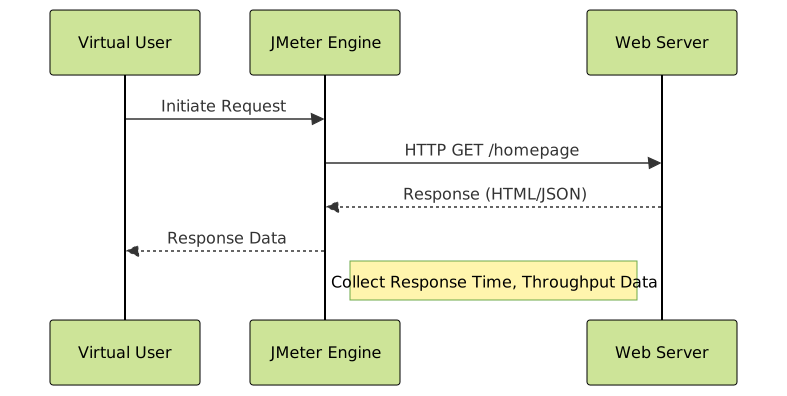
Sample JMeter Output
| Sample # | Response Time (ms) | Latency (ms) | Status |
|---|---|---|---|
| 1 | 220 | 50 | Success |
| 2 | 300 | 70 | Success |
| 3 | 180 | 45 | Success |
| 4 | 1200 | 1100 | Timeout |
| 5 | 250 | 55 | Success |
The above sample shows normal responses and an outlier that timed out, indicating potential issues under load that need investigation.
Interpreting Load Testing Results
When reviewing load test results, focus on several key performance indicators (KPIs):
- Average response time: Time taken to serve requests—lower is better.
- Throughput: Number of requests processed per second.
- Error rate: Percentage of failed requests—ideally should be zero or minimal.
- Resource utilization: CPU, memory, and network load should remain within acceptable limits.

Interactive Load Test Scenario (Conceptual)
To better grasp the dynamic nature of load testing, imagine a scenario where you incrementally increase user load from 10 to 500 users over 10 minutes. The system dashboard updates in real-time to show response times spiking as load increases and the point where errors start appearing.
This conceptual interactive helps visualize the importance of gradual load ramping and monitoring.
Best Practices for Effective Load Testing
- Test early and often: Integrate load testing into the development lifecycle.
- Use realistic scenarios: Mirror actual user behavior and traffic.
- Isolate test environment: Avoid affecting production systems during testing.
- Analyze trends, not just numbers: Look for patterns, anomalies, and bottleneck triggers.
- Automate tests: Use CI/CD tools to run load tests regularly.
Choosing Tools for Load Testing
Some popular tools with unique strengths include:
- Apache JMeter: Highly extensible, open-source, GUI and CLI mode.
- Locust: Python-based, supports distributed testing, easy scripting.
- k6: Modern CLI load testing tool, JavaScript scripting, excellent for cloud integration.
- Gatling: Scala-based, best for developers comfortable with code-driven tests.
Summary
Load testing is a non-negotiable step to prepare your site for traffic spikes, prevent crashes, and ensure a smooth user experience even under heavy demand. Through careful planning, realistic test scenarios, reliable tools, and detailed monitoring, websites can achieve robustness and scalability in the face of unpredictable traffic changes.
Implementing this practice improves not only user satisfaction but also operational efficiency and cost management, positioning your site for success in high-traffic environments.





