
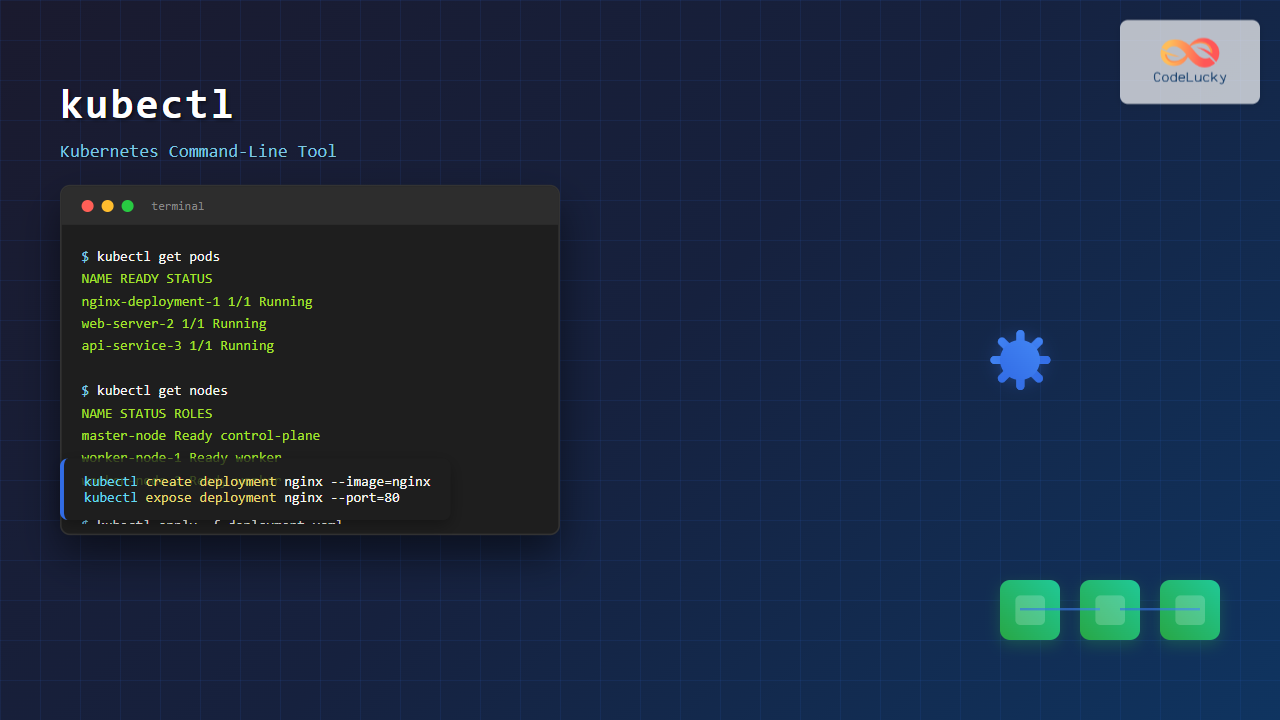
The kubectl command is the primary command-line interface for interacting with Kubernetes clusters. This powerful tool allows administrators and developers to deploy applications, inspect cluster resources, and manage containerized workloads efficiently. Whether you’re managing a single-node cluster or a complex multi-node production environment, kubectl is your gateway to Kubernetes operations.
What is kubectl?
kubectl (pronounced “kube-c-t-l” or “kube-control”) is the official command-line tool for Kubernetes. It communicates with the Kubernetes API server to execute operations on cluster resources such as pods, services, deployments, and namespaces. The tool translates user commands into REST API calls, making cluster management accessible through simple command-line operations.
Installation and Setup
Installing kubectl on Linux
Before using kubectl, you need to install it on your Linux system. Here are several installation methods:
Method 1: Using curl (Recommended)
# Download the latest stable release
curl -LO "https://dl.k8s.io/release/$(curl -L -s https://dl.k8s.io/release/stable.txt)/bin/linux/amd64/kubectl"

# Make it executable
chmod +x kubectl

# Move to PATH
sudo mv kubectl /usr/local/bin/

# Verify installation
kubectl version --client
Method 2: Using Package Manager
# Ubuntu/Debian
sudo apt-get update
sudo apt-get install -y kubectl

# CentOS/RHEL/Fedora
sudo yum install kubectl
# or
sudo dnf install kubectl
Configuration
kubectl requires a configuration file (kubeconfig) to connect to your Kubernetes cluster. This file is typically located at ~/.kube/config.
# Check current configuration
kubectl config view

# Set the cluster context
kubectl config use-context my-cluster

# View available contexts
kubectl config get-contexts
Basic kubectl Syntax
The general syntax for kubectl commands follows this pattern:
kubectl [command] [TYPE] [NAME] [flags]- command: The operation to perform (create, get, delete, apply, etc.)
- TYPE: The resource type (pod, service, deployment, etc.)
- NAME: The resource name (optional for some commands)
- flags: Additional options and parameters
Essential kubectl Commands
Viewing Cluster Information
# Get cluster information
kubectl cluster-info

# Check cluster status
kubectl get componentstatuses

# View nodes in the cluster
kubectl get nodes

# Get detailed node information
kubectl describe nodes
Sample Output:
NAME           STATUS   ROLES                  AGE   VERSION
master-node    Ready    control-plane,master   5d    v1.28.2
worker-node-1  Ready    <none>                 5d    v1.28.2
worker-node-2  Ready    <none>                 5d    v1.28.2
Working with Pods
Pods are the smallest deployable units in Kubernetes. Here’s how to manage them:
# List all pods in the current namespace
kubectl get pods

# List pods in all namespaces
kubectl get pods --all-namespaces

# Get detailed pod information
kubectl describe pod <pod-name>

# View pod logs
kubectl logs <pod-name>

# Follow pod logs in real-time
kubectl logs -f <pod-name>

# Execute commands in a pod
kubectl exec -it <pod-name> -- /bin/bash
Creating Resources
You can create Kubernetes resources using YAML manifests or imperative commands:
Imperative Creation
# Create a deployment
kubectl create deployment nginx --image=nginx:latest

# Create a service
kubectl create service clusterip my-service --tcp=80:80

# Create a namespace
kubectl create namespace development
Declarative Creation
# Apply configuration from a file
kubectl apply -f deployment.yaml

# Apply multiple files
kubectl apply -f .

# Apply from URL
kubectl apply -f https://example.com/manifest.yaml
Sample deployment.yaml:
apiVersion: apps/v1
kind: Deployment
metadata:
  name: nginx-deployment
spec:
  replicas: 3
  selector:
    matchLabels:
      app: nginx
  template:
    metadata:
      labels:
        app: nginx
    spec:
      containers:
      - name: nginx
        image: nginx:1.21
        ports:
        - containerPort: 80
Managing Deployments
Deployments manage replica sets and provide declarative updates to applications:
# List deployments
kubectl get deployments

# Scale a deployment
kubectl scale deployment nginx-deployment --replicas=5

# Update deployment image
kubectl set image deployment/nginx-deployment nginx=nginx:1.22

# Check rollout status
kubectl rollout status deployment/nginx-deployment

# View rollout history
kubectl rollout history deployment/nginx-deployment

# Rollback to previous version
kubectl rollout undo deployment/nginx-deployment
Service Management
Services provide network access to pods:
# List services
kubectl get services

# Expose a deployment as a service
kubectl expose deployment nginx-deployment --port=80 --type=LoadBalancer

# Get service details
kubectl describe service nginx-deployment

# Port forward to access service locally
kubectl port-forward service/nginx-deployment 8080:80
Advanced kubectl Operations
Resource Filtering and Output
# Filter by labels
kubectl get pods -l app=nginx

# Custom output columns
kubectl get pods -o custom-columns=NAME:.metadata.name,STATUS:.status.phase

# Output in different formats
kubectl get pods -o json
kubectl get pods -o yaml
kubectl get pods -o wide

# Watch resources for changes
kubectl get pods -w
Resource Management
# Get resource usage
kubectl top nodes
kubectl top pods

# Edit resources
kubectl edit deployment nginx-deployment

# Patch resources
kubectl patch deployment nginx-deployment -p '{"spec":{"replicas":4}}'

# Delete resources
kubectl delete pod <pod-name>
kubectl delete deployment nginx-deployment
kubectl delete -f deployment.yaml
Debugging and Troubleshooting
Common Debugging Commands
# Check events in namespace
kubectl get events --sort-by=.metadata.creationTimestamp

# Describe resource for detailed information
kubectl describe pod <pod-name>

# Check resource definitions
kubectl explain pod.spec.containers

# Validate YAML files
kubectl apply --dry-run=client -f deployment.yaml

# Check API resources
kubectl api-resources
Interactive Debugging
# Create a debug pod
kubectl run debug-pod --image=busybox -it --rm -- /bin/sh

# Debug network connectivity
kubectl run netshoot --image=nicolaka/netshoot -it --rm

# Copy files to/from pods
kubectl cp <pod-name>:/path/to/file ./local-file
kubectl cp ./local-file <pod-name>:/path/to/file
Working with Namespaces
Namespaces provide logical separation of cluster resources:
# List namespaces
kubectl get namespaces

# Set default namespace
kubectl config set-context --current --namespace=development

# Create namespace
kubectl create namespace production

# Get resources from specific namespace
kubectl get pods -n development

# Delete namespace (and all its resources)
kubectl delete namespace development
Configuration Management
ConfigMaps and Secrets
# Create ConfigMap from literal values
kubectl create configmap app-config --from-literal=database_url=mysql://localhost

# Create ConfigMap from file
kubectl create configmap app-config --from-file=config.properties

# Create Secret
kubectl create secret generic db-secret --from-literal=password=mysecretpassword

# View ConfigMap/Secret data
kubectl get configmap app-config -o yaml
kubectl get secret db-secret -o yaml
Best Practices and Tips
Productivity Tips
# Set up command aliases
alias k=kubectl
alias kgp="kubectl get pods"
alias kgs="kubectl get services"

# Use bash completion
source <(kubectl completion bash)

# Context switching
kubectl config use-context production
kubectl config use-context development
Common Patterns
# Get all resources in namespace
kubectl get all -n development

# Force delete stuck pods
kubectl delete pod <pod-name> --force --grace-period=0

# Check resource quotas
kubectl describe quota -n development

# Monitor resource changes
kubectl get events -w
Security Considerations
When using kubectl, consider these security aspects:
- RBAC: Ensure proper Role-Based Access Control
- Network Policies: Implement network segmentation
- Service Accounts: Use dedicated service accounts for applications
- Secret Management: Never expose secrets in plain text
# Check current user permissions
kubectl auth can-i create pods
kubectl auth can-i delete deployments --namespace=production

# View service accounts
kubectl get serviceaccounts
kubectl describe serviceaccount default
Performance Optimization
# Set resource limits in deployments
apiVersion: apps/v1
kind: Deployment
metadata:
  name: resource-limited-app
spec:
  template:
    spec:
      containers:
      - name: app
        image: nginx
        resources:
          requests:
            memory: "64Mi"
            cpu: "250m"
          limits:
            memory: "128Mi"
            cpu: "500m"
Conclusion
The kubectl command is an essential tool for anyone working with Kubernetes. From basic cluster inspection to complex application deployments, mastering kubectl commands enables efficient container orchestration and cluster management. Regular practice with these commands will significantly improve your Kubernetes workflow and troubleshooting capabilities.
Remember to always test commands in development environments before applying them to production clusters, and maintain proper backup strategies for critical workloads. With kubectl’s extensive functionality and the examples provided in this guide, you’re well-equipped to manage Kubernetes clusters effectively.
Related Posts

Kubernetes Linux: Complete Guide to Container Orchestration Platform
Kubernetes has revolutionized how we deploy, manage, and scale containerized applications on Linux systems. As the leading container orchestration platform,...

OpenShift Linux: Complete Guide to Enterprise Kubernetes Platform Management
OpenShift represents Red Hat's enterprise-grade Kubernetes platform that revolutionizes how organizations deploy, manage, and scale containerized applications on Linux systems....
Minikube Linux: Complete Guide to Local Kubernetes Development
Minikube has revolutionized local Kubernetes development by providing developers with a lightweight, single-node Kubernetes cluster that runs directly on their...

podman Command Linux: Complete Container Management Guide
Podman (Pod Manager) is a powerful, daemonless container engine that provides a Docker-compatible command-line interface for managing containers and pods...

machinectl Command Linux: Complete Guide to Managing systemd Containers and VMs
The machinectl command is a powerful utility in Linux systems that provides comprehensive management capabilities for systemd containers and virtual...

k3s Linux: Complete Guide to Lightweight Kubernetes for Edge Computing
k3s is a highly available, certified Kubernetes distribution designed for production workloads in unattended, resource-constrained, remote locations or inside IoT...
MicroK8s Linux: Complete Guide to Canonical’s Lightweight Kubernetes Distribution
MicroK8s is Canonical's lightweight, single-package Kubernetes distribution designed for developers, IoT, and edge computing environments. Unlike traditional Kubernetes installations that...
containerd Linux: Complete Guide to Industry-Standard Container Runtime
Containerd has emerged as the industry-standard container runtime, serving as the foundation for modern containerization platforms like Docker and Kubernetes....

kind Linux: Complete Guide to Running Kubernetes in Docker Containers
What is kind (Kubernetes in Docker)? kind (Kubernetes in Docker) is a powerful tool designed for running local Kubernetes clusters...
Rancher Linux: Complete Container Management Platform for DevOps Teams
Rancher Linux revolutionizes container management by providing a comprehensive platform that simplifies Kubernetes orchestration, multi-cloud deployments, and enterprise-grade container operations....
herd Command Linux: Complete Guide to Managing Shepherd Services
The herd command in Linux is a powerful utility designed for managing Shepherd services, particularly in the context of Laravel...

sv Command Linux: Master Runit Service Control and Management
The sv command is a powerful utility in Linux systems that serves as the primary interface for controlling services managed...





