Searching efficiently within sorted data is a crucial problem in computer science. While linear search checks elements one by one and binary search halves the search interval recursively, the Jump Search Algorithm offers a middle-ground by making fixed-size jumps, reducing the number of comparisons. This algorithm uses the square root searching technique, balancing efficiency with simplicity.
What is Jump Search Algorithm?
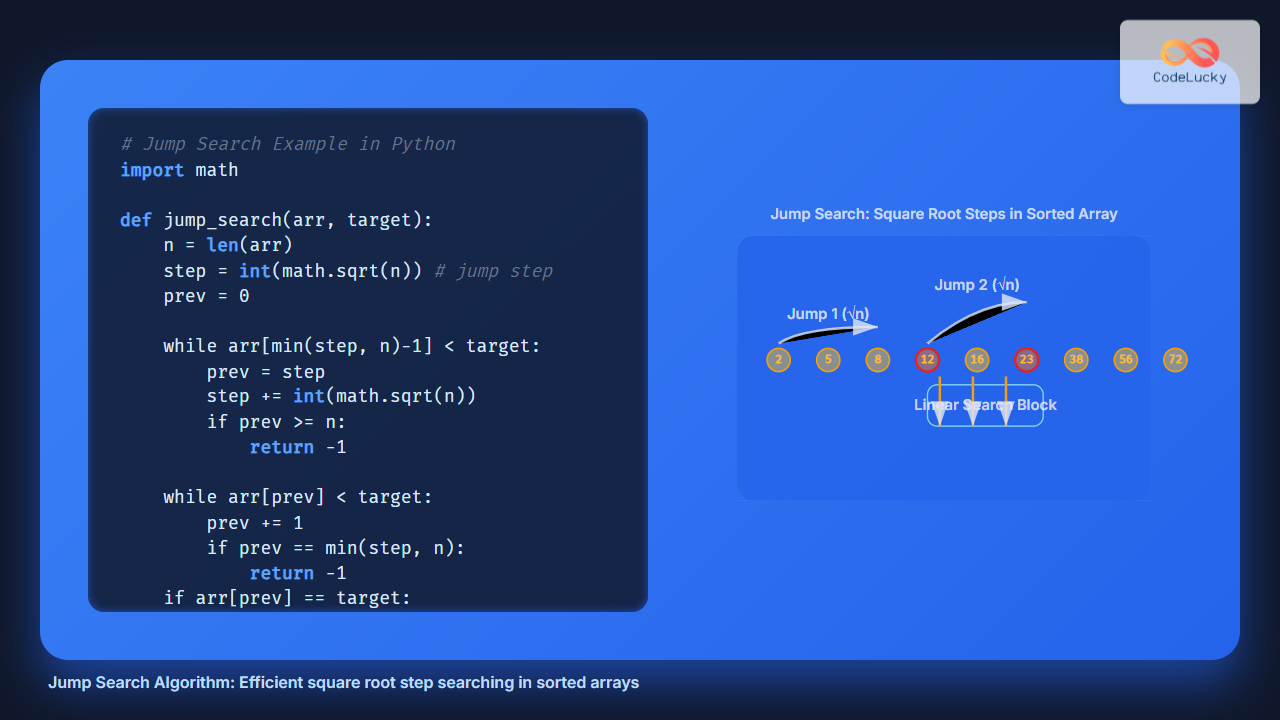
Jump Search is a searching technique designed for sorted arrays. Instead of checking every element sequentially, it skips ahead by a block of size √n (where n is the array length). Once it overshoots or finds a block likely containing the target, it performs a linear search inside that block.
When to Use Jump Search?
- Works only on sorted arrays.
- Faster than linear search for large datasets.
- Preferable when binary search is harder to implement (e.g., linked structures with sequential access).
How Jump Search Works
- Choose a jump step =
√n. - Start from the first element and jump ahead by
stepuntil the current element exceeds the target or the array end is reached. - Perform a linear search backward within the block where the target might exist.
- If found, return its index; otherwise, return
-1.

Example Walkthrough
Suppose we have a sorted array:
arr = [2, 5, 8, 12, 16, 23, 38, 56, 72, 91]
target = 23
n = 10
step = √n ≈ 3
Steps:
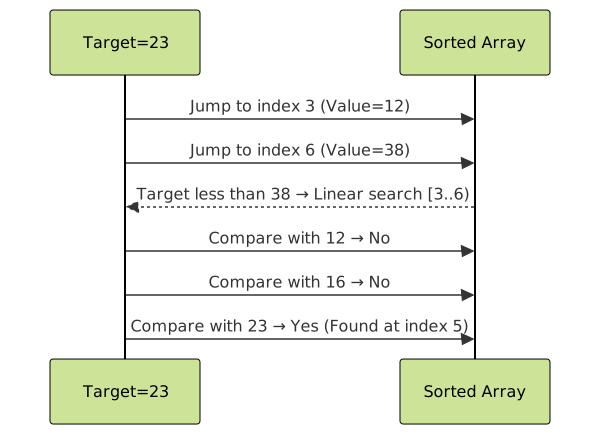
- Check
arr[0] = 2, jump toarr[3] = 12. - Check
arr[3] = 12, jump toarr[6] = 38. 23 < 38→ linear search back in block [12, 16, 23].- Found
23at index5.
Python Implementation of Jump Search
import math

def jump_search(arr, target):
    n = len(arr)
    step = int(math.sqrt(n))  # optimal step
    prev = 0

    # Jump until overshoot or target block found
    while arr[min(step, n)-1] < target:
        prev = step
        step += int(math.sqrt(n))
        if prev >= n:
            return -1

    # Linear search in identified block
    while arr[prev] < target:
        prev += 1
        if prev == min(step, n):
            return -1
    if arr[prev] == target:
        return prev
    return -1

# Example usage
arr = [2, 5, 8, 12, 16, 23, 38, 56, 72, 91]
target = 23
result = jump_search(arr, target)
print(f"Element found at index: {result}")
Output:
Element found at index: 5
Complexity Analysis
- Best Case: O(1) (if the first element matches)
- Average Case: O(√n)
- Worst Case: O(√n) (linear scan within one block)
- Space Complexity: O(1) (constant extra space)

Advantages of Jump Search
- Faster than linear search for large sorted datasets.
- Simpler to implement in certain sequential access structures compared to binary search.
- Predictable step size makes it efficient for indexed data.
Limitations
- Requires sorted input data.
- Not as fast as binary search (O(log n)).
- Best suited for arrays with random access; less efficient for linked lists due to jump cost.
Interactive Concept Visualization
Imagine standing on a number line. Instead of walking step by step like linear search, Jump Search makes leaps of √n steps. If you overshoot the target zone, you walk backward step by step until you find the exact number.

Conclusion
The Jump Search Algorithm provides a fine balance between simplicity and efficiency when working with sorted arrays. With a complexity of O(√n), it is significantly faster than linear search while being easier to implement than binary search in some scenarios. For practical programming, especially in cases where random access is expensive, Jump Search offers a valuable tradeoff.