
Understanding how users interact with a website is crucial for optimizing user experience (UX) and driving higher conversion rates. Heat mapping tools provide a powerful visual approach to decode user behavior by showing where users click, scroll, and focus their attention. This article explores what heat mapping is, how heat mapping tools work, practical examples, and how to leverage these insights for effective website enhancements.
What Are Heat Mapping Tools?
Heat mapping tools are specialized analytics software that capture and visually represent user interactions on a webpage using color-coded overlays—commonly called heatmaps. These maps use gradients (from cool blues to hot reds) to indicate levels of user activity: areas with more activity are highlighted in warmer colors, while less-engaged areas remain cooler or neutral.
The main types of heat maps used in web analytics include:
- Click Heatmaps: Indicate where users click or tap on a page, highlighting areas of interest or confusion.
- Scroll Heatmaps: Show how far down users scroll, helping identify where engagement drops off.
- Mouse Movement Heatmaps: Track cursor movements to approximate user attention and intent.
Why Use Heat Mapping Tools?
Heat maps provide qualitative analytics that complements quantitative data like bounce rates or page views. They help detect usability issues, UX bottlenecks, and navigation patterns, leading to smarter design decisions and optimized conversion funnel strategies.
- Visualize real user behavior quickly
- Identify dead zones and distracting elements
- Optimize layout, CTA placements, and content positioning
- Understand device-specific variances with mobile vs desktop heatmaps
Popular Heat Mapping Tools and Examples
There are several market-leading tools to create interactive heat maps for websites:
- Hotjar: Offers click, move, and scroll heatmaps along with session recordings and surveys.
- Crazy Egg: Provides snapshots of click, scroll, and confetti heatmaps with A/B testing integration.
- Mouseflow: Includes heatmaps and real-time user session replays.
Example of a Click Heatmap on an E-commerce Homepage

This heatmap reveals that users overwhelmingly click on product images and buy buttons but rarely interact with sidebar banners, indicating areas for optimization.
How to Read and Interpret Heatmaps
Interpreting heatmaps effectively requires understanding what colors represent in context. For example, a red zone over a non-clickable image could indicate confusion, signaling the need to make that element interactive or clearer.

Implementing Heat Maps: Step-by-Step
- Choose your tool: Pick based on features, integrations, and budget.
- Install tracking code: Usually a simple JavaScript snippet added to your website.
- Define key pages: Focus on landing pages, high bounce rate pages, or conversion funnels.
- Collect data: Allow sufficient time for meaningful data based on traffic volume.
- Analyze results: Look beyond colors—combine heatmaps with user session recordings and feedback.
- Action improvements: Test design adjustments informed by heatmap insights.
Interactive Demo of Heat Mapping Concept
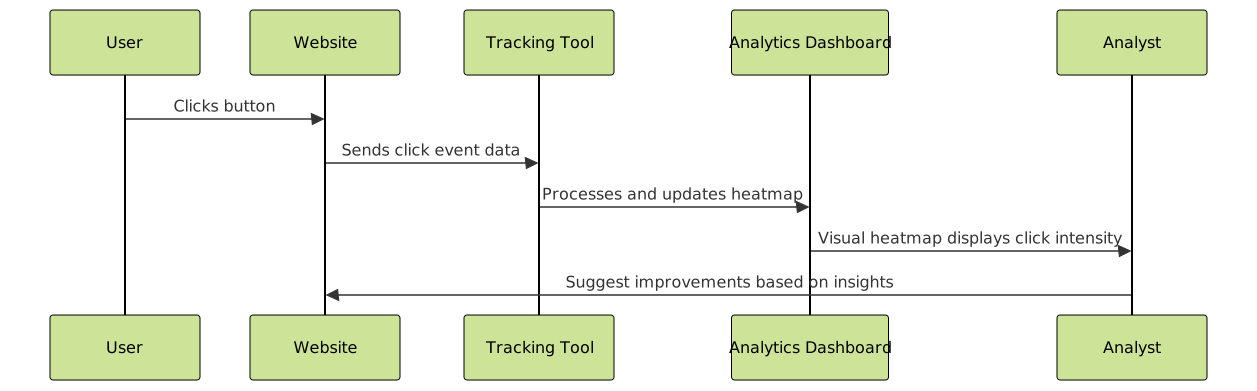
Below is a simplified conceptual flow showing how user clicks are transformed into heatmap data for analysis.
Best Practices and Tips
- Combine heatmap data with quantitative metrics like conversion rates and bounce rate.
- Segment heatmaps by device type to identify mobile vs desktop usability issues.
- Use session recordings alongside heatmaps to capture the “why” behind interactions.
- Continuously test design changes to validate improvements.
Limitations of Heat Mapping Tools
While powerful, heat maps have some limitations:
- Do not tell the full story of user intent or satisfaction alone.
- Require enough site traffic to generate statistically relevant data.
- Can sometimes mislead if users accidentally click or hover.

Conclusion
Heat mapping tools offer an invaluable window into authentic user behavior by visualizing clicks, scrolls, and attention on websites. Leveraging these insights helps refine UX design, optimize user journeys, and ultimately increase engagement and conversions. By integrating heatmaps with other analytics and testing strategies, businesses can make smarter decisions driven by real user data.
Getting started with heat mapping is easy, and the value it delivers for understanding user interaction patterns makes it a must-have tool for any serious website owner or digital marketer.





