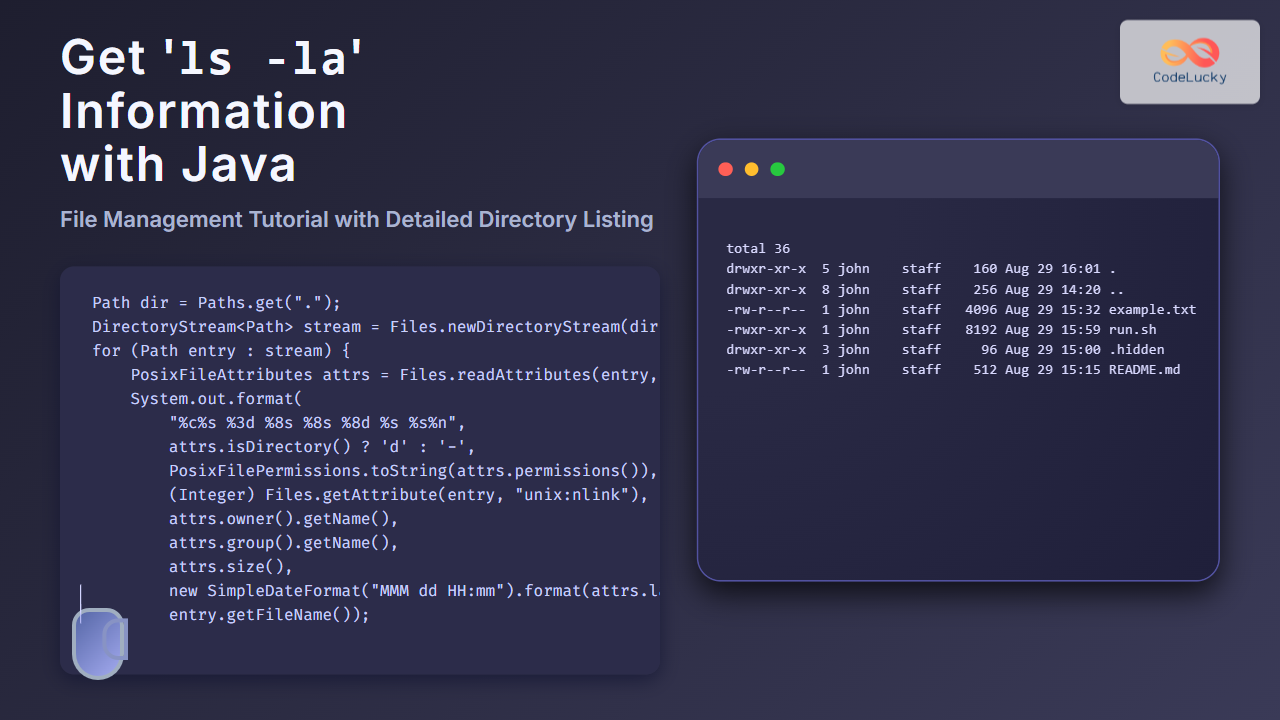
In this comprehensive Java File Management Tutorial, the focus is on how to replicate the functionality of the popular Unix/Linux command ls -la using Java code. This command lists directory contents with detailed information including hidden files, permissions, owner, size, and last modified time. For Java developers looking to integrate such file system details into applications, understanding how to extract this information programmatically is essential.
Understanding What ls -la Displays
The ls -la command provides a detailed listing of files and directories in the current directory or a specified path:
- File type and permissions (read, write, execute for user/group/others)
- Number of links
- Owner and group
- File size
- Last modification timestamp
- File/directory name (including hidden files starting with a dot)
Our tutorial will demonstrate how to obtain and display this information using Java’s java.nio.file and java.io packages.
Java Classes and APIs Used
java.nio.file.Pathandjava.nio.file.Files– for file path handling and querying attributesjava.nio.file.attribute.PosixFileAttributes– to read POSIX-specific file permissions and ownership (works on Unix-like systems)java.io.File– basic file info and directory listingjava.text.SimpleDateFormat– formatting the last modified date
Step-by-Step Java Implementation
1. List Directory Contents Including Hidden Files
First, obtain all files and directories in the target folder, including hidden files that begin with a dot.
import java.io.File;

public class ListFilesExample {
    public static void main(String[] args) {
        File directory = new File(".");
        File[] files = directory.listFiles();

        for (File file : files) {
            System.out.println(file.getName());
        }
    }
}
This lists all files, including hidden ones by default since listFiles() includes hidden files. But it does not show detailed information.
2. Retrieve Detailed File Attributes
For detailed file attributes such as permissions and ownership, we use java.nio.file APIs and POSIX attributes (on supported systems).
import java.nio.file.*;
import java.nio.file.attribute.*;
import java.text.SimpleDateFormat;
import java.util.Date;

public class LsLaSimulation {
    public static void main(String[] args) throws Exception {
        Path dir = Paths.get(".");
        DirectoryStream stream = Files.newDirectoryStream(dir);

        for (Path entry : stream) {
            printFileDetails(entry);
        }
    }

    private static void printFileDetails(Path path) throws Exception {
        PosixFileAttributes attrs = Files.readAttributes(path, PosixFileAttributes.class);

        // File type and permissions
        String perms = PosixFilePermissions.toString(attrs.permissions());
        char type = attrs.isDirectory() ? 'd' : '-';

        // Number of links
        int links = (Integer) Files.getAttribute(path, "unix:nlink");

        // Owner and group
        String owner = attrs.owner().getName();
        String group = attrs.group().getName();

        // Size
        long size = attrs.size();

        // Last modified time
        SimpleDateFormat sdf = new SimpleDateFormat("MMM dd HH:mm");
        String modTime = sdf.format(new Date(attrs.lastModifiedTime().toMillis()));

        // File name
        String fileName = path.getFileName().toString();

        System.out.format("%c%s %3d %8s %8s %8d %s %s%n",
                type, perms, links, owner, group, size, modTime, fileName);
    }
}
This code replicates the essential output of ls -la on Unix/Linux systems. Note that PosixFileAttributes might not be supported on Windows by default.
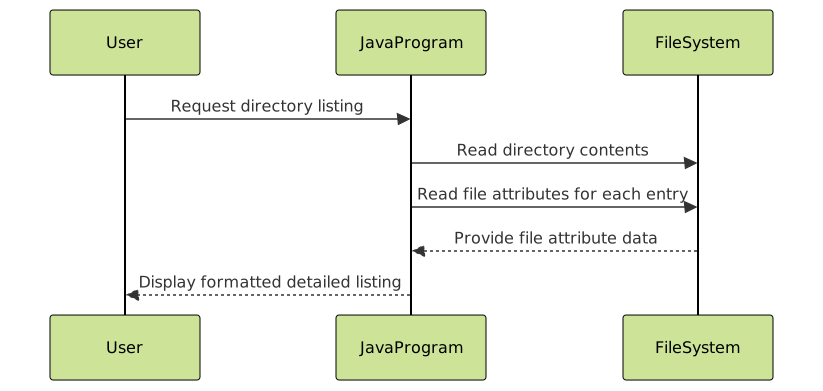
Visualizing the File Attribute Retrieval Flow

Explaination of Output Format
| Field | Description | Example |
|---|---|---|
| File Type & Permissions | First character: d for directory, - for file. Followed by permissions like rwxr-xr-x |
-rwxr-xr-x |
| Links | Number of hard links | 3 |
| Owner | File owner username | john |
| Group | File owner group name | staff |
| Size | File size in bytes | 4096 |
| Last Modified | Timestamp of last modification | Aug 29 15:23 |
| Filename | Name of the file or directory | example.txt |
Handling Windows Compatibility
Since PosixFileAttributes is Unix-specific, on Windows, you can use BasicFileAttributes instead but it does not provide permissions or ownership details.
import java.nio.file.*;
import java.nio.file.attribute.*;
import java.text.SimpleDateFormat;
import java.util.Date;

public class WindowsLsLa {
    public static void main(String[] args) throws Exception {
        Path dir = Paths.get(".");
        DirectoryStream stream = Files.newDirectoryStream(dir);

        for (Path entry : stream) {
            BasicFileAttributes attrs = Files.readAttributes(entry, BasicFileAttributes.class);

            char type = attrs.isDirectory() ? 'd' : '-';
            long size = attrs.size();
            SimpleDateFormat sdf = new SimpleDateFormat("MMM dd HH:mm");
            String modTime = sdf.format(new Date(attrs.lastModifiedTime().toMillis()));
            String fileName = entry.getFileName().toString();

            // Permissions and ownership are limited here
            System.out.format("%c %12d %s %n", type, size, modTime + " " + fileName);
        }
    }
}
Putting It Together: Building a Utility Class
import java.io.IOException;
import java.nio.file.*;
import java.nio.file.attribute.*;
import java.text.SimpleDateFormat;
import java.util.Date;

public class LsLaUtility {

    public static void listDetailed(String dirPath) throws IOException {
        Path directory = Paths.get(dirPath);
        DirectoryStream stream = Files.newDirectoryStream(directory);

        boolean isPosixSupported = FileSystems.getDefault()
                                                .supportedFileAttributeViews()
                                                .contains("posix");

        SimpleDateFormat sdf = new SimpleDateFormat("MMM dd HH:mm");

        for (Path entry : stream) {
            if (isPosixSupported) {
                try {
                    PosixFileAttributes attrs = Files.readAttributes(entry, PosixFileAttributes.class);
                    String perms = PosixFilePermissions.toString(attrs.permissions());
                    char type = attrs.isDirectory() ? 'd' : '-';
                    int links = (Integer) Files.getAttribute(entry, "unix:nlink");
                    String owner = attrs.owner().getName();
                    String group = attrs.group().getName();
                    long size = attrs.size();
                    String modTime = sdf.format(new Date(attrs.lastModifiedTime().toMillis()));
                    String fileName = entry.getFileName().toString();

                    System.out.format("%c%s %3d %8s %8s %8d %s %s%n",
                            type, perms, links, owner, group, size, modTime, fileName);
                } catch (UnsupportedOperationException e) {
                    // Fallback to basic attributes
                    printBasic(entry, sdf);
                }
            } else {
                printBasic(entry, sdf);
            }
        }
    }

    private static void printBasic(Path entry, SimpleDateFormat sdf) throws IOException {
        BasicFileAttributes attrs = Files.readAttributes(entry, BasicFileAttributes.class);
        char type = attrs.isDirectory() ? 'd' : '-';
        long size = attrs.size();
        String modTime = sdf.format(new Date(attrs.lastModifiedTime().toMillis()));
        String fileName = entry.getFileName().toString();

        System.out.format("%c %12d %s %n", type, size, modTime + " " + fileName);
    }

    public static void main(String[] args) throws IOException {
        listDetailed(".");
    }
}
Integration Ideas and Interactive Usage
This utility can be integrated into Java desktop or server applications to display detailed directory listings. To make it interactive, one could extend the functionality to accept user input for directory paths or filtering options, then refresh the displayed data accordingly.
Summary
This tutorial demonstrated how to replicate ls -la-style detailed directory listings in Java, covering both Unix/Linux (using POSIX attributes) and Windows (using basic attributes) environments. The examples included file permissions, ownership, size, modification time, and type information, along with visualizations to clarify the process. This knowledge is valuable for building powerful Java file management tools.