
Introduction to File Systems
A file system is a fundamental component of any operating system that provides a structured way to organize, store, retrieve, and manage data on storage devices. It acts as an interface between the operating system and the physical storage medium, abstracting the complexity of data storage and presenting a logical view to users and applications.
File systems are responsible for managing everything from individual files and directories to metadata, permissions, and storage allocation. Understanding file system structure and organization is crucial for system administrators, developers, and anyone working with computer systems.
Core Components of File System Structure
Files
A file is the basic unit of storage in a file system. Files contain data and have associated metadata including:
- Name: Human-readable identifier for the file
- Size: Amount of storage space occupied
- Type: File format or extension
- Timestamps: Creation, modification, and access times
- Permissions: Access control information
- Location: Physical address on storage device
Directories
A directory (also called a folder) is a special type of file that contains references to other files and directories. Directories enable hierarchical organization and provide a namespace for files within the system.

Metadata
Metadata is data about data – information that describes the properties and characteristics of files and directories. Common metadata includes:
- File attributes (read-only, hidden, system)
- Owner and group information
- Access permissions
- File size and block allocation
- Inode numbers (in Unix-like systems)
- Checksums for integrity verification
Hierarchical File System Structure
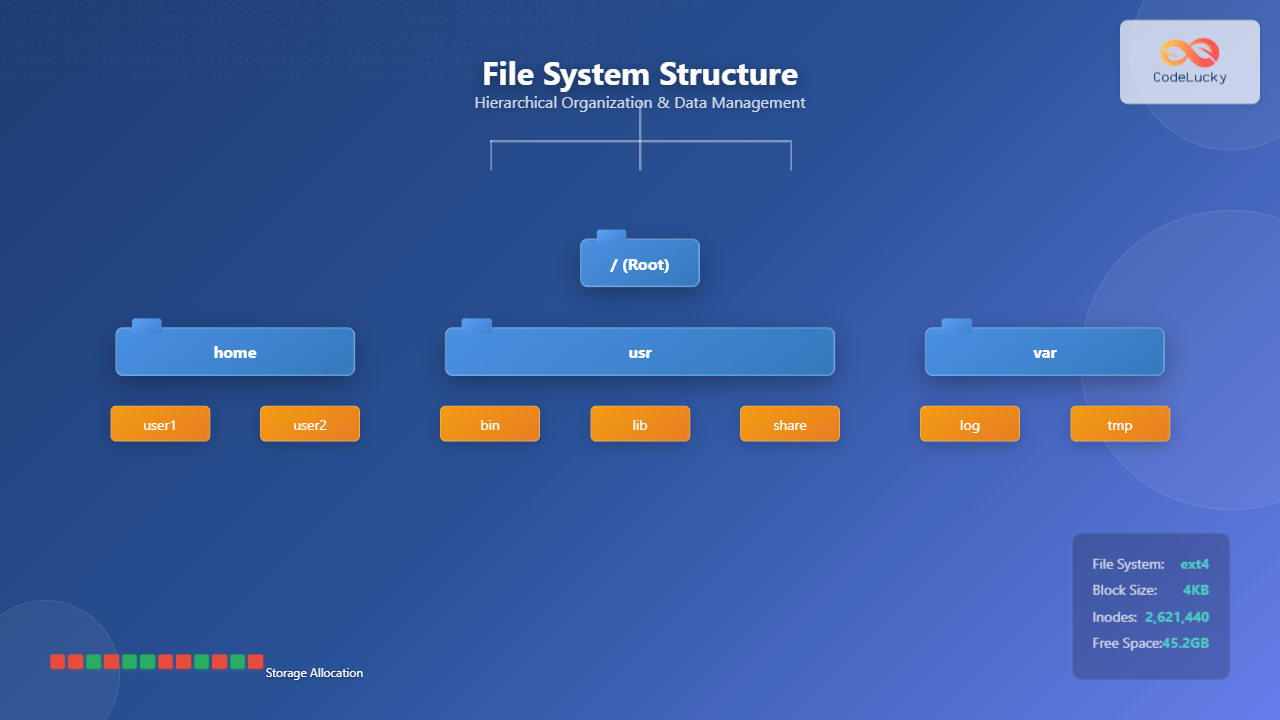
Most modern file systems use a hierarchical structure, organizing files and directories in a tree-like arrangement. This structure provides several advantages:
Tree Structure Benefits
- Logical Organization: Related files can be grouped together
- Namespace Management: Multiple files can have the same name in different directories
- Scalability: Easy to add new branches to the tree
- Navigation: Intuitive path-based file location
Path Representation
Files and directories are accessed using paths, which specify their location in the hierarchy:
# Absolute paths (from root)
/home/user1/Documents/report.txt
/usr/bin/ls
/var/log/system.log

# Relative paths (from current directory)
Documents/report.txt
../user2/Pictures/photo.jpg
./script.sh
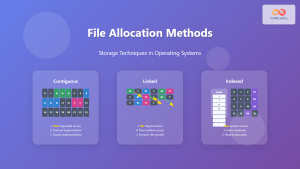
File Allocation Methods
File systems use different methods to allocate storage space on physical devices. The choice of allocation method affects performance, storage efficiency, and fragmentation.
Contiguous Allocation
Contiguous allocation stores each file in consecutive blocks on the storage device.
Advantages:
- Simple implementation
- Excellent sequential access performance
- Minimal seek time for reading entire files
Disadvantages:
- External fragmentation
- Difficult to grow files
- Requires pre-allocation of maximum file size
Block Layout Example (Contiguous):
[File A][File A][File A][Free][Free][File B][File B][Free]
 0      1       2       3     4      5       6       7
Linked Allocation
Linked allocation stores files as linked lists of blocks, where each block contains data and a pointer to the next block.
Advantages:
- No external fragmentation
- Files can grow dynamically
- Efficient use of available space
Disadvantages:
- Poor random access performance
- Overhead of storing pointers
- Reliability issues if pointers are corrupted
Indexed Allocation
Indexed allocation uses an index block that contains pointers to all blocks belonging to a file.
Advantages:
- Good random access performance
- No external fragmentation
- Files can grow up to index block capacity
Example of indexed allocation structure:
Index Block for File "document.txt":
┌─────────────────┐
│ Block Pointers  │
├─────────────────┤
│ Block 15 ──────┼─→ [Data Block 15]
│ Block 23 ──────┼─→ [Data Block 23]
│ Block 31 ──────┼─→ [Data Block 31]
│ Block 47 ──────┼─→ [Data Block 47]
│ NULL           │
└─────────────────┘

Directory Implementation
Directories can be implemented using various data structures, each with different performance characteristics:
Linear List Implementation
The simplest implementation stores directory entries in a linear list or array.
Directory Structure (Linear List):
Entry 1: [filename: "report.txt", inode: 1234, size: 5120]
Entry 2: [filename: "photo.jpg", inode: 1235, size: 2048000]
Entry 3: [filename: "music.mp3", inode: 1236, size: 5242880]
Time Complexity:
- Search: O(n)
- Insert: O(1) at end, O(n) to maintain order
- Delete: O(n)
Hash Table Implementation
Hash tables provide faster file lookup by using filename as the key.
Time Complexity:
- Search: O(1) average case
- Insert: O(1) average case
- Delete: O(1) average case
B-Tree Implementation
B-trees provide efficient operations and maintain sorted order for large directories.

File System Implementation Examples
Unix/Linux File System (ext4)
The ext4 file system is widely used in Linux systems and demonstrates modern file system features:
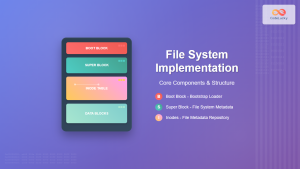
ext4 Structure:
┌─────────────┐
│ Boot Block  │
├─────────────┤
│ Super Block │ ← Contains file system metadata
├─────────────┤
│ Group Desc. │ ← Block group descriptors
├─────────────┤
│ Block Bitmap│ ← Free block tracking
├─────────────┤
│ Inode Bitmap│ ← Free inode tracking
├─────────────┤
│ Inode Table │ ← File metadata storage
├─────────────┤
│ Data Blocks │ ← Actual file content
└─────────────┘
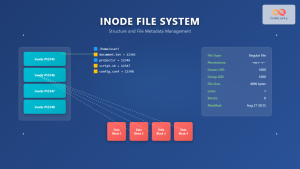
Inode Structure Example
Inode #1234 (example file):
├── File Type: Regular file
├── Permissions: rw-r--r-- (644)
├── Owner: user1 (UID: 1000)
├── Group: users (GID: 100)
├── Size: 4096 bytes
├── Timestamps:
│   ├── Created: 2024-01-15 10:30:00
│   ├── Modified: 2024-01-16 14:22:00
│   └── Accessed: 2024-01-17 09:15:00
├── Link Count: 1
└── Block Pointers:
    ├── Direct[0]: Block 5000
    ├── Direct[1]: Block 5001
    ├── ...
    ├── Indirect: Block 6000
    └── Double Indirect: Block 7000
Windows NTFS
NTFS (New Technology File System) is Microsoft’s modern file system with advanced features:
Key Features:
- Master File Table (MFT) for metadata
- Journaling for crash recovery
- Access Control Lists (ACLs)
- File compression and encryption
- Hard links and symbolic links
File System Operations
Basic File Operations
File systems provide standard operations for file manipulation:
File Operations Example (C-style pseudocode):

// Create and open a file
int fd = open("example.txt", O_CREAT | O_WRONLY, 0644);

// Write data to file
write(fd, "Hello, World!", 13);

// Close file
close(fd);

// Read from file
fd = open("example.txt", O_RDONLY);
char buffer[100];
read(fd, buffer, sizeof(buffer));
close(fd);

// Delete file
unlink("example.txt");
Directory Operations
Directory Operations Example:

// Create directory
mkdir("new_folder", 0755);

// List directory contents
DIR *dir = opendir(".");
struct dirent *entry;
while ((entry = readdir(dir)) != NULL) {
    printf("File: %s\n", entry->d_name);
}
closedir(dir);

// Remove directory
rmdir("empty_folder");

Virtual File System (VFS)
The Virtual File System is an abstraction layer that allows the operating system to support multiple file system types simultaneously.
VFS Benefits
- Uniformity: Same interface for all file systems
- Portability: Applications work with any supported file system
- Flexibility: Easy to add new file system types
- Network Support: Seamless integration of network file systems
VFS Implementation Example
VFS Structure (Linux):

struct file_operations {
    int (*open)(struct inode *, struct file *);
    ssize_t (*read)(struct file *, char *, size_t, loff_t *);
    ssize_t (*write)(struct file *, const char *, size_t, loff_t *);
    int (*close)(struct inode *, struct file *);
    // ... other operations
};

struct inode_operations {
    int (*create)(struct inode *, struct dentry *, int);
    int (*mkdir)(struct inode *, struct dentry *, int);
    int (*rmdir)(struct inode *, struct dentry *);
    // ... other operations
};
File System Performance and Optimization
Caching Strategies
File systems use various caching mechanisms to improve performance:
- Buffer Cache: Caches frequently accessed disk blocks
- Directory Cache: Caches directory lookup results
- Inode Cache: Keeps recently used inodes in memory
- Page Cache: Caches file content at the page level
Prefetching and Read-Ahead
Read-Ahead Example:
When reading block 100:
1. Application requests block 100
2. File system reads blocks 100, 101, 102, 103
3. Future sequential reads hit cache
4. Improved overall throughput
Fragmentation Management
File systems employ various strategies to minimize fragmentation:
- Block allocation policies: Best-fit, first-fit, next-fit
- Extent-based allocation: Allocate contiguous runs
- Delayed allocation: Defer allocation until write-back
- Online defragmentation: Reorganize files while mounted
Modern File System Features
Journaling
Journaling ensures file system consistency by logging changes before applying them:
Journal Transaction Example:
1. Begin Transaction
2. Log: "Create file /home/user/test.txt"
3. Log: "Allocate inode 5678"
4. Log: "Allocate data block 9000"
5. Commit Transaction
6. Apply changes to file system
7. Mark transaction complete
Copy-on-Write (CoW)
CoW file systems like Btrfs and ZFS never overwrite existing data:
- Atomic operations
- Instant snapshots
- Built-in compression
- Data integrity verification
Compression and Deduplication
Modern file systems offer transparent compression and deduplication:
Compression Example (ZFS):
Original file: 1MB of text data
Compressed: 256KB on disk
Transparent to applications
Real-time compression/decompression
File System Security and Permissions
Unix-style Permissions
Permission Examples:
-rw-r--r--  1 user group  1024 Jan 15 10:30 file.txt
drwxr-xr-x  2 user group  4096 Jan 15 10:31 directory/

Permission breakdown:
- First character: file type (- = regular, d = directory)
- Next 3 characters: owner permissions (rwx)
- Next 3 characters: group permissions (r-x)
- Last 3 characters: other permissions (r--)

Octal representation:
chmod 644 file.txt  # rw-r--r--
chmod 755 directory # rwxr-xr-x
Access Control Lists (ACLs)
ACLs provide fine-grained permission control:
ACL Example:
getfacl file.txt
# file: file.txt
# owner: user1
# group: developers
user::rw-
user:alice:rwx
group::r--
group:admins:rwx
mask::rwx
other::r--
Conclusion
File systems are complex but essential components of operating systems that provide organized, efficient, and secure data storage. Understanding their structure and organization is crucial for system administration, performance optimization, and software development.
Key takeaways include:
- File systems abstract physical storage into logical structures
- Hierarchical organization provides intuitive data management
- Different allocation methods offer various trade-offs
- Modern features like journaling and CoW enhance reliability
- Virtual File Systems enable multiple file system support
- Security mechanisms protect data access and integrity
As storage technology evolves with SSDs, NVMe, and persistent memory, file systems continue to adapt and optimize for new hardware capabilities while maintaining backward compatibility and providing enhanced features for modern computing needs.
Related Posts
File System Types: FAT32, NTFS, ext4 and Modern Linux Filesystems Explained
Understanding File Systems: The Foundation of Data Storage A file system is the method and data structure that an operating...
Directory Structure: Single-level, Two-level, and Tree Structure in Operating Systems
Understanding Directory Structures in Operating Systems Directory structures are fundamental components of file systems that organize and manage files in...
Windows File System: Complete NTFS Features and Implementation Guide
Introduction to NTFS File System NTFS (New Technology File System) is the default file system for modern Windows operating systems,...
File System Implementation: Boot Block, Super Block and Inodes Explained
Understanding File System Implementation File system implementation is a critical component of operating systems that manages how data is stored,...
File Allocation Methods: Contiguous, Linked and Indexed Storage Techniques
Understanding File Allocation Methods in Operating Systems File allocation methods are fundamental techniques used by operating systems to organize and...
Inode in File System: Complete Guide to Structure and File Metadata
What is an Inode? An inode (index node) is a fundamental data structure in Unix-like file systems that stores metadata...
xattr Command Linux: Complete Guide to Extended File Attributes Management
Extended file attributes in Linux provide a powerful mechanism to store additional metadata beyond traditional file permissions and ownership. The...

Distributed File System: Complete Guide to NFS, CIFS and Network Storage Solutions
A Distributed File System (DFS) allows multiple computers to access and share files over a network as if they were...

File Locking Mechanisms: Complete Guide to Advisory and Mandatory Locking in Operating Systems
File locking mechanisms are essential components of modern operating systems that prevent data corruption and ensure data integrity when multiple...
sysfs Linux: Complete Guide to Understanding and Using /sys Filesystem
The sysfs filesystem is one of Linux's most powerful yet underutilized features, providing a window into the kernel's internal operations...
proc filesystem Linux: Complete Guide to Understanding /proc Directory Structure and Commands
What is the Linux /proc Filesystem? The /proc filesystem is a virtual filesystem in Linux that provides a window into...
File Permissions in Operating System: Complete Guide to Access Control Lists (ACLs)
Introduction to File Permissions and Access Control File permissions form the backbone of operating system security, controlling who can access,...
- Introduction to File Systems
- Core Components of File System Structure
- Hierarchical File System Structure
- File Allocation Methods
- Directory Implementation
- File System Implementation Examples
- File System Operations
- Virtual File System (VFS)
- File System Performance and Optimization
- Modern File System Features
- File System Security and Permissions
- Conclusion





