Understanding File System Implementation
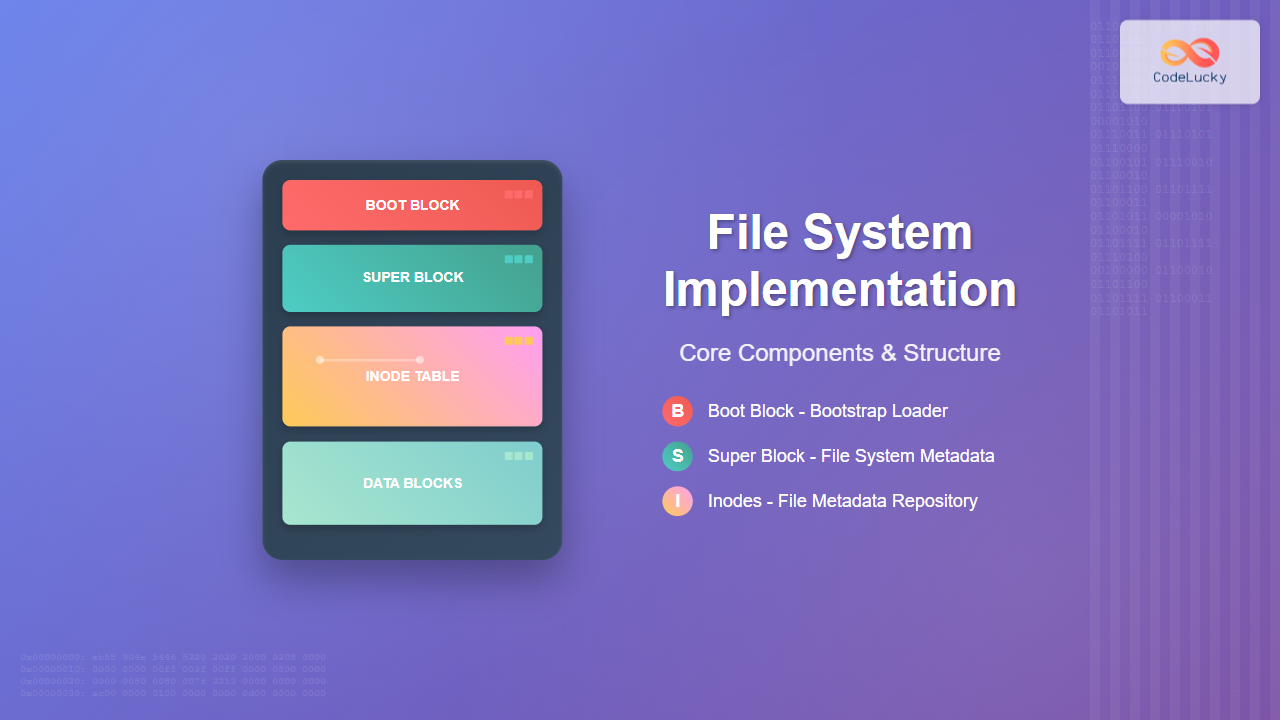
File system implementation is a critical component of operating systems that manages how data is stored, organized, and retrieved on storage devices. At its core, a file system consists of several key structures: the boot block, super block, and inodes. These components work together to provide a hierarchical organization of files and directories while ensuring efficient storage utilization and data integrity.
Modern file systems like ext4, XFS, and Btrfs all implement these fundamental concepts, though with varying degrees of complexity and optimization. Understanding these structures is essential for system administrators, developers, and anyone working with low-level storage operations.

Boot Block: The Foundation
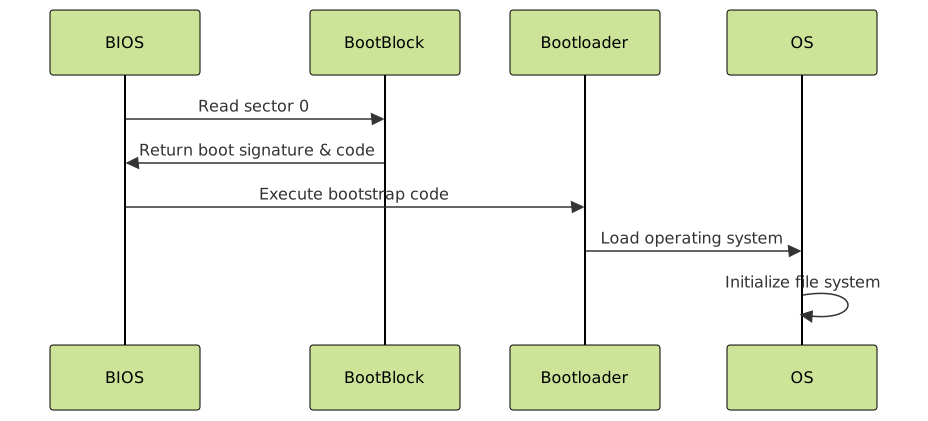
The boot block is the first block of a file system and contains the bootstrap loader code necessary to boot the operating system. This block is typically 512 bytes or 1024 bytes in size and is located at the very beginning of the partition or storage device.
Boot Block Structure
The boot block contains several critical components:
- Boot signature: A magic number (usually 0xAA55) that identifies the block as bootable
- Partition table: Information about disk partitions (in MBR systems)
- Bootstrap code: Machine code that initializes the boot process
- File system identifier: Indicates the type of file system present
Here’s an example of examining a boot block using hexdump:
# View the boot block of /dev/sda1
sudo hexdump -C /dev/sda1 | head -20

# Output example:
00000000  eb 58 90 4e 54 46 53 20  20 20 20 00 02 08 00 00  |.X.NTFS    .....|
00000010  00 00 00 00 00 f8 00 00  3f 00 ff 00 00 08 00 00  |........?.......|
00000020  00 00 00 00 80 00 80 00  7f 33 13 00 00 00 00 00  |.........3......|
Boot Block Functionality
When a computer starts, the BIOS or UEFI firmware reads the boot block to determine how to load the operating system. The boot block may contain:
- Stage 1 bootloader: Basic code that loads the more complex Stage 2 bootloader
- Partition information: Details about how the disk is divided
- File system parameters: Basic metadata about the file system structure
Super Block: File System Metadata Central
The super block is the control block that contains metadata about the entire file system. It’s typically located immediately after the boot block and serves as the central repository for file system configuration and state information.
Super Block Contents
A typical super block contains the following information:
- File system size: Total number of blocks in the file system
- Block size: Size of each data block (commonly 4KB)
- Free space information: Number of free blocks and inodes
- Mount count: Number of times the file system has been mounted
- Magic number: Identifies the file system type
- Creation timestamp: When the file system was created
- Last check time: When the file system was last checked for errors
Here’s how you can examine super block information on a Linux system:
# Display super block information for ext4 file system
sudo dumpe2fs /dev/sda1 | head -20

# Sample output:
Filesystem volume name:   /
Last mounted on:          /
Filesystem UUID:          a1b2c3d4-e5f6-7890-abcd-ef1234567890
Filesystem magic number:  0xEF53
Filesystem revision #:    1 (dynamic)
Filesystem features:      has_journal ext_attr resize_inode dir_index filetype needs_recovery extent 64bit flex_bg sparse_super large_file huge_file uninit_bg dir_nlink extra_isize
Filesystem flags:         signed_directory_hash
Default mount options:    user_xattr acl
Filesystem state:         clean
Errors behavior:          Continue
Filesystem OS type:       Linux
Inode count:              1966080
Block count:              7864064
Reserved block count:     393203
Free blocks:              6234567
Free inodes:              1654321
Super Block Redundancy
Most modern file systems maintain multiple copies of the super block to prevent data loss. For example, ext2/3/4 file systems store backup super blocks at specific intervals:
# List backup super block locations
sudo dumpe2fs /dev/sda1 | grep "Backup superblock"

# Output example:
Backup superblock at 32768, Group descriptors at 32769-32770
Backup superblock at 98304, Group descriptors at 98305-98306
Backup superblock at 163840, Group descriptors at 163841-163842
Inodes: The File Metadata Repository
Inodes (index nodes) are data structures that store metadata about files and directories. Each file or directory in a Unix-like file system has an associated inode that contains all the information about the file except its name and actual data.
Inode Structure and Contents
An inode typically contains the following information:
- File type: Regular file, directory, symbolic link, etc.
- Permissions: Read, write, execute permissions for owner, group, and others
- Link count: Number of hard links pointing to this inode
- Owner information: User ID (UID) and Group ID (GID)
- File size: Size of the file in bytes
- Timestamps: Access time, modification time, change time
- Block pointers: Addresses of data blocks containing file content

Examining Inodes
You can examine inode information using various Linux commands:
# Display inode information for a file
ls -li /etc/passwd

# Output example:
1048577 -rw-r--r-- 1 root root 2847 2024-01-15 10:30 /etc/passwd

# Get detailed inode information
stat /etc/passwd

# Output example:
  File: /etc/passwd
  Size: 2847            Blocks: 8          IO Block: 4096   regular file
Device: 801h/2049d      Inode: 1048577     Links: 1
Access: (0644/-rw-r--r--)  Uid: (    0/    root)   Gid: (    0/    root)
Access: 2024-01-15 08:15:30.123456789 +0000
Modify: 2024-01-15 10:30:45.987654321 +0000
Change: 2024-01-15 10:30:45.987654321 +0000
 Birth: 2024-01-10 14:22:15.555666777 +0000
Block Addressing in Inodes
Inodes use a sophisticated addressing scheme to handle files of various sizes efficiently:
- Direct blocks: Typically 12 pointers directly to data blocks (for small files)
- Single indirect: Points to a block containing pointers to data blocks
- Double indirect: Points to a block of single indirect blocks
- Triple indirect: Points to a block of double indirect blocks
This addressing scheme allows efficient storage of both small and large files:
# Calculate maximum file size with 4KB blocks and 32-bit block addresses
# Direct blocks: 12 * 4KB = 48KB
# Single indirect: (4KB / 4 bytes) * 4KB = 4MB
# Double indirect: (4KB / 4 bytes)² * 4KB = 4GB
# Triple indirect: (4KB / 4 bytes)³ * 4KB = 4TB
# Total theoretical maximum: ~4TB (in practice, limited by other factors)
File System Layout and Organization
The complete layout of a typical Unix-style file system demonstrates how boot blocks, super blocks, and inodes work together:

Block Groups
Large file systems are divided into block groups to improve performance and reduce fragmentation:
# Display block group information
sudo dumpe2fs /dev/sda1 | grep -A 5 "Group 0"

# Sample output:
Group 0: (Blocks 0-32767)
  Primary superblock at 0, Group descriptors at 1-1
  Reserved GDT blocks at 2-512
  Block bitmap at 513 (+513), Inode bitmap at 529 (+529)
  Inode table at 545-672 (+545)
  24815 free blocks, 8048 free inodes, 2 directories
Practical Implementation Examples
Creating a Custom File System
Here’s a simplified example of how these components might be implemented:
#include <stdio.h>
#include <stdint.h>
#include <time.h>

// Super block structure
struct superblock {
    uint32_t magic_number;      // 0x12345678 for our custom FS
    uint32_t block_size;        // Size of each block
    uint32_t total_blocks;      // Total number of blocks
    uint32_t free_blocks;       // Number of free blocks
    uint32_t total_inodes;      // Total number of inodes
    uint32_t free_inodes;       // Number of free inodes
    uint32_t first_data_block;  // First block containing data
    time_t   creation_time;     // File system creation time
    time_t   last_mount_time;   // Last mount time
    uint16_t mount_count;       // Number of mounts since last check
};

// Inode structure
struct inode {
    uint16_t mode;              // File type and permissions
    uint16_t uid;               // Owner user ID
    uint32_t size;              // File size in bytes
    time_t   atime;             // Last access time
    time_t   mtime;             // Last modification time
    time_t   ctime;             // Last change time
    uint16_t gid;               // Owner group ID
    uint16_t links_count;       // Number of hard links
    uint32_t blocks;            // Number of 512-byte blocks allocated
    uint32_t direct_blocks[12]; // Direct block pointers
    uint32_t indirect_block;    // Single indirect block pointer
    uint32_t double_indirect;   // Double indirect block pointer
    uint32_t triple_indirect;   // Triple indirect block pointer
};

// Example function to read super block
int read_superblock(int fd, struct superblock *sb) {
    // Seek to super block location (typically block 1)
    lseek(fd, 1024, SEEK_SET);

    // Read super block
    if (read(fd, sb, sizeof(struct superblock)) != sizeof(struct superblock)) {
        return -1;
    }

    // Verify magic number
    if (sb->magic_number != 0x12345678) {
        return -1;
    }

    return 0;
}
Directory Implementation
Directories are special files that contain mappings from filenames to inode numbers:
// Directory entry structure
struct dir_entry {
    uint32_t inode_number;      // Inode number of the file
    uint16_t record_length;     // Length of this directory entry
    uint8_t  name_length;       // Length of the filename
    uint8_t  file_type;         // File type indicator
    char     name[];            // Variable-length filename
};

// Example of reading directory entries
void read_directory(int fd, uint32_t inode_num) {
    struct inode dir_inode;
    struct dir_entry entry;

    // Read directory inode
    read_inode(fd, inode_num, &dir_inode);

    // Read directory data blocks
    for (int i = 0; i < 12 && dir_inode.direct_blocks[i]; i++) {
        lseek(fd, dir_inode.direct_blocks[i] * block_size, SEEK_SET);

        // Read directory entries from this block
        int offset = 0;
        while (offset < block_size) {
            read(fd, &entry, sizeof(struct dir_entry));
            printf("Inode: %u, Name: %.*s\n",
                   entry.inode_number, entry.name_length, entry.name);
            offset += entry.record_length;
        }
    }
}
File System Operations
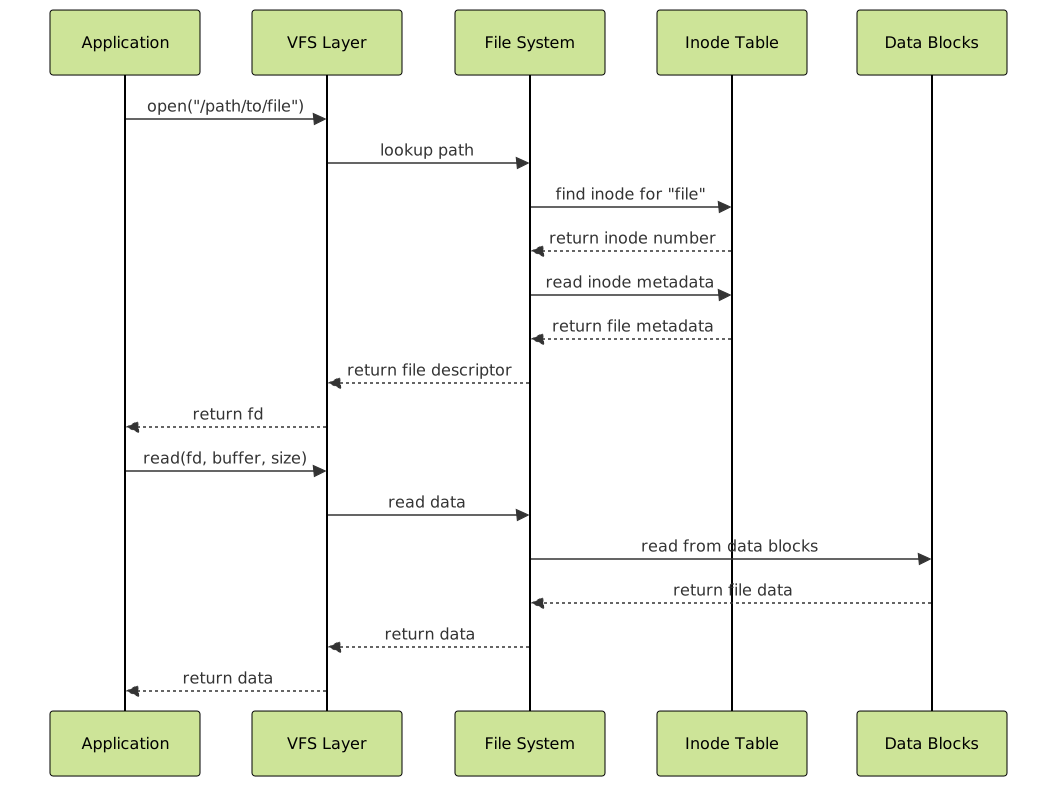
Understanding how common file system operations interact with these structures is crucial:
File Creation Process
When creating a new file, the file system must:
- Allocate an inode: Find a free inode from the inode bitmap
- Initialize inode: Set metadata like permissions, timestamps, and owner
- Update directory: Add directory entry mapping filename to inode number
- Update super block: Decrement free inode count
- Allocate data blocks: If data is written immediately
# Monitor file creation with strace
strace -e trace=file touch newfile.txt

# Output shows system calls:
openat(AT_FDCWD, "newfile.txt", O_WRONLY|O_CREAT|O_NOCTTY|O_NONBLOCK, 0666) = 3
fstat(3, {st_mode=S_IFREG|0664, st_size=0, ...}) = 0
close(3) = 0
Performance Considerations
The design of boot blocks, super blocks, and inodes significantly impacts file system performance:
Caching Strategies
- Super block caching: Keep super block in memory to avoid repeated disk reads
- Inode caching: Cache frequently accessed inodes
- Directory caching: Cache directory entries for faster path resolution
Optimization Techniques
# View file system cache statistics
cat /proc/meminfo | grep -E "(Buffers|Cached)"

# Output example:
Buffers:          245760 kB
Cached:          1847296 kB

# Monitor inode cache usage
cat /proc/sys/fs/inode-nr

# Output: current_inodes unused_inodes max_inodes
# Example: 85234 12456 0
Error Handling and Recovery
File system integrity depends on proper handling of these critical structures:
Consistency Checking
File system checkers (fsck) verify the consistency of boot blocks, super blocks, and inodes:
# Check file system consistency
sudo fsck.ext4 -n /dev/sda1

# Sample output showing checks:
e2fsck 1.45.5 (07-Jan-2020)
/dev/sda1: clean, 284537/1966080 files, 1629497/7864064 blocks

# Force check with detailed output
sudo fsck.ext4 -f -v /dev/sda1

# Output includes:
Pass 1: Checking inodes, blocks, and sizes
Pass 2: Checking directory structure
Pass 3: Checking directory connectivity
Pass 4: Checking reference counts
Pass 5: Checking group summary information
Backup and Recovery
Critical file system structures should be backed up:
# Backup super block
sudo dd if=/dev/sda1 of=superblock_backup bs=1024 count=1 skip=1

# List all super block locations for recovery
sudo dumpe2fs /dev/sda1 | grep "Backup superblock" | head -3
Modern File System Enhancements
Contemporary file systems have evolved these basic concepts:
Journal Integration
Journaling file systems maintain transaction logs to ensure consistency:
- Metadata journaling: Log changes to inodes and directory structures
- Full data journaling: Log both metadata and data changes
- Ordered mode: Write data before committing metadata changes
Extended Attributes
Modern inodes support extended attributes for additional metadata:
# Set extended attribute
setfattr -n user.author -v "John Doe" myfile.txt

# List extended attributes
getfattr -d myfile.txt

# Output:
# file: myfile.txt
# user.author="John Doe"
Conclusion
The boot block, super block, and inode structures form the foundation of file system implementation in modern operating systems. The boot block provides the essential bootstrap code for system initialization, the super block maintains critical file system metadata and configuration, while inodes store comprehensive file metadata and enable efficient data organization.
Understanding these structures is fundamental for system administrators managing storage systems, developers working with file I/O operations, and anyone involved in operating system development. The sophisticated addressing schemes, caching strategies, and error recovery mechanisms built around these core concepts enable modern file systems to deliver the reliability and performance required by today’s computing environments.
As storage technology continues to evolve with NVMe SSDs, persistent memory, and distributed file systems, these foundational concepts remain relevant while being enhanced with new features like copy-on-write, snapshots, and advanced compression techniques.
Related Posts

File System in Operating System: Complete Guide to Structure and Organization
Introduction to File Systems A file system is a fundamental component of any operating system that provides a structured way...

File System Types: FAT32, NTFS, ext4 and Modern Linux Filesystems Explained
Understanding File Systems: The Foundation of Data Storage A file system is the method and data structure that an operating...
sysfs Linux: Complete Guide to Understanding and Using /sys Filesystem
The sysfs filesystem is one of Linux's most powerful yet underutilized features, providing a window into the kernel's internal operations...
Copy-on-Write File System: Complete Guide to ZFS and Btrfs Implementation
Copy-on-Write (COW) file systems represent a revolutionary approach to data storage and management, fundamentally changing how operating systems handle file...
Inode in File System: Complete Guide to Structure and File Metadata
What is an Inode? An inode (index node) is a fundamental data structure in Unix-like file systems that stores metadata...
btrfs Command Linux: Complete Guide to Advanced Filesystem Management
The btrfs command is a powerful utility for managing the B-tree filesystem (Btrfs) in Linux, offering advanced features like snapshots,...
proc filesystem Linux: Complete Guide to Understanding /proc Directory Structure and Commands
What is the Linux /proc Filesystem? The /proc filesystem is a virtual filesystem in Linux that provides a window into...
xfs_info Command Linux: Complete Guide to Display XFS Filesystem Information
The xfs_info command is a powerful utility in Linux systems that provides comprehensive information about XFS filesystems. This command is...

Directory Structure: Single-level, Two-level, and Tree Structure in Operating Systems
Understanding Directory Structures in Operating Systems Directory structures are fundamental components of file systems that organize and manage files in...

File Allocation Methods: Contiguous, Linked and Indexed Storage Techniques
Understanding File Allocation Methods in Operating Systems File allocation methods are fundamental techniques used by operating systems to organize and...

Log-structured File System: Sequential Write Optimization for High-Performance Storage
Log-structured File Systems (LFS) represent a revolutionary approach to data storage that fundamentally changes how operating systems handle file operations....
tmpfs Linux: Complete Guide to Temporary Filesystem in Memory for Better Performance
tmpfs (temporary file system) is a powerful Linux feature that creates a virtual filesystem stored entirely in RAM and swap...
- Understanding File System Implementation
- Boot Block: The Foundation
- Super Block: File System Metadata Central
- Inodes: The File Metadata Repository
- File System Layout and Organization
- Practical Implementation Examples
- File System Operations
- Performance Considerations
- Error Handling and Recovery
- Modern File System Enhancements
- Conclusion