
Understanding File Allocation Methods in Operating Systems
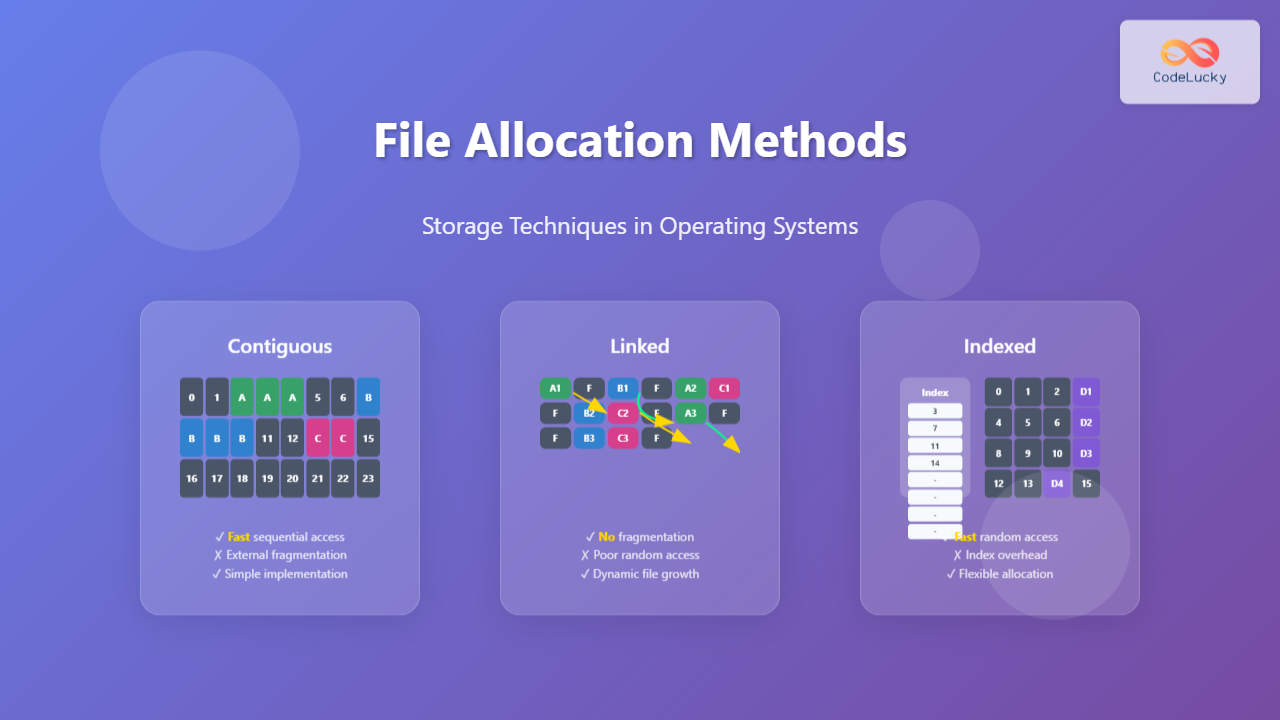
File allocation methods are fundamental techniques used by operating systems to organize and store files on storage devices. These methods determine how files are physically stored on disk, how space is allocated, and how the system tracks file locations. Understanding these methods is crucial for system administrators, developers, and anyone working with file systems.
The three primary file allocation methods are:
- Contiguous Allocation – Files stored in consecutive disk blocks
- Linked Allocation – Files stored as linked lists of disk blocks
- Indexed Allocation – Files tracked through index blocks containing pointers
Contiguous File Allocation
Contiguous allocation is the simplest file allocation method where each file occupies a set of contiguous blocks on the disk. This approach is similar to how arrays are stored in memory – all elements are placed sequentially.
How Contiguous Allocation Works
In contiguous allocation, when a file is created, the operating system allocates a continuous sequence of blocks. The file allocation table stores only two pieces of information for each file:
- Starting block address – The first block where the file begins
- Length – Number of consecutive blocks the file occupies

Advantages of Contiguous Allocation
- Simple Implementation – Easy to implement and manage
- Fast Sequential Access – Excellent performance for sequential file operations
- Minimal Metadata – Only requires start address and length
- Good Random Access – Direct calculation of block addresses
Disadvantages of Contiguous Allocation
- External Fragmentation – Creates unusable gaps between allocated blocks
- File Size Limitation – Difficult to extend files beyond initial allocation
- Disk Compaction Required – Periodic reorganization needed to reclaim fragmented space
- Allocation Challenges – Finding suitable contiguous space becomes difficult
Practical Example: Contiguous Allocation
Consider a disk with 20 blocks (0-19) and three files:
File A: "config.txt" - 3 blocks starting at block 2
File B: "data.bin" - 5 blocks starting at block 7
File C: "log.txt" - 2 blocks starting at block 15

Directory Structure:
config.txt → Start: 2, Length: 3
data.bin  → Start: 7, Length: 5
log.txt   → Start: 15, Length: 2

Block Allocation:
[0][1][A][A][A][5][6][B][B][B][B][B][12][13][14][C][C][17][18][19]
Free: 0,1,5,6,12,13,14,17,18,19
Linked File Allocation
Linked allocation eliminates the external fragmentation problem by storing files as linked lists of disk blocks. Each block contains data and a pointer to the next block in the sequence.
How Linked Allocation Works
In linked allocation, each file is a linked list of disk blocks scattered throughout the disk. The directory contains a pointer to the first block of each file, and each block contains a pointer to the next block.

File Allocation Table (FAT)
Many systems implement linked allocation using a File Allocation Table (FAT), which centralizes all the link information in a separate table rather than storing pointers in each block.
FAT Example:
Block 0: FREE
Block 1: FREE
Block 2: 7      (points to block 7)
Block 3: 12     (points to block 12)
Block 4: FREE
Block 5: 3      (points to block 3)
Block 6: FREE
Block 7: EOF    (end of file)
Block 8: FREE
...

File "document.txt" starts at block 2:
Block 2 → Block 7 → EOF
File "image.jpg" starts at block 5:
Block 5 → Block 3 → Block 12 → EOF
Advantages of Linked Allocation
- No External Fragmentation – Can utilize any free block on disk
- Dynamic File Size – Files can grow dynamically without pre-allocation
- Efficient Space Utilization – No wasted space due to fragmentation
- Simple File Extension – Easy to add blocks to existing files
Disadvantages of Linked Allocation
- Poor Random Access – Must traverse the chain to reach specific blocks
- Storage Overhead – Each block requires space for pointer storage
- Reliability Issues – Single pointer corruption can lose entire file portions
- Sequential Access Overhead – Multiple disk seeks required for file traversal
Practical Example: Linked Allocation
Here’s how three files might be stored using linked allocation:
Disk Blocks (0-15):
Block 0: [Data A1] → 4
Block 1: [Data C1] → 8
Block 2: [FREE]
Block 3: [Data B1] → 9
Block 4: [Data A2] → 11
Block 5: [FREE]
Block 6: [Data B3] → EOF
Block 7: [FREE]
Block 8: [Data C2] → 14
Block 9: [Data B2] → 6
Block 10: [FREE]
Block 11: [Data A3] → EOF
Block 12: [FREE]
Block 13: [FREE]
Block 14: [Data C3] → EOF
Block 15: [FREE]

Directory:
file_a.txt → Start: Block 0
file_b.txt → Start: Block 3
file_c.txt → Start: Block 1

File Chains:
file_a.txt: 0 → 4 → 11 → EOF
file_b.txt: 3 → 9 → 6 → EOF
file_c.txt: 1 → 8 → 14 → EOF
Indexed File Allocation
Indexed allocation addresses the random access limitations of linked allocation by maintaining an index block for each file. This index block contains pointers to all the data blocks belonging to the file.
How Indexed Allocation Works
Each file has an associated index block that contains an array of disk block addresses. The directory entry points to the index block, and the index block points to the actual data blocks.

Multi-Level Indexed Allocation
For large files, a single index block might not be sufficient. Multi-level indexing uses a hierarchical approach with primary, secondary, and tertiary index blocks.

Combined Indexed Allocation (UNIX inode)
UNIX file systems use a sophisticated approach combining direct, indirect, double indirect, and triple indirect pointers in the inode structure:
UNIX inode structure:
Direct pointers (0-9):     Point directly to data blocks
Single indirect (10):      Points to block containing 256 pointers
Double indirect (11):      Points to block containing 256 single indirect pointers
Triple indirect (12):      Points to block containing 256 double indirect pointers

Maximum file size calculation:
Direct: 10 × 4KB = 40KB
Single indirect: 256 × 4KB = 1MB
Double indirect: 256 × 256 × 4KB = 256MB
Triple indirect: 256 × 256 × 256 × 4KB = 64GB
Advantages of Indexed Allocation
- Excellent Random Access – Direct access to any block via index
- No External Fragmentation – Blocks can be allocated anywhere
- Dynamic File Growth – Files can expand up to index capacity
- Efficient Directory Operations – Quick file size and block count calculations
Disadvantages of Indexed Allocation
- Index Block Overhead – Additional space required for index storage
- Small File Inefficiency – Overhead significant for small files
- Index Block Management – Complex allocation and deallocation procedures
- Multiple Disk Accesses – Requires reading index before accessing data
Practical Example: Indexed Allocation
Consider a file system using indexed allocation with block size of 1KB:
File: "database.dat" (5KB file)
Index Block: 15

Index Block 15 Contents:
[0]: 23  → database.dat block 1
[1]: 7   → database.dat block 2
[2]: 45  → database.dat block 3
[3]: 12  → database.dat block 4
[4]: 31  → database.dat block 5
[5]: NULL
[6]: NULL
...
[255]: NULL

Directory Entry:
database.dat → Index Block: 15, Size: 5KB

To read byte 3500 of database.dat:
1. Block number = 3500 / 1024 = 3 (4th block, index 3)
2. Check index block 15, position 3 → Block 12
3. Offset within block = 3500 % 1024 = 476
4. Read byte 476 from block 12
Performance Comparison
Each allocation method has distinct performance characteristics depending on the use case:
| Aspect | Contiguous | Linked | Indexed |
|---|---|---|---|
| Sequential Access | Excellent | Good | Good |
| Random Access | Excellent | Poor | Excellent |
| Space Utilization | Poor (fragmentation) | Excellent | Good |
| File Growth | Difficult | Easy | Easy |
| Metadata Overhead | Minimal | Medium | High |
| Implementation Complexity | Simple | Medium | Complex |
Real-World Applications
Contiguous Allocation in Practice
- ISO Images – CD/DVD file systems often use contiguous allocation
- Database Files – Some databases pre-allocate contiguous space
- Embedded Systems – Simple file systems in resource-constrained environments
Linked Allocation in Practice
- FAT File Systems – FAT12, FAT16, FAT32 use linked allocation via FAT
- Legacy Systems – Older mainframe and minicomputer systems
- Simple File Systems – Educational and minimal implementations
Indexed Allocation in Practice
- UNIX/Linux – ext2, ext3, ext4 use inode-based indexed allocation
- Windows NTFS – Master File Table (MFT) with indexed approach
- Modern File Systems – ZFS, Btrfs use sophisticated indexed structures
Optimization Techniques
Hybrid Approaches
Modern file systems often combine multiple allocation methods:
- Small files – Store directly in directory entries or inode
- Medium files – Use direct pointers for immediate access
- Large files – Employ indirect pointers and extent-based allocation
Extent-Based Allocation
Instead of tracking individual blocks, extents track contiguous ranges:
Extent Structure:
- Starting block address
- Number of contiguous blocks
- Logical file offset

Example:
File "video.mp4" extents:
Extent 1: Logical 0-99, Physical blocks 500-599
Extent 2: Logical 100-199, Physical blocks 750-849
Extent 3: Logical 200-299, Physical blocks 200-299
Block Allocation Strategies
- First Fit – Use first available space large enough
- Best Fit – Use smallest available space that fits
- Worst Fit – Use largest available space
- Next Fit – Continue search from last allocation point
Implementation Considerations
Block Size Selection
Block size affects performance and space utilization:
- Small blocks (1-2KB) – Better space utilization, higher metadata overhead
- Large blocks (8-64KB) – Better I/O performance, internal fragmentation
- Variable block sizes – Optimal but complex to manage
Free Space Management
Each allocation method requires different free space tracking:
- Contiguous – Track free extents with start and size
- Linked – Maintain free block list or bitmap
- Indexed – Track both free data blocks and free index blocks

Error Handling and Recovery
Contiguous Allocation Recovery
- Directory corruption affects only metadata
- Data blocks remain intact and recoverable
- Simple consistency checks possible
Linked Allocation Recovery
- Pointer corruption can lose file segments
- Cross-linked files require careful resolution
- FAT backup copies help with recovery
Indexed Allocation Recovery
- Index block corruption affects entire file
- Multiple index levels provide redundancy
- Consistency checking tools (fsck) required
Future Trends and Advanced Concepts
Copy-on-Write (COW)
Modern file systems implement COW for efficiency:
- Share blocks between files until modification
- Create new blocks only when changes occur
- Enables efficient snapshots and deduplication
Log-Structured File Systems
Write all changes sequentially to log:
- Eliminates seek time for writes
- Requires garbage collection for space reclamation
- Popular in SSDs and flash storage
Object Storage
Alternative to traditional block-based allocation:
- Files stored as objects with metadata
- Flat namespace instead of hierarchical
- Scalable for cloud and distributed systems
Understanding file allocation methods is essential for system administrators, developers, and anyone working with file systems. Each method offers distinct advantages and trade-offs, making them suitable for different use cases and environments. Modern file systems often combine multiple approaches to optimize performance, reliability, and space utilization based on specific requirements and workload patterns.
Related Posts
Memory Allocation Techniques: Contiguous vs Non-contiguous Management Strategies
Memory allocation is a fundamental aspect of operating system design that determines how programs and data are stored and accessed...

File System in Operating System: Complete Guide to Structure and Organization
Introduction to File Systems A file system is a fundamental component of any operating system that provides a structured way...
Directory Structure: Single-level, Two-level, and Tree Structure in Operating Systems
Understanding Directory Structures in Operating Systems Directory structures are fundamental components of file systems that organize and manage files in...
File System Types: FAT32, NTFS, ext4 and Modern Linux Filesystems Explained
Understanding File Systems: The Foundation of Data Storage A file system is the method and data structure that an operating...

C++ How To: Implement a Linked List
Linked lists are fundamental data structures in computer science, offering dynamic memory allocation and efficient insertion and deletion operations. In...
Segmentation in OS: Memory Management Through Logical Address Space Division
Introduction to Segmentation in Operating Systems Segmentation is a fundamental memory management technique in operating systems that divides the logical...

C File Handling: Creating, Writing, and Reading Files
File handling is a crucial aspect of programming in C, allowing developers to interact with external data sources, store information...
File System Implementation: Boot Block, Super Block and Inodes Explained
Understanding File System Implementation File system implementation is a critical component of operating systems that manages how data is stored,...

C Linked Lists: Implementing a Basic Data Structure
Linked lists are fundamental data structures in computer science, offering a dynamic and flexible way to store and manipulate data....
Storage Management: Complete Guide to Primary, Secondary and Tertiary Storage Systems
Storage management is one of the most critical components of an operating system, responsible for efficiently organizing, accessing, and maintaining...
Log-structured File System: Sequential Write Optimization for High-Performance Storage
Log-structured File Systems (LFS) represent a revolutionary approach to data storage that fundamentally changes how operating systems handle file operations....

Disk Scheduling Algorithms: FCFS, SSTF, SCAN, C-SCAN – Complete Implementation Guide
Disk scheduling algorithms are fundamental components of operating systems that determine the order in which disk I/O requests are processed....





