
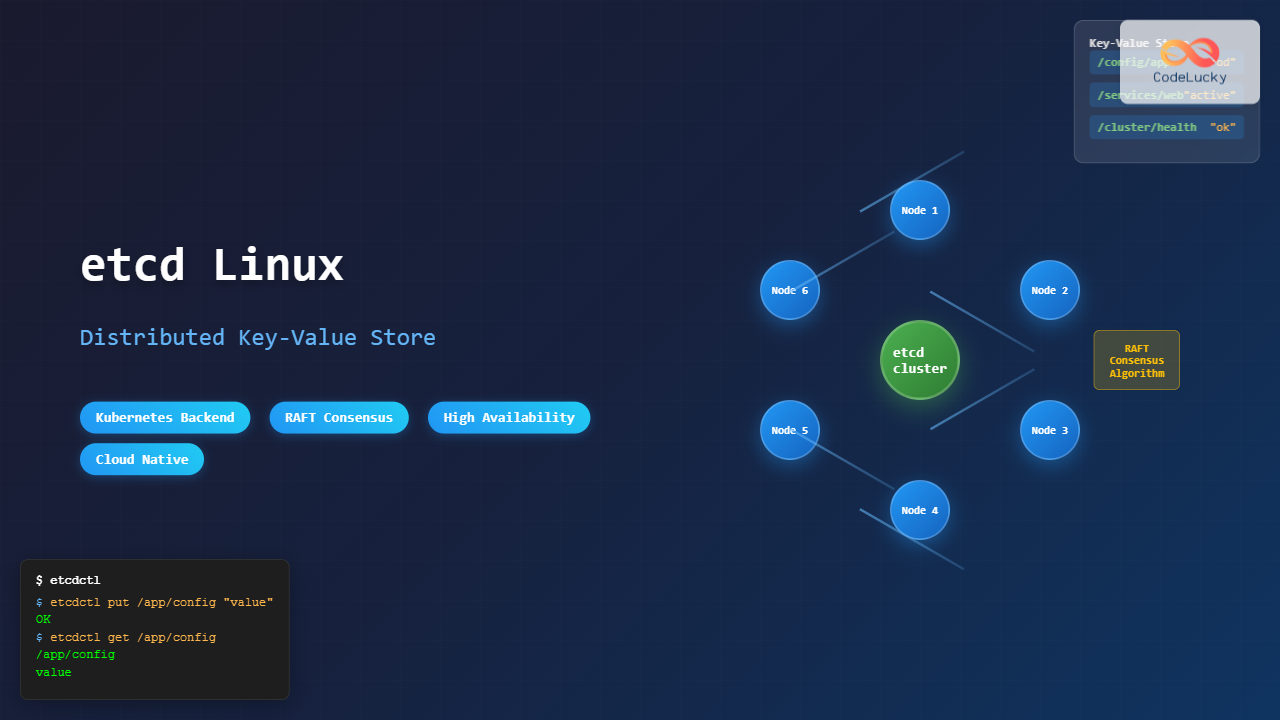
etcd is a distributed, reliable key-value store for the most critical data of a distributed system. Originally developed by CoreOS and now maintained by the Cloud Native Computing Foundation (CNCF), etcd serves as the backbone for many modern distributed applications, most notably Kubernetes.
What is etcd?
etcd (pronounced “et-see-dee”) is a strongly consistent, distributed key-value store that provides a reliable way to store data across a cluster of machines. It gracefully handles network partitions and can survive hardware failure, making it ideal for storing configuration data, service discovery information, and coordination data for distributed systems.
Key Features of etcd
- Strong Consistency: Uses the Raft consensus algorithm to ensure data consistency across all nodes
- High Availability: Tolerates failures and maintains service availability
- Secure: Supports SSL client certificate authentication
- Fast: Benchmarked at 10,000 writes per second
- Simple API: RESTful HTTP+JSON API for easy integration
- Watch Support: Real-time monitoring of key changes
Installing etcd on Linux
There are several ways to install etcd on Linux systems. Here are the most common methods:
Method 1: Binary Installation
# Download the latest etcd release
ETCD_VER=v3.5.9
GITHUB_URL=https://github.com/etcd-io/etcd/releases/download
DOWNLOAD_URL=${GITHUB_URL}

# Create directory and download
mkdir -p /tmp/etcd-download
cd /tmp/etcd-download

# Download and extract
curl -L ${DOWNLOAD_URL}/${ETCD_VER}/etcd-${ETCD_VER}-linux-amd64.tar.gz -o etcd-${ETCD_VER}-linux-amd64.tar.gz
tar xzf etcd-${ETCD_VER}-linux-amd64.tar.gz

# Move binaries to system path
sudo mv etcd-${ETCD_VER}-linux-amd64/etcd* /usr/local/bin/

# Verify installation
etcd --version
Expected Output:
etcd Version: 3.5.9
Git SHA: 54ba95891
Go Version: go1.19.9
Go OS/Arch: linux/amd64
Method 2: Package Manager Installation
Ubuntu/Debian:
sudo apt update
sudo apt install etcd-server etcd-client
CentOS/RHEL/Fedora:
# CentOS/RHEL
sudo yum install etcd

# Fedora
sudo dnf install etcd
Basic etcd Configuration
Before starting etcd, it’s important to understand the basic configuration options:
Single Node Setup
For development or testing purposes, you can run a single-node etcd cluster:
# Start etcd with basic configuration
etcd \
  --name etcd-node-1 \
  --data-dir /var/lib/etcd \
  --listen-client-urls http://0.0.0.0:2379 \
  --advertise-client-urls http://localhost:2379 \
  --listen-peer-urls http://0.0.0.0:2380 \
  --initial-advertise-peer-urls http://localhost:2380 \
  --initial-cluster-token etcd-cluster-1 \
  --initial-cluster etcd-node-1=http://localhost:2380 \
  --initial-cluster-state new
Creating a systemd Service
For production environments, create a systemd service file:
# Create the service file
sudo nano /etc/systemd/system/etcd.service
Add the following content:
[Unit]
Description=etcd distributed reliable key-value store
Documentation=https://github.com/etcd-io/etcd
Wants=network-online.target
After=network-online.target
Conflicts=etcd.service

[Service]
Type=notify
Restart=always
RestartSec=5s
ExecStart=/usr/local/bin/etcd \
  --name etcd-node-1 \
  --data-dir /var/lib/etcd \
  --listen-client-urls http://0.0.0.0:2379 \
  --advertise-client-urls http://localhost:2379 \
  --listen-peer-urls http://0.0.0.0:2380 \
  --initial-advertise-peer-urls http://localhost:2380 \
  --initial-cluster-token etcd-cluster-1 \
  --initial-cluster etcd-node-1=http://localhost:2380 \
  --initial-cluster-state new

[Install]
WantedBy=multi-user.target
Enable and start the service:
# Create data directory
sudo mkdir -p /var/lib/etcd

# Reload systemd and start etcd
sudo systemctl daemon-reload
sudo systemctl enable etcd
sudo systemctl start etcd

# Check status
sudo systemctl status etcd
Working with etcd: Basic Operations
etcd provides both a command-line client (etcdctl) and HTTP API for interacting with the store.
Setting Up etcdctl
First, configure the etcdctl environment:
# Set API version (v3 is recommended)
export ETCDCTL_API=3

# Set endpoints
export ETCDCTL_ENDPOINTS=http://localhost:2379
Basic Key-Value Operations
1. Putting Values:
# Store a simple key-value pair
etcdctl put mykey "Hello, etcd!"

# Store with TTL (time to live)
etcdctl put tempkey "temporary value" --lease=$(etcdctl lease grant 60 | cut -d' ' -f2)
Expected Output:
OK2. Getting Values:
# Get a specific key
etcdctl get mykey

# Get all keys with a prefix
etcdctl get /app/ --prefix

# Get keys in a range
etcdctl get key1 key5
Expected Output:
mykey
Hello, etcd!
3. Deleting Keys:
# Delete a specific key
etcdctl del mykey

# Delete keys with prefix
etcdctl del /app/ --prefix
Advanced etcd Operations
Working with Directories and Hierarchical Keys
etcd supports hierarchical key structures, making it easy to organize data:
# Store configuration data in a hierarchy
etcdctl put /app/database/host "localhost"
etcdctl put /app/database/port "5432"
etcdctl put /app/database/name "myapp"
etcdctl put /app/cache/redis/host "redis-server"
etcdctl put /app/cache/redis/port "6379"

# Retrieve all database configuration
etcdctl get /app/database/ --prefix

# Get keys only (without values)
etcdctl get /app/ --prefix --keys-only
Expected Output:
/app/database/host
localhost
/app/database/name
myapp
/app/database/port
5432
Watching for Changes
One of etcd’s most powerful features is the ability to watch for changes:
# Watch a specific key for changes
etcdctl watch mykey

# Watch all keys with a prefix
etcdctl watch /app/ --prefix

# Watch and get initial values
etcdctl watch /app/config --prefix --rev=0
In another terminal, make changes to see the watch in action:
# This will trigger the watch
etcdctl put /app/config/debug "true"
Transactions
etcd supports multi-key transactions for atomic operations:
# Conditional transaction
etcdctl txn <<EOF
compare:
value("/app/counter") = "5"

success:
put /app/counter "6"
put /app/status "updated"

failure:
put /app/status "failed"
EOF
Leases and TTL
Leases provide a way to expire keys automatically:
# Create a lease with 30-second TTL
LEASE_ID=$(etcdctl lease grant 30 | cut -d' ' -f2)

# Attach key to lease
etcdctl put session-key "active-session" --lease=$LEASE_ID

# Keep lease alive (run in background)
etcdctl lease keep-alive $LEASE_ID &

# Check lease information
etcdctl lease timetolive $LEASE_ID

# Revoke lease manually
etcdctl lease revoke $LEASE_ID
Multi-Node etcd Cluster Setup
For production environments, you’ll want to run a multi-node etcd cluster for high availability:
Three-Node Cluster Configuration
Node 1 (etcd-1):
etcd \
  --name etcd-1 \
  --data-dir /var/lib/etcd \
  --listen-client-urls http://10.0.0.1:2379 \
  --advertise-client-urls http://10.0.0.1:2379 \
  --listen-peer-urls http://10.0.0.1:2380 \
  --initial-advertise-peer-urls http://10.0.0.1:2380 \
  --initial-cluster-token etcd-cluster \
  --initial-cluster etcd-1=http://10.0.0.1:2380,etcd-2=http://10.0.0.2:2380,etcd-3=http://10.0.0.3:2380 \
  --initial-cluster-state new
Node 2 (etcd-2):
etcd \
  --name etcd-2 \
  --data-dir /var/lib/etcd \
  --listen-client-urls http://10.0.0.2:2379 \
  --advertise-client-urls http://10.0.0.2:2379 \
  --listen-peer-urls http://10.0.0.2:2380 \
  --initial-advertise-peer-urls http://10.0.0.2:2380 \
  --initial-cluster-token etcd-cluster \
  --initial-cluster etcd-1=http://10.0.0.1:2380,etcd-2=http://10.0.0.2:2380,etcd-3=http://10.0.0.3:2380 \
  --initial-cluster-state new
Node 3 (etcd-3):
etcd \
  --name etcd-3 \
  --data-dir /var/lib/etcd \
  --listen-client-urls http://10.0.0.3:2379 \
  --advertise-client-urls http://10.0.0.3:2379 \
  --listen-peer-urls http://10.0.0.3:2380 \
  --initial-advertise-peer-urls http://10.0.0.3:2380 \
  --initial-cluster-token etcd-cluster \
  --initial-cluster etcd-1=http://10.0.0.1:2380,etcd-2=http://10.0.0.2:2380,etcd-3=http://10.0.0.3:2380 \
  --initial-cluster-state new
Cluster Health and Status
Monitor your cluster health:
# Check cluster health
etcdctl --endpoints=http://10.0.0.1:2379,http://10.0.0.2:2379,http://10.0.0.3:2379 endpoint health

# List cluster members
etcdctl member list

# Check cluster status
etcdctl endpoint status --write-out=table
Expected Output:
+----------------------------+------------------+---------+---------+-----------+------------+-----------+------------+--------------------+--------+
|          ENDPOINT          |        ID        | VERSION | DB SIZE | IS LEADER | IS LEARNER | RAFT TERM | RAFT INDEX | RAFT APPLIED INDEX | ERRORS |
+----------------------------+------------------+---------+---------+-----------+------------+-----------+------------+--------------------+--------+
| http://10.0.0.1:2379      | 8211f1d0f64f3269 |   3.5.9 |   20 kB |     false |      false |         2 |          8 |                  8 |        |
| http://10.0.0.2:2379      | 91bc3c398fb3c146 |   3.5.9 |   20 kB |      true |      false |         2 |          8 |                  8 |        |
| http://10.0.0.3:2379      | fd422379fda50e48 |   3.5.9 |   20 kB |     false |      false |         2 |          8 |                  8 |        |
+----------------------------+------------------+---------+---------+-----------+------------+-----------+------------+--------------------+--------+
etcd Security Configuration
For production deployments, security is crucial. etcd supports both transport security (TLS) and authentication.
Setting Up TLS
1. Generate Certificates:
# Create CA key
openssl genrsa -out ca-key.pem 4096

# Create CA certificate
openssl req -new -x509 -key ca-key.pem -out ca.pem -days 365 \
  -subj "/C=US/ST=CA/L=San Francisco/O=etcd/CN=etcd-ca"

# Create server key
openssl genrsa -out server-key.pem 4096

# Create server certificate signing request
openssl req -new -key server-key.pem -out server.csr \
  -subj "/C=US/ST=CA/L=San Francisco/O=etcd/CN=localhost"

# Sign server certificate
openssl x509 -req -in server.csr -CA ca.pem -CAkey ca-key.pem \
  -CAcreateserial -out server.pem -days 365
2. Start etcd with TLS:
etcd \
  --name etcd-secure \
  --data-dir /var/lib/etcd-secure \
  --cert-file=server.pem \
  --key-file=server-key.pem \
  --trusted-ca-file=ca.pem \
  --client-cert-auth \
  --listen-client-urls https://0.0.0.0:2379 \
  --advertise-client-urls https://localhost:2379
User Authentication
# Enable authentication
etcdctl auth enable

# Create root user
etcdctl user add root

# Create regular user
etcdctl user add appuser

# Create role
etcdctl role add approle

# Grant permissions to role
etcdctl role grant-permission approle readwrite /app/

# Grant role to user
etcdctl user grant-role appuser approle

# Authenticate as user
etcdctl --user=appuser:password put /app/config "value"
etcd Performance Tuning
Configuration Optimization
Key parameters for performance tuning:
# Optimized etcd configuration
etcd \
  --name etcd-optimized \
  --data-dir /var/lib/etcd \
  --listen-client-urls http://0.0.0.0:2379 \
  --advertise-client-urls http://localhost:2379 \
  --heartbeat-interval 100 \
  --election-timeout 1000 \
  --snapshot-count 10000 \
  --max-snapshots 3 \
  --max-wals 3 \
  --quota-backend-bytes 8589934592
Monitoring and Metrics
etcd exposes metrics in Prometheus format:
# Get etcd metrics
curl http://localhost:2379/metrics

# Key metrics to monitor:
# - etcd_server_is_leader
# - etcd_server_leader_changes_seen_total
# - etcd_disk_wal_fsync_duration_seconds
# - etcd_network_peer_round_trip_time_seconds
Common etcd Use Cases
Service Discovery
# Register a service
etcdctl put /services/web-app/instance-1 '{"host":"10.0.0.10","port":8080,"health":"up"}'
etcdctl put /services/web-app/instance-2 '{"host":"10.0.0.11","port":8080,"health":"up"}'

# Discover services
etcdctl get /services/web-app/ --prefix

# Watch for service changes
etcdctl watch /services/ --prefix
Configuration Management
# Store application configuration
etcdctl put /config/app/database/url "postgresql://localhost:5432/myapp"
etcdctl put /config/app/redis/url "redis://localhost:6379"
etcdctl put /config/app/debug "false"

# Retrieve configuration as JSON
etcdctl get /config/app/ --prefix --write-out=json
Distributed Locking
# Create a lock using leases
LEASE_ID=$(etcdctl lease grant 30 | cut -d' ' -f2)

# Try to acquire lock
etcdctl txn <<EOF
compare:
create("/locks/resource-1") = "0"

success:
put /locks/resource-1 "locked-by-process-1" --lease=$LEASE_ID

failure:
get /locks/resource-1
EOF
Backup and Recovery
Creating Backups
# Create snapshot backup
etcdctl snapshot save backup.db

# Verify snapshot
etcdctl snapshot status backup.db
Expected Output:
{"hash":924741963,"revision":12,"totalKey":4,"totalSize":20480}Restoring from Backup
# Stop etcd service
sudo systemctl stop etcd

# Remove old data directory
sudo rm -rf /var/lib/etcd/*

# Restore from snapshot
etcdctl snapshot restore backup.db \
  --data-dir /var/lib/etcd \
  --name etcd-restore \
  --initial-cluster etcd-restore=http://localhost:2380 \
  --initial-advertise-peer-urls http://localhost:2380

# Start etcd service
sudo systemctl start etcd
Troubleshooting Common Issues
Connection Issues
# Check if etcd is running
sudo systemctl status etcd

# Test connectivity
etcdctl endpoint health

# Check etcd logs
sudo journalctl -u etcd -f
Cluster Split-Brain Prevention
Always use odd numbers of nodes (3, 5, 7) to prevent split-brain scenarios in your cluster configuration.
Performance Issues
# Check disk I/O performance
etcdctl check perf

# Monitor slow operations
etcdctl alarm list
Best Practices for etcd
- Use SSDs: etcd is I/O intensive and benefits significantly from fast storage
- Monitor Disk Space: Set appropriate quotas to prevent out-of-space conditions
- Regular Backups: Automate snapshot creation for disaster recovery
- Network Latency: Keep cluster nodes geographically close to minimize latency
- Resource Allocation: Dedicate sufficient CPU and memory resources
- Security: Always use TLS in production environments
- Monitoring: Implement comprehensive monitoring and alerting
Integration with Other Tools
Kubernetes Integration
etcd is the default backend for Kubernetes. When setting up a Kubernetes cluster, etcd configuration is crucial:
# Kubernetes etcd configuration example
apiVersion: v1
kind: Pod
metadata:
  name: etcd
spec:
  containers:
  - name: etcd
    image: k8s.gcr.io/etcd:3.5.9-0
    command:
    - etcd
    - --data-dir=/var/lib/etcd
    - --advertise-client-urls=https://10.0.0.1:2379
    - --listen-client-urls=https://0.0.0.0:2379
Conclusion
etcd is a powerful and reliable distributed key-value store that serves as the foundation for many cloud-native applications. Its strong consistency guarantees, high availability, and simple API make it an excellent choice for storing critical configuration data, service discovery information, and coordination data in distributed systems.
By following the practices and examples outlined in this guide, you’ll be able to successfully deploy, configure, and manage etcd clusters in your Linux environments. Whether you’re running a single-node development setup or a multi-node production cluster, etcd provides the reliability and performance needed for modern distributed applications.
Remember to always prioritize security, monitoring, and backup strategies when deploying etcd in production environments. With proper configuration and maintenance, etcd will provide a solid foundation for your distributed system architecture.
Related Posts

Zookeeper Linux: Complete Guide to Centralized Service Configuration Management
Apache Zookeeper is a centralized service for maintaining configuration information, naming, providing distributed synchronization, and providing group services in distributed...

Distributed File System: Complete Guide to NFS, CIFS and Network Storage Solutions
A Distributed File System (DFS) allows multiple computers to access and share files over a network as if they were...

launchd Linux: Understanding the Service Management Framework for System Administrators
The launchd service management framework has become an essential tool for Linux system administrators who need robust process and service...

Kubernetes Linux: Complete Guide to Container Orchestration Platform
Kubernetes has revolutionized how we deploy, manage, and scale containerized applications on Linux systems. As the leading container orchestration platform,...

Redis Linux: Complete Guide to In-Memory Data Structure Store Installation and Commands
Redis (Remote Dictionary Server) is a powerful, open-source, in-memory data structure store that functions as a database, cache, and message...

containerd Linux: Complete Guide to Industry-Standard Container Runtime
Containerd has emerged as the industry-standard container runtime, serving as the foundation for modern containerization platforms like Docker and Kubernetes....

serf Linux: Complete Guide to Decentralized Cluster Membership and Service Discovery
Serf is a powerful decentralized solution for cluster membership, failure detection, and orchestration that runs on Linux systems. Unlike traditional...

C++ Unordered Containers: Hash-Based Data Structures
In the world of C++ programming, efficiency and performance are paramount. When it comes to storing and retrieving data quickly,...

systemd Linux: Complete Guide to System and Service Manager
systemd is a powerful system and service manager that has become the default init system for most modern Linux distributions....

Java LinkedHashMap: Ordered Key-Value Pairs
Java's LinkedHashMap is a powerful and versatile data structure that combines the best features of HashMap and LinkedList. It provides...

Marathon Linux: Complete Guide to Container Orchestration Platform
Marathon is a powerful container orchestration platform built on top of Apache Mesos that enables you to deploy, manage, and...
Storage Management: Complete Guide to Primary, Secondary and Tertiary Storage Systems
Storage management is one of the most critical components of an operating system, responsible for efficiently organizing, accessing, and maintaining...





