Email security is an essential concern in the digital age, especially with rising threats from spam and phishing attacks. This comprehensive article explores effective methods to protect your email accounts, practical programming examples, and how to use technology to keep your communications safe and secure.
Understanding Email Security Threats
To effectively protect against email threats, one must first understand what spam and phishing entail:
- Spam refers to unsolicited, often irrelevant or malicious bulk emails that flood inboxes, wasting resources and potentially carrying harmful links or attachments.
- Phishing attacks impersonate trusted entities to trick users into revealing sensitive information like passwords, credit card numbers, or other personal data.
Common Indicators of Spam and Phishing
Recognizing the signs of spam and phishing attempts is vital. Typical indicators include:
- Suspicious sender addresses with misspellings or unusual domains
- Urgent or threatening language compelling immediate action
- Links or attachments urging downloads or credential input
- Generic greetings instead of personalized names

Technical Strategies to Protect Against Spam
Blocking spam efficiently involves layered technical controls employed at multiple points:
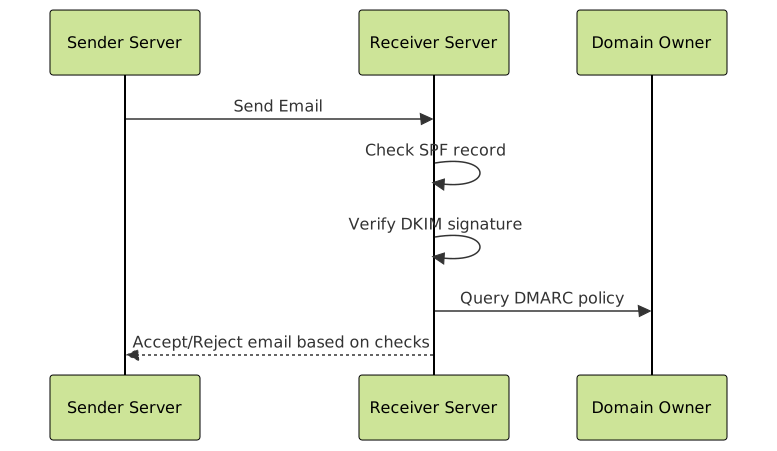
- SPF (Sender Policy Framework): Defines which mail servers are authorized to send emails on behalf of a domain.
- DKIM (DomainKeys Identified Mail): Uses cryptographic signatures to verify sender authenticity and prevent tampering.
- DMARC (Domain-based Message Authentication, Reporting & Conformance): Aligns SPF and DKIM results with domain policies to instruct receivers how to handle suspicious emails.
Practical Programming Example: Verifying SPF Record Using Python
Below is an example of how to programmatically check the SPF record of an email sender domain to help filter spam emails:
import dns.resolver

def check_spf(domain):
    try:
        answers = dns.resolver.resolve(domain, 'TXT')
        for rdata in answers:
            for txt_string in rdata.strings:
                if b"v=spf1" in txt_string:
                    return txt_string.decode()
        return "No SPF record found."
    except Exception as e:
        return f"Error checking SPF: {e}"

# Example usage
domain = "example.com"
print(f"SPF record for {domain}: {check_spf(domain)}")
How to Prevent Phishing Attacks
Preventing phishing requires a combination of user awareness and technology:
- Educate users about recognizing phishing emails and hyperlinks.
- Use browser-based tools and email clients that highlight suspicious links.
- Implement multifactor authentication (MFA) to reduce impact if credentials are stolen.
- Deploy email filtering solutions that use machine learning to detect phishing attempts based on email content, sender reputation, and historical behavior.

Interactive Example: Phishing Link Detection Concept
An interactive concept in JavaScript to detect suspicious URLs containing common phishing keywords:
// Simplified phishing link checker
function isPhishingURL(url) {
    const phishingKeywords = ["login", "verify", "secure", "bank", "update"];
    url = url.toLowerCase();
    for (const word of phishingKeywords) {
        if (url.includes(word)) {
            return true;
        }
    }
    return false;
}

// Example usage
const testUrls = [
    "http://example.com/login",
    "https://secure-banking.com",
    "http://normalwebsite.com/page"
];

testUrls.forEach(url => {
    console.log(url + ": " + (isPhishingURL(url) ? "Potential Phishing" : "Safe"));
});
Best Practices for Users and Developers
- For users: Always verify the sender, avoid clicking suspicious links, and use strong, unique passwords.
- For developers: Implement SPF, DKIM, DMARC, use email validation libraries, and build user education into apps.
- Keep security software up to date and regularly audit email server logs for suspicious activities.
Conclusion
Combining technical email authentication methods, user education, and proactive phishing detection programs creates a robust defense against spam and phishing threats. By integrating these strategies, both individuals and organizations can safeguard sensitive information and maintain secure email communications.