
Getting your website online involves two fundamental steps: registering a domain name and setting up web hosting. This comprehensive guide will walk you through both processes, explaining everything you need to know as a beginner.
What is Domain Registration?
A domain name is your website’s address on the internet (like codelucky.com). Domain registration is the process of purchasing and reserving a unique domain name for your website. Think of it as buying a plot of land in the digital world.

Key Components of a Domain Name
- Subdomain: www (optional)
- Second-level domain: codelucky (your chosen name)
- Top-level domain (TLD): .com, .org, .net, etc.
Understanding Web Hosting
Web hosting is a service that provides the technology and services needed for your website to be viewed on the Internet. Your website files are stored on special computers called servers.

Types of Web Hosting
- Shared Hosting: Multiple websites share one server (most affordable)
- VPS Hosting: Virtual private server with dedicated resources
- Dedicated Hosting: Entire server dedicated to your website
- Cloud Hosting: Resources distributed across multiple servers
Step-by-Step Domain Registration Process
Step 1: Choose Your Domain Name
Your domain name should be:
- Easy to remember and type
- Related to your business or website purpose
- Short (ideally under 15 characters)
- Free of hyphens and numbers when possible
Step 2: Check Domain Availability
Use domain registrar tools to check if your desired domain is available. Popular registrars include:
- GoDaddy
- Namecheap
- Google Domains
- Domain.com
Step 3: Select Domain Extension
| Extension | Purpose | Annual Cost |
|---|---|---|
| .com | Commercial/General | $10-15 |
| .org | Organizations | $10-15 |
| .net | Networks/Tech | $10-15 |
| .io | Tech/Startups | $35-50 |
Step 4: Complete Registration
Fill out the registration form with accurate information:
- Personal/business contact details
- Administrative contact information
- Technical contact information
- Billing information
Setting Up Web Hosting
Step 1: Choose a Hosting Provider
Consider these factors when selecting a host:
- Uptime: Look for 99.9% or higher
- Speed: Server response times under 200ms
- Support: 24/7 customer service
- Scalability: Room to grow
- Security: SSL certificates and backups
Step 2: Select Hosting Plan
For beginners, shared hosting is typically sufficient:
- Disk Space: 10GB+ for small websites
- Bandwidth: Unlimited or 100GB+
- Email Accounts: Multiple email addresses
- Databases: MySQL support
Step 3: Purchase Hosting
Most hosting providers offer:
- Monthly payment options
- Annual discounts (often 50% off)
- Free domain for first year
- Money-back guarantee
Connecting Domain and Hosting
Once you have both domain and hosting, you need to connect them through DNS configuration.
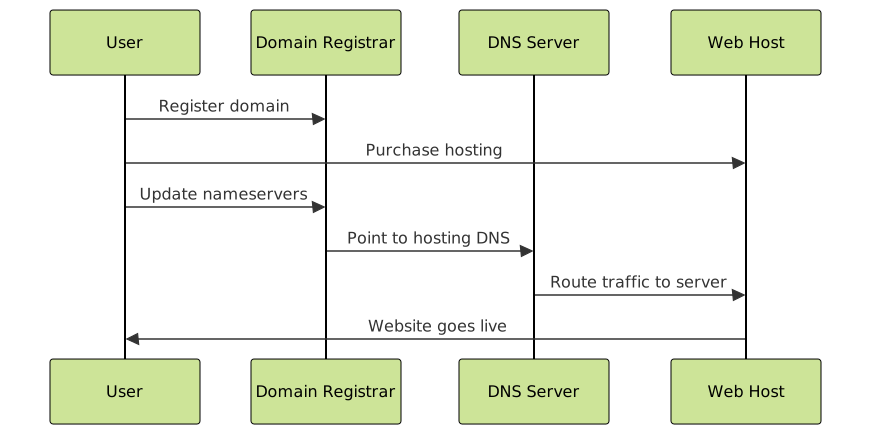
Method 1: Update Nameservers
- Get nameservers from your hosting provider (e.g., ns1.hostingprovider.com)
- Log into your domain registrar account
- Find DNS/Nameserver settings
- Replace default nameservers with hosting provider’s nameservers
- Save changes (propagation takes 24-48 hours)
Method 2: Update DNS Records
If you prefer to keep your domain registrar’s nameservers:
| Record Type | Name | Value | Purpose |
|---|---|---|---|
| A | @ | 123.456.789.0 | Point domain to server IP |
| CNAME | www | yourdomain.com | Redirect www to main domain |
| MX | @ | mail.yourdomain.com | Email server configuration |
Setting Up Your Website
Using cPanel (Most Common)
Most shared hosting providers use cPanel for website management:
- Access cPanel: Usually at yourdomain.com/cpanel
- File Manager: Upload website files to public_html folder
- Database Setup: Create MySQL databases if needed
- Email Setup: Create email accounts for your domain
Installing a Content Management System
Popular CMS options available through one-click installers:
- WordPress: Most popular, great for blogs and business sites
- Joomla: More complex, good for advanced users
- Drupal: Highly customizable, developer-friendly
Essential Post-Setup Tasks
1. Install SSL Certificate
SSL (Secure Sockets Layer) encrypts data between your website and visitors:
- Most hosts offer free Let’s Encrypt certificates
- Enables HTTPS (secure browsing)
- Required for e-commerce and improved SEO
2. Set Up Email
Create professional email addresses using your domain:
3. Configure Backups
Protect your website with regular backups:
- Daily automated backups
- Store backups offsite
- Test backup restoration process
4. Set Up Website Analytics
Track your website performance:
- Install Google Analytics
- Set up Google Search Console
- Monitor website speed and uptime
Common Issues and Troubleshooting

Website Not Loading
- DNS propagation: Wait 24-48 hours after DNS changes
- Browser cache: Clear cache or try incognito mode
- Hosting issues: Check hosting provider status page
Email Not Working
- Verify MX records are configured correctly
- Check spam folders
- Ensure email client settings are correct
SSL Certificate Issues
- Allow time for certificate generation (up to 24 hours)
- Clear browser cache
- Check for mixed content (HTTP resources on HTTPS pages)
Best Practices for Beginners
Domain Management
- Auto-renewal: Enable to prevent accidental expiration
- Privacy protection: Hide personal information from WHOIS
- Multiple years: Register for 2-5 years for better SEO
Hosting Management
- Regular updates: Keep CMS and plugins updated
- Security monitoring: Use security plugins or services
- Performance optimization: Compress images and use caching
Cost Optimization
- Start with shared hosting and upgrade as needed
- Look for bundled domain + hosting deals
- Use annual payments for discounts
- Monitor resource usage to avoid overpaying
Next Steps After Setup
Once your domain and hosting are configured:
- Design your website: Choose a template or hire a designer
- Create content: Write compelling copy and gather images
- Optimize for SEO: Research keywords and optimize pages
- Test functionality: Ensure all features work properly
- Launch marketing: Promote your website through various channels
Conclusion
Setting up a domain and hosting is the foundation of your online presence. While the process might seem complex initially, following this step-by-step guide ensures you’ll have your website online smoothly. Remember that most hosting providers offer excellent support to help beginners through the process.
Take your time with each step, keep your login credentials secure, and don’t hesitate to contact support when needed. With your domain registered and hosting configured, you’re ready to build an amazing website that serves your goals and audience.





