
When you make changes to your domain’s DNS settings, these modifications don’t instantly appear worldwide. Instead, they undergo a process called DNS propagation – a gradual rollout that can take anywhere from minutes to 48 hours. Understanding this process is crucial for web developers, system administrators, and anyone managing domains.
What is DNS Propagation?
DNS propagation is the time it takes for DNS changes to spread across all DNS servers on the internet. When you update your domain’s DNS records (like changing nameservers, updating A records, or modifying MX records), these changes must propagate through a hierarchical network of DNS servers worldwide.

This hierarchical system ensures internet stability but creates inevitable delays when propagating changes.
How DNS Propagation Works
The DNS Resolution Process
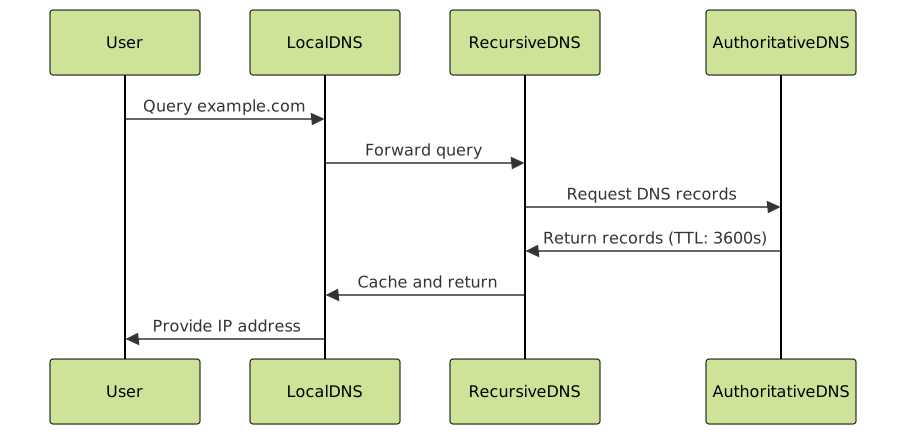
To understand propagation delays, let’s examine how DNS resolution works:
- Initial Query: A user types your domain name in their browser
- Local Cache Check: The system checks if the DNS information is already cached locally
- Recursive Resolution: If not cached, the query travels up the DNS hierarchy
- Authoritative Response: The authoritative nameserver provides the current DNS records
- Caching: The response is cached at multiple levels with specific TTL (Time To Live) values
TTL: The Key Factor
Time To Live (TTL) values determine how long DNS records remain cached. Lower TTL values mean faster propagation but increased DNS query load. Higher TTL values improve performance but slow down propagation.
| TTL Value | Duration | Use Case |
|---|---|---|
| 300 | 5 minutes | During planned changes |
| 3600 | 1 hour | Standard websites |
| 86400 | 24 hours | Stable configurations |
| 604800 | 7 days | Rarely changing domains |
Factors Affecting Propagation Time
1. TTL Settings
The most significant factor affecting propagation time is your DNS records’ TTL values. Before making changes, reduce your TTL to 300 seconds (5 minutes) and wait for the previous TTL period to expire.
example.com.    IN    A    192.168.1.100    ; TTL: 300
www.example.com. IN   CNAME example.com.    ; TTL: 300
2. DNS Provider Infrastructure
Different DNS providers have varying propagation speeds based on their infrastructure quality and global presence. Premium DNS services typically propagate faster than free alternatives.
3. Geographic Distribution
Changes propagate faster to DNS servers closer to your authoritative nameservers. Remote locations might experience longer delays.

4. ISP Caching Policies
Some Internet Service Providers ignore TTL values and cache DNS records longer than specified, particularly for popular domains. This behavior can extend propagation times beyond your control.
Types of DNS Changes and Their Propagation Times
A Record Changes
Typical Time: 1-4 hours
Description: Changing the IP address your domain points to
; Before
example.com.    3600    IN    A    192.168.1.100

; After
example.com.    300     IN    A    192.168.1.200
Nameserver Changes
Typical Time: 24-48 hours
Description: Switching to different DNS providers
MX Record Updates
Typical Time: 2-8 hours
Description: Changing email server configuration
CNAME Modifications
Typical Time: 1-6 hours
Description: Updating subdomain aliases
How to Check DNS Propagation Status
Command Line Tools
Use these commands to check propagation from different locations:
# Check A record
nslookup example.com 8.8.8.8
dig @8.8.8.8 example.com A

# Check propagation from different DNS servers
dig @8.8.8.8 example.com        # Google DNS
dig @1.1.1.1 example.com        # Cloudflare DNS
dig @208.67.222.222 example.com # OpenDNS
Expected Output:
; <<>> DiG 9.16.1 <<>> @8.8.8.8 example.com
;; ANSWER SECTION:
example.com.		299	IN	A	192.168.1.200
;; Query time: 45 msec
;; SERVER: 8.8.8.8#53(8.8.8.8)
Online DNS Propagation Checkers
Several online tools check DNS propagation from multiple global locations simultaneously. These tools query various DNS servers worldwide and display the results in an easy-to-understand format.

Strategies to Speed Up DNS Propagation
1. Pre-Planning with TTL Reduction
The most effective strategy is planning ahead:
- Reduce TTL values to 300 seconds (5 minutes) at least 24-48 hours before changes
- Wait for the old TTL period to expire
- Make your DNS changes
- Monitor propagation
- Restore original TTL values after propagation completes
; Step 1: Reduce TTL (48 hours before changes)
example.com.    300    IN    A    192.168.1.100

; Step 2: Make changes
example.com.    300    IN    A    192.168.1.200

; Step 3: Restore TTL after propagation
example.com.    3600   IN    A    192.168.1.200
2. Choose Quality DNS Providers
Premium DNS providers offer faster propagation through:
- Global Anycast Networks: Servers in multiple continents
- High-Performance Infrastructure: Fast response times
- API Integration: Programmatic updates
- Advanced Features: Health checks, failover, load balancing
3. Use Multiple DNS Servers
Configure multiple authoritative nameservers for redundancy and improved propagation:
example.com.    IN    NS    ns1.provider.com.
example.com.    IN    NS    ns2.provider.com.
example.com.    IN    NS    ns3.provider.com.
example.com.    IN    NS    ns4.provider.com.
4. Clear Local DNS Cache
Force immediate updates on your local system:
# Windows
ipconfig /flushdns

# macOS
sudo dscacheutil -flushcache
sudo killall -HUP mDNSResponder

# Linux
sudo systemctl restart systemd-resolved
# or
sudo service nscd restart
Common DNS Propagation Issues and Solutions
Issue 1: Partial Propagation
Problem: Some locations see new records while others see old ones.
Solution: This is normal during propagation. Wait for TTL expiration and verify no caching issues exist.
Issue 2: Extended Propagation Time
Problem: Changes taking longer than expected (>48 hours).
Solution:
- Verify DNS record syntax is correct
- Check if ISP is caching aggressively
- Contact DNS provider support
- Try different DNS resolver for testing
Issue 3: Email Delivery Problems
Problem: Email issues during MX record propagation.
Solution:
- Keep old MX records alongside new ones temporarily
- Use lower TTL values for MX records
- Monitor email delivery during transition

Best Practices for DNS Management
1. Document Your DNS Configuration
Maintain detailed records of all DNS settings, including:
- Current TTL values
- All DNS records and their purposes
- Change history with timestamps
- Rollback procedures
2. Test Changes in Staging
Use subdomains to test DNS configurations before applying to production:
staging.example.com.    300    IN    A    192.168.1.200
test.example.com.       300    IN    CNAME staging.example.com.
3. Monitor DNS Health
Implement monitoring to track:
- DNS response times
- Resolution accuracy
- Propagation status
- TTL compliance
4. Plan Maintenance Windows
Schedule DNS changes during low-traffic periods and communicate with stakeholders about potential temporary issues.
Advanced DNS Propagation Concepts
Anycast DNS
Anycast technology allows multiple servers to share the same IP address, with traffic routed to the nearest server. This improves both performance and propagation speed.
DNS Load Balancing
Distribute traffic across multiple servers using DNS records with identical names but different IP addresses:
example.com.    300    IN    A    192.168.1.100
example.com.    300    IN    A    192.168.1.101
example.com.    300    IN    A    192.168.1.102
DNSSEC Impact
DNS Security Extensions (DNSSEC) can affect propagation times due to additional cryptographic validation requirements. Plan for slightly longer propagation when DNSSEC is enabled.
Troubleshooting Propagation Delays
Systematic Approach
- Verify Record Syntax: Ensure all DNS records are correctly formatted
- Check TTL Values: Confirm TTL settings align with your timeline
- Test Multiple Resolvers: Use different DNS servers to check propagation
- Monitor Geographic Distribution: Check propagation across different regions
- Clear All Caches: Flush local, browser, and application caches
Emergency Procedures
When immediate DNS changes are critical:
- Contact your DNS provider for expedited propagation
- Implement temporary redirects or CDN solutions
- Use multiple DNS providers for redundancy
- Consider emergency hosting alternatives
Conclusion
DNS propagation is an inherent part of the internet’s distributed architecture. While delays are unavoidable, understanding the process and implementing proper strategies can significantly minimize disruption. Key takeaways include:
- Plan ahead by reducing TTL values before changes
- Use quality DNS providers with global infrastructure
- Monitor propagation using multiple tools and methods
- Implement best practices for DNS management and documentation
By mastering DNS propagation concepts and techniques, you’ll ensure smoother domain transitions and minimize downtime for your websites and applications. Remember that patience and proper planning are your best tools when working with DNS changes.





