DNS (Domain Name System) management is a critical aspect of web hosting that bridges the gap between your domain name and your hosting server. Understanding how to properly configure DNS settings ensures your website is accessible to visitors worldwide and functions reliably.
What is DNS and Why It Matters
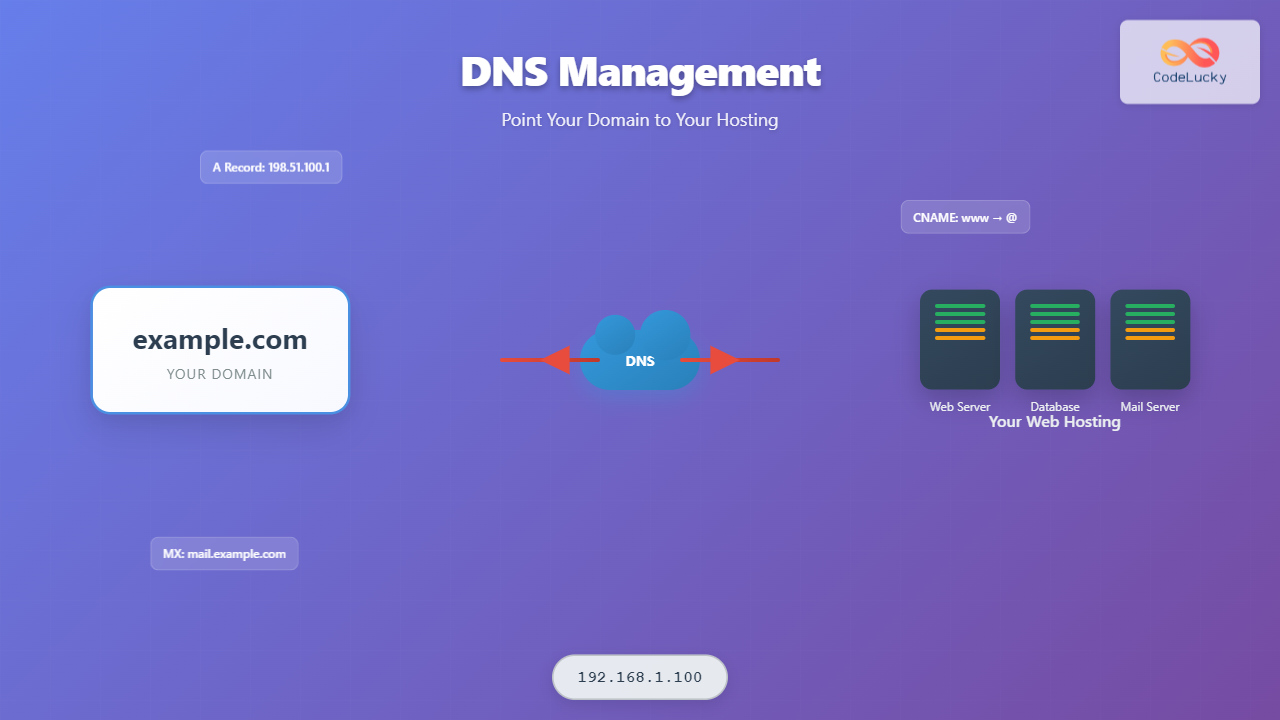
DNS acts as the internet’s phone book, translating human-readable domain names like example.com into IP addresses that computers use to locate servers. When someone types your domain into their browser, DNS servers guide them to your hosting provider’s servers where your website files are stored.

Types of DNS Records
Different DNS record types serve specific purposes in directing traffic and managing your domain’s functionality:
A Records (Address Records)
A records are the most fundamental DNS records, pointing your domain directly to an IPv4 address. They’re essential for connecting your domain to your web hosting server.
- Format:
domain.com → 192.168.1.100 - Purpose: Direct domain traffic to your hosting server
- TTL: Typically 300-3600 seconds
Example A Record Configuration:
| Type | Name | Value | TTL |
|---|---|---|---|
| A | @ | 198.51.100.1 | 300 |
| A | www | 198.51.100.1 | 300 |
CNAME Records (Canonical Name)
CNAME records create aliases for your domain, allowing multiple names to point to the same destination. They’re particularly useful for subdomains and CDN configurations.
- Format:
subdomain.domain.com → target.domain.com - Limitation: Cannot be used for root domains
- Common Use: Pointing www to non-www versions
MX Records (Mail Exchange)
MX records specify which mail servers handle email for your domain. They include priority values to determine the order in which mail servers are contacted.
Example MX Record Setup:
| Type | Priority | Value | TTL |
|---|---|---|---|
| MX | 10 | mail.domain.com | 3600 |
| MX | 20 | backup-mail.domain.com | 3600 |
TXT Records
TXT records store text information and are commonly used for domain verification, SPF records for email security, and other administrative purposes.
Step-by-Step DNS Configuration Process

Step 1: Gather Required Information
Before configuring DNS settings, collect the following information from your hosting provider:
- Server IP address (IPv4 and IPv6 if available)
- Nameserver addresses
- Mail server details (if hosting email)
- Any specific CNAME requirements
Step 2: Access Your DNS Management Interface
DNS management can be handled through various interfaces:
- Domain Registrar: GoDaddy, Namecheap, Google Domains
- Hosting Provider: cPanel, Plesk, custom panels
- Third-party Services: Cloudflare, Route 53, DNS Made Easy
Step 3: Configure Basic DNS Records
Start with essential records to make your website accessible:
Root Domain Configuration:
Type: A
Name: @ (or leave blank)
Value: 198.51.100.1
TTL: 300
WWW Subdomain Configuration:
Type: A
Name: www
Value: 198.51.100.1
TTL: 300
Alternative CNAME Approach:
Type: CNAME
Name: www
Value: domain.com
TTL: 300
Advanced DNS Configuration Scenarios
Load Balancing with Multiple A Records
For high-traffic websites, you can configure multiple A records pointing to different servers:
| Type | Name | Value | TTL |
|---|---|---|---|
| A | @ | 198.51.100.1 | 300 |
| A | @ | 198.51.100.2 | 300 |
| A | @ | 198.51.100.3 | 300 |
Subdomain Management
Create specific subdomains for different services:
blog.domain.com→ Blog hosting servershop.domain.com→ E-commerce platformapi.domain.com→ API server

DNS Propagation and Testing
Understanding DNS Propagation
DNS propagation is the time it takes for DNS changes to spread across the internet. This process typically takes:
- Local ISP Cache: 30 minutes to 4 hours
- Global Propagation: 24-48 hours (maximum)
- TTL Impact: Lower TTL values speed up propagation
Testing DNS Configuration
Use these methods to verify your DNS setup:
Command Line Tools:
# Check A record
nslookup domain.com

# Check specific record type
dig domain.com MX

# Trace DNS resolution path
dig +trace domain.com
Online DNS Testing Tools:
- DNS Checker (dnschecker.org)
- WhatsMyDNS (whatsmydns.net)
- DNS Propagation Checker
Common DNS Configuration Issues and Solutions

Website Not Loading
Symptoms: Domain shows “Site not found” or similar errors
Solutions:
- Verify A record points to correct IP address
- Check if server is responding on the specified IP
- Ensure nameservers are correctly configured
- Wait for DNS propagation to complete
Email Delivery Problems
Symptoms: Emails bounce or aren’t received
Solutions:
- Verify MX records point to correct mail servers
- Check MX record priority values
- Ensure SPF and DKIM records are properly configured
- Test mail server connectivity
Subdomain Configuration Errors
Common Issues:
- CNAME pointing to non-existent domain
- Conflicting A and CNAME records
- Incorrect subdomain spelling
Best Practices for DNS Management
Security Considerations
- Enable DNSSEC: Protects against DNS spoofing attacks
- Use Reputable DNS Providers: Choose reliable, secure services
- Regular Monitoring: Set up alerts for DNS changes
- Access Control: Limit who can modify DNS settings
Performance Optimization
- Choose Strategic TTL Values: Balance update flexibility with caching efficiency
- Use Anycast Networks: Reduce latency with geographically distributed servers
- Implement DNS Load Balancing: Distribute traffic across multiple servers
- Monitor Response Times: Track DNS query performance
Maintenance and Monitoring
- Regular Audits: Review DNS records quarterly
- Documentation: Maintain detailed records of all DNS configurations
- Backup Configurations: Keep copies of working DNS setups
- Test Before Changes: Verify configurations in staging environments
Troubleshooting DNS Issues
Diagnostic Commands and Tools
Windows Commands:
nslookup domain.com
ping domain.com
tracert domain.com
Linux/Mac Commands:
dig domain.com
host domain.com
nslookup domain.com
traceroute domain.com
Interpreting DNS Query Results
Successful A Record Query:
domain.com. 300 IN A 198.51.100.1This indicates:
- Domain: domain.com
- TTL: 300 seconds
- Record Type: A (Address)
- IP Address: 198.51.100.1
Migrating DNS Between Providers

Pre-Migration Checklist
- Export current DNS zone file
- Document all custom records and configurations
- Identify critical services that depend on DNS
- Plan migration during low-traffic periods
- Prepare rollback procedures
Post-Migration Verification
- Test website accessibility from multiple locations
- Verify email functionality
- Check subdomain configurations
- Monitor error logs for DNS-related issues
- Confirm SSL certificate validity
Proper DNS management is essential for maintaining a reliable web presence. By understanding the fundamentals of DNS records, following best practices for configuration, and implementing robust monitoring procedures, you can ensure your domain points correctly to your hosting infrastructure while maintaining optimal performance and security.