Understanding Directory Structures in Operating Systems
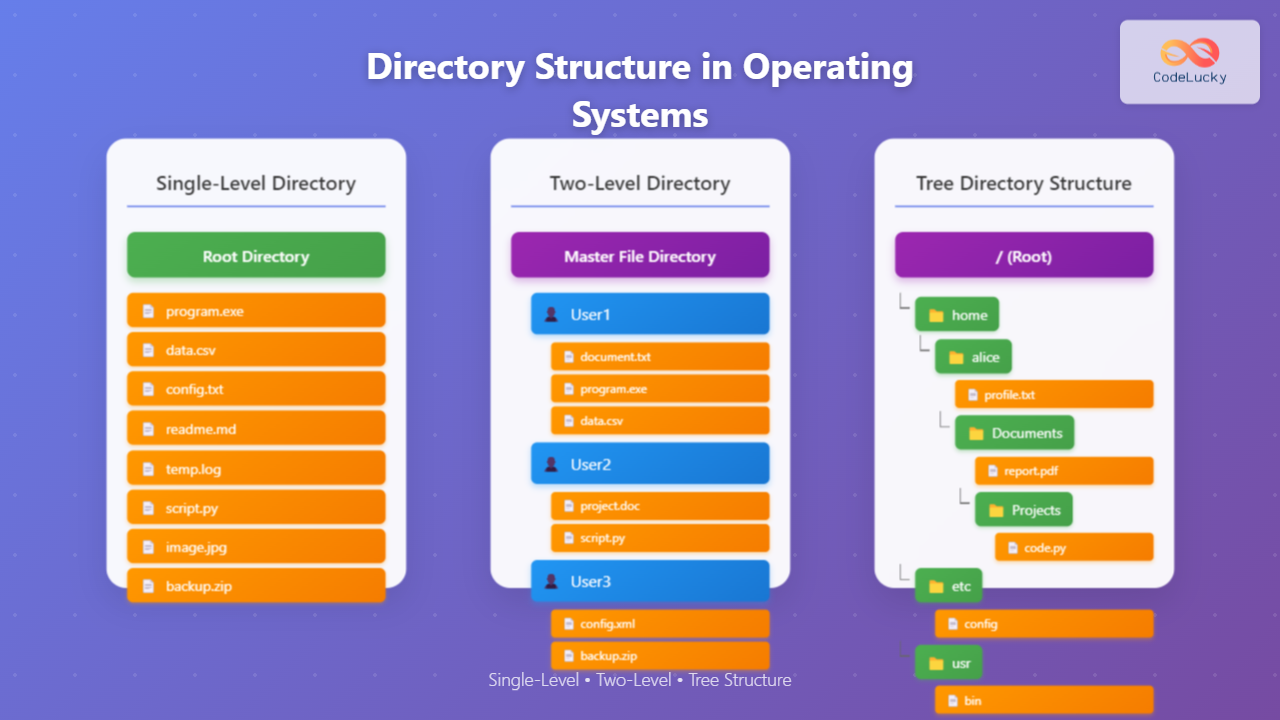
Directory structures are fundamental components of file systems that organize and manage files in operating systems. They provide a systematic way to store, locate, and access files efficiently. The evolution from simple single-level directories to complex hierarchical tree structures reflects the growing complexity of computing systems and user needs.
A directory structure defines how files and subdirectories are organized within a file system. It determines the naming conventions, access patterns, and organizational hierarchy that users and applications follow when storing and retrieving data.
Single-Level Directory Structure
The single-level directory structure is the simplest form of file organization where all files reside in a single directory. This structure was commonly used in early operating systems and simple embedded systems.

Characteristics of Single-Level Directory
- Flat Structure: All files exist at the same level with no subdirectories
- Unique Naming: Each file must have a unique name within the directory
- Simple Access: Direct access to files using just the filename
- No Hierarchical Organization: Cannot create logical groupings of related files
Example Implementation
# Single-level directory listing
$ ls
config.txt    data.csv      program.exe   readme.md     temp.log

# Accessing files directly by name
$ cat config.txt
$ ./program.exe
$ vim readme.md
Advantages of Single-Level Directory
- Simplicity: Easy to understand and implement
- Fast Access: No need to traverse directory paths
- Low Overhead: Minimal metadata storage requirements
- Direct Addressing: Simple file lookup mechanisms
Disadvantages of Single-Level Directory
- Naming Conflicts: All files must have unique names
- No Organization: Cannot group related files logically
- Scalability Issues: Becomes unwieldy with many files
- No User Separation: All users share the same namespace
- Security Limitations: Difficult to implement file-level permissions
Use Cases for Single-Level Directory
Single-level directories are still used in specific scenarios:
- Embedded Systems: Simple microcontroller applications
- Boot Loaders: Initial system startup files
- Temporary Storage: Cache directories or temporary file systems
- Legacy Systems: Older operating systems with limited resources
Two-Level Directory Structure
The two-level directory structure addresses some limitations of single-level directories by introducing a second level of organization. Each user gets their own directory, creating separate namespaces for different users.

Components of Two-Level Directory
- Master File Directory (MFD): Root directory containing user directories
- User File Directory (UFD): Individual directories for each user
- File Entries: Actual files stored within user directories
Implementation Example
# Two-level directory structure
/
├── user1/
│   ├── file1.txt
│   ├── program.exe
│   └── data.csv
├── user2/
│   ├── project.doc
│   ├── script.py
│   └── notes.txt
└── user3/
    ├── config.xml
    ├── backup.zip
    └── log.txt

# Accessing files with user path
$ cat /user1/file1.txt
$ /user2/script.py
$ ls /user3/
Addressing in Two-Level Directory
Files are accessed using a two-part address: user_name/file_name
# File addressing format
user_name/file_name

# Examples
john/document.txt
alice/program.exe
bob/data.csv
Advantages of Two-Level Directory
- User Isolation: Each user has their own namespace
- Reduced Naming Conflicts: Same filename can exist in different user directories
- Better Organization: Files are grouped by user ownership
- Enhanced Security: Users can only access their own files
- Scalability: Better than single-level for multi-user systems
Disadvantages of Two-Level Directory
- Limited Hierarchy: Only two levels of organization
- No Subdirectories: Users cannot create their own organizational structure
- Inflexible: Cannot group files by project or category within user space
- Sharing Difficulties: Hard to share files between users
- System Files: No clear place for system-wide files
Tree Directory Structure
The tree directory structure, also known as hierarchical directory structure, is the most common and flexible approach used in modern operating systems. It allows unlimited levels of nested directories, creating a tree-like organization.
Key Features of Tree Structure
- Hierarchical Organization: Unlimited levels of nested directories
- Path-based Addressing: Files accessed using full paths
- Flexible Structure: Users can create custom organizational schemes
- Efficient Navigation: Logical grouping of related files
Tree Structure Implementation
# Typical Unix/Linux tree structure
/
├── bin/           # System binaries
├── etc/           # Configuration files
├── home/          # User directories
│   ├── alice/
│   │   ├── Documents/
│   │   │   ├── project1/
│   │   │   │   ├── src/
│   │   │   │   │   ├── main.c
│   │   │   │   │   └── utils.c
│   │   │   │   └── README.md
│   │   │   └── notes.md
│   │   ├── Downloads/
│   │   └── Pictures/
│   └── bob/
│       ├── work/
│       └── personal/
├── usr/           # User programs
├── var/           # Variable data
└── tmp/           # Temporary files

# Accessing files using full paths
$ cat /home/alice/Documents/notes.md
$ gcc /home/alice/Documents/project1/src/main.c
$ ls /home/bob/work/
Path Types in Tree Structure
Absolute Paths
Start from the root directory and specify the complete path:
# Absolute path examples
/home/alice/Documents/project1/README.md
/usr/bin/gcc
/etc/passwd
/var/log/system.log
Relative Paths
Specify paths relative to the current working directory:
# If current directory is /home/alice/
Documents/project1/README.md
../bob/work/file.txt
./Downloads/image.jpg

# Special directory references
.      # Current directory
..     # Parent directory
~      # Home directory (user-specific)
Tree Structure Operations
# Creating directories
$ mkdir -p /home/alice/Documents/project2/src
$ mkdir /home/bob/work/backup

# Navigating directories
$ cd /home/alice/Documents
$ pwd
/home/alice/Documents

$ cd project1/src
$ pwd
/home/alice/Documents/project1/src

$ cd ../../..
$ pwd
/home/alice

# Listing directory contents
$ ls -la /home/alice/Documents/
total 12
drwxr-xr-x 3 alice alice 4096 Aug 27 10:30 .
drwxr-xr-x 5 alice alice 4096 Aug 27 10:25 ..
drwxr-xr-x 3 alice alice 4096 Aug 27 10:30 project1
-rw-r--r-- 1 alice alice  156 Aug 27 10:28 notes.md

# Moving and copying files
$ mv /home/alice/file.txt /home/alice/Documents/
$ cp -r /home/alice/Documents/project1/ /home/alice/backup/
Advantages of Tree Directory Structure
- Unlimited Hierarchy: Can create deeply nested organizational structures
- Logical Organization: Group files by project, type, or any criteria
- Scalability: Efficiently handles millions of files
- Flexible Access Control: Different permissions for different directory levels
- Efficient Search: Can limit searches to specific subtrees
- User Customization: Each user can organize their space as needed
- System Organization: Clear separation of system, user, and application files
Disadvantages of Tree Directory Structure
- Complexity: Can become complex with deep hierarchies
- Path Length Limitations: Very deep paths may hit system limits
- Navigation Overhead: May require multiple directory traversals
- Redundancy: Same file may need to exist in multiple locations
- Dependency Issues: Moving directories can break application paths
Comparative Analysis

| Feature | Single-Level | Two-Level | Tree Structure |
|---|---|---|---|
| Complexity | Very Simple | Simple | Complex |
| Organization | None | By User | Hierarchical |
| Naming Conflicts | High | Medium | Low |
| Scalability | Poor | Limited | Excellent |
| User Isolation | None | Yes | Yes |
| File Sharing | Easy | Difficult | Flexible |
| Access Speed | Fast | Medium | Variable |
| Memory Overhead | Low | Medium | Higher |
Modern Implementation Considerations
File System Support
Modern file systems implement tree structures with various optimizations:
- B-tree Indexing: Fast directory lookup in large directories
- Inode Caching: Frequently accessed directories kept in memory
- Path Compression: Optimized storage for long paths
- Symbolic Links: Create shortcuts to files in other locations
Virtual File Systems
Operating systems use virtual file systems (VFS) to present a unified tree structure even when using multiple file system types:
# Linux VFS example
/
├── proc/          # Virtual filesystem for process information
├── sys/           # Virtual filesystem for system information
├── dev/           # Device files
├── mnt/           # Mount points for other filesystems
│   ├── usb/       # USB drive
│   └── network/   # Network filesystem
└── home/          # Regular filesystem
Best Practices for Directory Organization
Naming Conventions
- Descriptive Names: Use clear, meaningful directory names
- Consistent Casing: Stick to lowercase for compatibility
- Avoid Spaces: Use underscores or hyphens instead
- Version Control: Include version numbers when appropriate
Structural Guidelines
- Logical Grouping: Group related files together
- Depth Limitation: Avoid extremely deep hierarchies
- Standard Locations: Follow OS conventions for common directories
- Backup Considerations: Organize for easy backup strategies
Security Implications
Directory structures have significant security implications:
- Access Control Lists (ACLs): Different permissions for each directory level
- Path Traversal Attacks: Malicious use of “../” sequences
- Privilege Escalation: Improper directory permissions can lead to security breaches
- Symbolic Link Attacks: Malicious links can expose sensitive files
Security Best Practices
# Setting proper permissions
$ chmod 755 /home/alice/                    # User rwx, others rx
$ chmod 700 /home/alice/private/            # User only
$ chmod 644 /home/alice/public/readme.txt   # User rw, others r

# Checking directory permissions
$ ls -la /home/alice/
drwxr-xr-x 5 alice alice 4096 Aug 27 10:30 .
drwxr-xr-x 3 root  root  4096 Aug 27 09:15 ..
drwx------ 2 alice alice 4096 Aug 27 10:25 private
drwxr-xr-x 2 alice alice 4096 Aug 27 10:28 public
Performance Considerations
Directory Size Impact
Large directories can impact performance:
- Linear Search: Some file systems search directories linearly
- Cache Efficiency: Large directories may not fit in cache
- Fragmentation: Directory metadata may become fragmented
Optimization Strategies
- Balanced Trees: Keep directory hierarchies reasonably balanced
- Index Structures: Use file systems with efficient directory indexing
- Partitioning: Split large directories into smaller subdirectories
- Regular Maintenance: Periodically reorganize and clean up directories
Future Developments
Directory structures continue to evolve with new technologies:
- Content-Addressable Storage: Files identified by content hash rather than path
- Graph-Based Organization: Files connected by relationships rather than hierarchy
- AI-Driven Organization: Automatic file organization based on content and usage
- Distributed File Systems: Directory structures spanning multiple machines
Understanding directory structures is crucial for system administrators, developers, and power users. The evolution from single-level to tree structures reflects the increasing complexity and capabilities of modern computing systems. Each structure has its place, with tree structures dominating modern operating systems due to their flexibility and organizational capabilities.
The choice of directory structure significantly impacts system usability, security, and performance. While tree structures offer the most flexibility, they require careful planning and maintenance to remain effective. As computing continues to evolve, directory structures will likely continue adapting to meet new challenges and requirements in data organization and access.
Related Posts

File System in Operating System: Complete Guide to Structure and Organization
Introduction to File Systems A file system is a fundamental component of any operating system that provides a structured way...
File System Types: FAT32, NTFS, ext4 and Modern Linux Filesystems Explained
Understanding File Systems: The Foundation of Data Storage A file system is the method and data structure that an operating...
File Allocation Methods: Contiguous, Linked and Indexed Storage Techniques
Understanding File Allocation Methods in Operating Systems File allocation methods are fundamental techniques used by operating systems to organize and...
File System Implementation: Boot Block, Super Block and Inodes Explained
Understanding File System Implementation File system implementation is a critical component of operating systems that manages how data is stored,...
Inode in File System: Complete Guide to Structure and File Metadata
What is an Inode? An inode (index node) is a fundamental data structure in Unix-like file systems that stores metadata...
Windows File System: Complete NTFS Features and Implementation Guide
Introduction to NTFS File System NTFS (New Technology File System) is the default file system for modern Windows operating systems,...

C Binary Trees: Implementing Tree Data Structures
Binary trees are fundamental data structures in computer science, offering efficient ways to organize and search data. In this comprehensive...
Storage Management: Complete Guide to Primary, Secondary and Tertiary Storage Systems
Storage management is one of the most critical components of an operating system, responsible for efficiently organizing, accessing, and maintaining...
sysfs Linux: Complete Guide to Understanding and Using /sys Filesystem
The sysfs filesystem is one of Linux's most powerful yet underutilized features, providing a window into the kernel's internal operations...
mount Command Linux: Complete Guide to Mount Filesystems and Drives
The mount command is one of the most fundamental tools in Linux system administration, allowing you to attach filesystems from...

C File Handling: Creating, Writing, and Reading Files
File handling is a crucial aspect of programming in C, allowing developers to interact with external data sources, store information...
Python File fileno() Method: Getting File Descriptor
The fileno() method is a powerful tool in Python for working with files at a lower level. It allows you...