
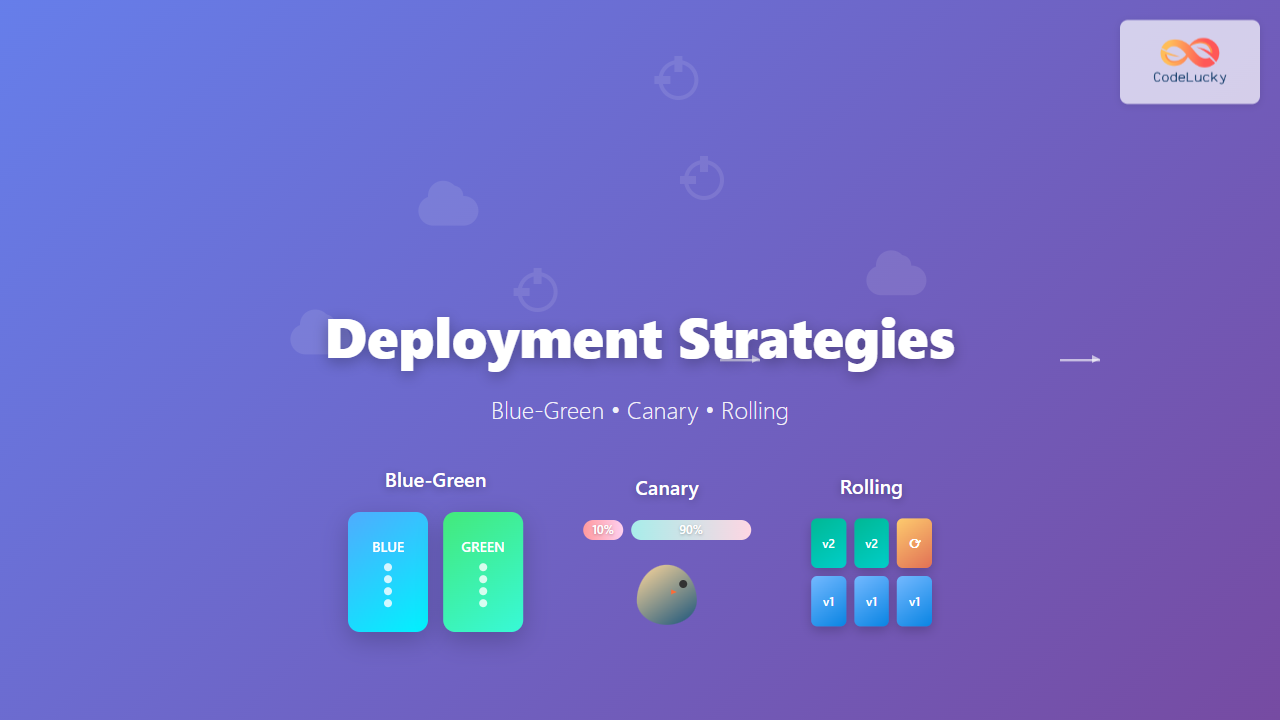
Understanding Modern Deployment Strategies
In today’s fast-paced software development landscape, choosing the right deployment strategy can make the difference between seamless user experiences and costly downtime. Organizations deploying code multiple times per day need robust strategies that minimize risk while maximizing deployment speed and reliability.
This comprehensive guide explores the three most critical deployment strategies: Blue-Green, Canary, and Rolling deployments. Each approach offers unique advantages for different scenarios, and understanding their nuances is essential for DevOps teams aiming to achieve zero-downtime deployments.
Blue-Green Deployment Strategy
Blue-Green deployment is a technique that reduces downtime and risk by running two identical production environments called Blue and Green. At any given time, only one environment serves live production traffic while the other remains idle, ready for deployment.
How Blue-Green Deployment Works
The Blue-Green deployment process follows a straightforward pattern. When you’re ready to deploy a new version, you deploy it to the idle environment (let’s say Green while Blue is live). After thorough testing on the Green environment, you switch the router or load balancer to direct all traffic from Blue to Green instantly.
This approach creates a clean separation between the current production version and the new release. If issues arise with the new deployment, you can immediately switch back to the previous environment, ensuring rapid rollback capabilities.
Benefits of Blue-Green Deployment
Blue-Green deployment offers several compelling advantages for organizations prioritizing stability and quick rollbacks. The most significant benefit is instant rollback capability – if problems occur with the new version, switching back to the previous environment takes seconds rather than minutes or hours required for traditional rollback procedures.
Zero-downtime deployment represents another major advantage. Since the switch between environments happens instantaneously at the load balancer level, users experience no service interruption during deployments. This capability is crucial for applications requiring high availability.
The strategy also provides excellent testing opportunities. You can perform comprehensive testing on the idle environment using production-like data and traffic patterns before making the switch, significantly reducing the risk of production issues.
Drawbacks and Considerations
Despite its benefits, Blue-Green deployment comes with notable challenges. The most significant drawback is resource requirements – maintaining two identical production environments doubles your infrastructure costs. For resource-intensive applications, this can represent a substantial financial burden.
Database synchronization poses another challenge. Handling database migrations and ensuring data consistency between environments requires careful planning and often complex synchronization mechanisms. Applications with frequent database schema changes may find this particularly challenging.
The strategy works best for stateless applications. Applications with significant state management or those requiring sticky sessions may face complications during the environment switch.
Implementation Best Practices
Successful Blue-Green deployment implementation requires several key practices. First, ensure your infrastructure automation can provision and configure identical environments consistently. Tools like Terraform, CloudFormation, or Ansible excel at creating reproducible infrastructure.
Implement comprehensive monitoring and alerting for both environments. You need visibility into application performance, resource utilization, and business metrics to make informed decisions about when to switch environments.
Develop a robust testing strategy for the idle environment. This should include automated testing, performance testing, and potentially shadowing production traffic to validate the new deployment under realistic conditions.
Plan your database strategy carefully. Consider using database migration tools that can handle forward and backward compatibility, and implement strategies for handling data that changes during the deployment window.
Canary Deployment Strategy
Canary deployment takes its name from the historical practice of using canary birds in coal mines to detect dangerous gases. Similarly, canary deployments expose new software versions to a small subset of users before rolling out to the entire user base, acting as an early warning system for potential issues.
Understanding Canary Deployment Mechanics
In canary deployment, you gradually roll out changes to a small percentage of your user base while the majority continues using the stable version. This approach allows you to monitor the new version’s performance, error rates, and user feedback before deciding whether to proceed with a full rollout.
The process typically starts with deploying the new version to a small percentage of servers or users – often 5-10%. If metrics remain healthy after a predetermined observation period, you gradually increase the percentage until 100% of traffic uses the new version.
Advantages of Canary Deployment
Canary deployment excels at risk mitigation through gradual exposure. By limiting the blast radius of potential issues, you protect the majority of your user base from problems while gathering real-world performance data about the new version.
This strategy provides excellent observability opportunities. You can compare metrics between the canary and stable versions in real-time, making data-driven decisions about rollout progression. Key metrics might include error rates, response times, conversion rates, and user engagement metrics.
Resource efficiency represents another advantage. Unlike Blue-Green deployment, canary deployment doesn’t require double the infrastructure. You only need additional capacity for the small percentage of traffic receiving the new version.
The approach also enables A/B testing capabilities. You can gather user feedback and behavioral data to inform not just technical decisions but also product and business decisions about new features.
Challenges and Limitations
Canary deployment complexity increases significantly with sophisticated routing requirements. You need infrastructure capable of intelligently routing traffic based on various criteria such as user segments, geographic regions, or feature flags.
Monitoring and observability requirements are more demanding than other strategies. You need robust metrics collection, alerting systems, and dashboards to compare performance between versions and make informed rollout decisions.
The gradual rollout process means longer deployment cycles compared to Blue-Green deployment. While this provides safety benefits, it may not suit organizations needing rapid deployment capabilities.
Session management can become complicated if your application maintains user sessions. Ensuring users don’t flip between versions during their session requires additional complexity in your routing logic.
Canary Deployment Implementation Guidelines
Successful canary deployment requires robust traffic routing capabilities. Implement service mesh technologies like Istio, or use load balancers with advanced routing features to control traffic distribution between versions.
Establish clear success criteria and automated decision-making processes. Define specific metrics thresholds that trigger automatic rollback or progression to the next rollout phase. This might include error rate increases, performance degradation, or business metric declines.
Implement comprehensive logging and tracing to understand user experiences across different versions. Distributed tracing tools help identify performance bottlenecks and errors specific to each version.
Design your rollout plan with specific stages and time intervals. A typical progression might be 5% → 25% → 50% → 100%, with observation periods between each stage based on your application’s traffic patterns and business requirements.
Rolling Deployment Strategy
Rolling deployment gradually replaces instances of the previous version with the new version across your server fleet. This approach updates your application incrementally, maintaining service availability while spreading the deployment risk across time and infrastructure.
Rolling Deployment Process
The rolling deployment process works by updating a subset of servers at a time while others continue serving traffic. In a typical scenario with ten servers, you might update two servers at a time, ensuring eight servers remain available to handle user requests throughout the deployment.
The process continues until all servers run the new version. Load balancers automatically route traffic away from servers being updated and back to them once the update completes and health checks pass.
Benefits of Rolling Deployment
Rolling deployment offers excellent resource efficiency since it uses existing infrastructure without requiring additional servers or environments. This makes it cost-effective for organizations with budget constraints or those running resource-intensive applications.
The strategy provides built-in gradual rollout characteristics. If issues emerge during deployment, they typically affect only a portion of users, and you can halt the rollout before impacting everyone.
Simplicity represents another key advantage. Rolling deployment requires less complex infrastructure compared to Blue-Green or Canary strategies, making it accessible for smaller teams or simpler applications.
The approach works well with most orchestration platforms. Kubernetes, Docker Swarm, and other container orchestrators provide native rolling deployment capabilities, simplifying implementation.
Rolling Deployment Drawbacks
Mixed version challenges pose the primary concern with rolling deployment. During the rollout process, different versions of your application run simultaneously, potentially causing compatibility issues or inconsistent user experiences.
Rollback complexity increases compared to Blue-Green deployment. If issues arise, rolling back requires updating servers back to the previous version, which takes time and may not address issues that have already affected users or data.
The deployment process duration depends on your fleet size and update batch size. Large deployments can take considerable time, during which your system operates in a mixed-version state.
Database migration challenges mirror those of other strategies but become more complex when different application versions must work with the same database schema during the transition period.
Rolling Deployment Best Practices
Design your applications for backward compatibility to handle mixed-version scenarios gracefully. This includes API versioning, database schema compatibility, and message format considerations.
Implement robust health checks that accurately reflect application readiness. Your orchestration system relies on these checks to determine when servers are ready to receive traffic after updates.
Choose appropriate batch sizes based on your risk tolerance and deployment speed requirements. Smaller batches reduce risk but increase deployment time, while larger batches speed deployment but increase potential impact.
Monitor deployment progress closely with automated rollback triggers. Set up alerts for error rate increases, performance degradation, or health check failures that automatically halt or reverse the deployment.
Choosing the Right Deployment Strategy
Selecting the optimal deployment strategy depends on multiple factors including application architecture, business requirements, resource constraints, and risk tolerance. Understanding these factors helps you make informed decisions for different scenarios.
Application Architecture Considerations
Stateless applications work well with all three strategies, but stateful applications require more careful consideration. Blue-Green deployment suits stateless applications with complex database requirements, while rolling deployment works better for applications designed with backward compatibility in mind.
Microservices architectures often benefit from canary deployment, allowing independent service updates with controlled risk exposure. Monolithic applications might find Blue-Green deployment simpler to implement and manage.
Business and Risk Factors
High-availability requirements often favor Blue-Green deployment for its instant rollback capabilities and zero-downtime characteristics. Financial services, healthcare, and e-commerce platforms frequently choose this approach.
Budget constraints might push organizations toward rolling deployment, which requires no additional infrastructure. Startups and smaller organizations often start with rolling deployment and evolve to more sophisticated strategies as they grow.
Risk tolerance plays a crucial role in strategy selection. Conservative organizations might prefer canary deployment for its gradual exposure characteristics, while agile teams comfortable with rapid iteration might choose Blue-Green for its speed.
Technical Infrastructure Requirements
Your existing infrastructure capabilities significantly influence strategy choice. Organizations with advanced container orchestration platforms can implement rolling deployment easily, while those with sophisticated load balancing and monitoring systems might prefer canary deployment.
Cloud-native applications often have more strategy options due to cloud providers’ advanced deployment features, while on-premises applications might have more constraints based on existing infrastructure investments.
Advanced Implementation Techniques
Modern deployment strategies often combine elements from multiple approaches to create hybrid solutions tailored to specific organizational needs. These advanced techniques provide additional flexibility and risk mitigation capabilities.
Hybrid Deployment Approaches
Blue-Green canary deployment combines the instant rollback capabilities of Blue-Green with the gradual exposure benefits of canary deployment. You maintain two environments but gradually shift traffic from Blue to Green while monitoring metrics closely.
Ring deployment extends canary deployment concepts by defining multiple user segments or “rings” with different risk profiles. Internal users might be in the first ring, followed by beta users, then general users, allowing for multiple validation stages.
Feature Flags and Deployment Decoupling
Feature flags provide another layer of deployment control by separating deployment from feature activation. You can deploy code with new features disabled, then gradually enable them for specific user segments without additional deployments.
This approach works particularly well with any deployment strategy, providing fine-grained control over feature rollouts and the ability to quickly disable problematic features without full application rollbacks.
Automated Deployment Pipelines
Modern deployment strategies rely heavily on automation for consistency and reliability. Implement automated pipelines that handle testing, deployment, monitoring, and rollback decisions based on predefined criteria.
Continuous Integration/Continuous Deployment (CI/CD) systems can orchestrate complex deployment workflows, automatically progressing through deployment stages based on success criteria or triggering rollbacks when issues arise.
Monitoring and Observability
Effective monitoring and observability form the foundation of successful deployment strategies. Without proper visibility into application performance and user experience, you cannot make informed decisions about deployment progression or rollback timing.
Key Metrics for Deployment Success
Technical metrics should include error rates, response times, throughput, and resource utilization. These metrics help identify performance regressions or system instability introduced by new deployments.
Business metrics provide insight into the impact of deployments on user experience and business outcomes. Conversion rates, user engagement, and customer satisfaction scores offer valuable feedback about deployment success from a business perspective.
Infrastructure metrics help ensure your deployment strategy doesn’t negatively impact system stability. Monitor CPU usage, memory consumption, network traffic, and disk I/O to identify resource-related issues.
Alerting and Automated Response
Implement intelligent alerting systems that can distinguish between normal variations and deployment-related issues. Use statistical analysis and anomaly detection to reduce false positives while ensuring real issues trigger appropriate responses.
Automated response systems can halt deployments, trigger rollbacks, or escalate to human operators based on predefined criteria. This automation reduces response time to issues and minimizes the impact of problematic deployments.
Conclusion
Mastering deployment strategies requires understanding the trade-offs between risk, speed, resource requirements, and complexity. Blue-Green deployment excels for applications requiring instant rollback and zero downtime, canary deployment provides excellent risk mitigation through gradual exposure, and rolling deployment offers resource efficiency with acceptable risk levels.
The most successful organizations often evolve their deployment strategies over time, starting with simpler approaches like rolling deployment and advancing to more sophisticated strategies as their infrastructure and expertise grow. Consider your current constraints and future goals when choosing a deployment strategy, and remember that hybrid approaches can provide the best of multiple strategies for complex requirements.
Implementing any of these strategies successfully requires investment in automation, monitoring, and team expertise. Start with the strategy that best fits your current capabilities and business requirements, then iterate and improve your deployment processes as your organization’s needs evolve.
Related Posts

Mastering Continuous Deployment: Automating Your Way to Rapid, Reliable Releases
Welcome back to our "DevOps from Scratch" series! In our previous posts, we've explored the fundamentals of DevOps, Git workflows,...
Continuous Deployment: Complete Guide to Fully Automated Software Releases
Continuous Deployment (CD) represents the pinnacle of software delivery automation, where every code change that passes automated tests gets deployed...
Continuous Delivery: Automated Software Release Pipeline Guide for Modern Development Teams
Continuous Delivery (CD) represents a fundamental shift in how modern software teams approach releases, transforming the traditional manual, error-prone deployment...
CI/CD Pipeline: Complete Implementation Guide for Modern DevOps Teams
What is a CI/CD Pipeline? A CI/CD pipeline (Continuous Integration/Continuous Deployment) is an automated workflow that enables development teams to...

DevOps Metrics and Optimization: Measuring Success and Driving Continuous Improvement
Welcome to the next installment in our "DevOps from Scratch" series! In our previous posts, we've explored the fundamentals of...
Configuration Management: Infrastructure as Code – Complete Guide to Modern DevOps Practices
Configuration Management and Infrastructure as Code (IaC) have revolutionized how modern organizations approach infrastructure deployment and management in Agile environments....
DevOps and Agile: Extending Agility to Operations – Complete Guide for Modern Software Delivery
The evolution of software development has witnessed remarkable transformations, from traditional waterfall methodologies to Agile practices, and now to the...

Migration in Virtual Machines: Complete Guide to Live Migration Process
Virtual machine live migration represents one of the most critical capabilities in modern virtualization environments, enabling seamless movement of running...
Katello Linux: Complete Guide to Enterprise Content and Configuration Management
Introduction to Katello Linux Katello is a powerful open-source content and configuration management platform that serves as the upstream project...

DevOps Demystified: A Practical Guide to Transforming Your Development Process
Welcome to the first installment of our "DevOps from Scratch" series! Whether you're a seasoned developer looking to streamline your...
Building a Robust Continuous Integration Pipeline: The DevOps Accelerator
Welcome back to our "DevOps from Scratch" series! In our previous posts, we explored the fundamentals of DevOps and dove...
Cloud-Native Agile: Revolutionizing Born-in-the-Cloud Development Practices
Cloud-native agile development represents a paradigm shift that fundamentally transforms how software teams approach application development, deployment, and maintenance. This...





