
Understanding Database Performance Bottlenecks
Database performance issues are among the most common causes of slow websites and poor user experience. When your database becomes the bottleneck, users face longer loading times, timeouts, and frustrated abandonment of your site. Understanding the root causes of these performance issues is the first step toward effective optimization.

The most common database performance bottlenecks include:
- Inefficient queries that scan entire tables instead of using indexes
- Missing or poorly designed indexes that force the database to work harder
- Excessive data retrieval where applications fetch more data than needed
- Lock contention where concurrent operations block each other
- Hardware limitations such as insufficient memory or slow storage
SQL Query Optimization Fundamentals
Query optimization forms the foundation of database performance. A well-written query can execute in milliseconds, while a poorly constructed one might take seconds or even minutes to complete the same task.
Analyzing Query Performance
Before optimizing, you need to identify which queries are causing problems. Most database systems provide tools to analyze query performance:
-- MySQL: Enable slow query log
SET GLOBAL slow_query_log = 'ON';
SET GLOBAL long_query_time = 1;

-- Analyze specific query performance
EXPLAIN SELECT * FROM users WHERE email = '[email protected]';
The EXPLAIN command reveals how the database executes your query, showing whether it uses indexes, how many rows it examines, and the overall execution plan.
Common Query Anti-Patterns
Avoid these performance-killing patterns in your SQL queries:
-- BAD: Using wildcards at the beginning
SELECT * FROM products WHERE name LIKE '%widget%';

-- GOOD: Specific matching when possible
SELECT * FROM products WHERE name LIKE 'widget%';

-- BAD: Using functions in WHERE clauses
SELECT * FROM orders WHERE YEAR(created_at) = 2023;

-- GOOD: Direct date comparison
SELECT * FROM orders WHERE created_at >= '2023-01-01' AND created_at < '2024-01-01';
Database Indexing Strategies
Indexes are data structures that dramatically improve query performance by creating shortcuts to your data. Think of them as a book’s index that helps you quickly locate information without reading every page.

Types of Indexes
Primary Index: Automatically created for primary keys, ensuring fast unique record retrieval.
Secondary Indexes: Created on frequently queried columns to speed up filtering and sorting operations.
Composite Indexes: Cover multiple columns and are particularly effective for queries that filter on multiple fields.
-- Creating indexes for common query patterns
CREATE INDEX idx_user_email ON users(email);
CREATE INDEX idx_order_date ON orders(created_at);
CREATE INDEX idx_product_category_price ON products(category, price);
Index Optimization Best Practices
- Monitor index usage: Remove unused indexes as they consume storage and slow down write operations
- Consider query patterns: Create indexes based on your most common WHERE, ORDER BY, and JOIN conditions
- Use composite indexes wisely: Order columns by selectivity (most selective first)
- Balance read vs. write performance: More indexes improve reads but can slow down inserts and updates
Database Caching Strategies
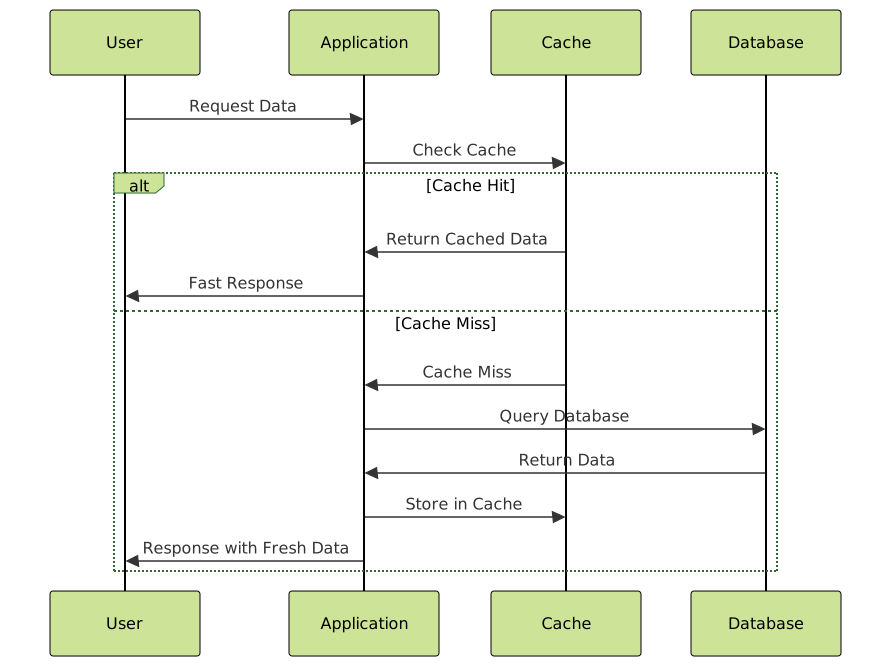
Caching reduces database load by storing frequently accessed data in faster storage systems, dramatically improving response times for repeated requests.
Query Result Caching
Most modern databases offer built-in query caching that automatically stores results of SELECT statements:
-- MySQL Query Cache configuration
SET GLOBAL query_cache_type = ON;
SET GLOBAL query_cache_size = 268435456; -- 256MB

-- PostgreSQL: Enable shared_preload_libraries
# postgresql.conf
shared_preload_libraries = 'pg_stat_statements'
Application-Level Caching
Implement caching in your application using tools like Redis or Memcached:
# Python example with Redis
import redis
import json

cache = redis.Redis(host='localhost', port=6379, db=0)

def get_user_profile(user_id):
    # Check cache first
    cached_profile = cache.get(f"user_profile_{user_id}")
    if cached_profile:
        return json.loads(cached_profile)

    # If not in cache, query database
    profile = database.query("SELECT * FROM users WHERE id = %s", user_id)

    # Store in cache for 1 hour
    cache.setex(f"user_profile_{user_id}", 3600, json.dumps(profile))
    return profile
Connection Pool Management
Database connections are expensive resources. Connection pooling allows multiple application requests to share a limited number of database connections, improving both performance and resource utilization.

Connection Pool Configuration
# Python example with SQLAlchemy
from sqlalchemy import create_engine
from sqlalchemy.pool import QueuePool

engine = create_engine(
    'postgresql://user:password@localhost:5432/mydb',
    poolclass=QueuePool,
    pool_size=10,          # Number of connections to keep open
    max_overflow=20,       # Additional connections if needed
    pool_pre_ping=True,    # Verify connections before use
    pool_recycle=3600      # Recycle connections every hour
)
Connection Pool Best Practices
- Right-size your pool: Too few connections create bottlenecks; too many waste resources
- Monitor connection usage: Track active connections and adjust pool size accordingly
- Handle connection failures gracefully: Implement retry logic and connection validation
- Use connection timeouts: Prevent hanging connections from blocking the pool
Database Monitoring and Maintenance
Continuous monitoring helps identify performance issues before they impact users. Regular maintenance ensures your database continues operating efficiently as data grows.
Key Performance Metrics
Monitor these critical database metrics:
- Query response time: Average and 95th percentile query execution time
- Throughput: Queries per second and transactions per second
- Connection utilization: Active connections vs. maximum available
- Buffer cache hit ratio: Percentage of requests served from memory vs. disk
- Disk I/O: Read/write operations and disk queue length
-- MySQL: Check performance metrics
SHOW GLOBAL STATUS LIKE 'Slow_queries';
SHOW GLOBAL STATUS LIKE 'Questions';
SHOW GLOBAL STATUS LIKE 'Innodb_buffer_pool_read_requests';

-- PostgreSQL: Performance monitoring
SELECT query, mean_time, calls
FROM pg_stat_statements
ORDER BY mean_time DESC
LIMIT 10;
Regular Maintenance Tasks
Update Table Statistics: Ensure the query optimizer has accurate information about data distribution.
-- MySQL
ANALYZE TABLE users, orders, products;

-- PostgreSQL
ANALYZE;
Index Maintenance: Rebuild fragmented indexes and remove unused ones.
-- MySQL: Check index cardinality
SHOW INDEX FROM users;

-- PostgreSQL: Find unused indexes
SELECT schemaname, tablename, attname, n_distinct, correlation
FROM pg_stats
WHERE tablename = 'users';
Database Schema Optimization
An efficient schema design prevents many performance issues from occurring in the first place. Poor schema choices can create bottlenecks that no amount of indexing or caching can fully resolve.
Normalization vs. Denormalization
Normalization reduces data redundancy but can require complex joins. Denormalization trades storage space for query performance by storing duplicate data to avoid joins.
-- Normalized approach (requires JOIN)
SELECT u.name, o.total, o.created_at
FROM users u
JOIN orders o ON u.id = o.user_id
WHERE u.id = 123;

-- Denormalized approach (single table query)
SELECT user_name, total, created_at
FROM orders_with_user_data
WHERE user_id = 123;
Data Type Optimization
Choose appropriate data types to minimize storage requirements and improve performance:
-- Inefficient data types
VARCHAR(255) for short, fixed-length codes
INT for boolean values
TEXT for short descriptions

-- Optimized data types
CHAR(10) for fixed-length codes
BOOLEAN or TINYINT for true/false values
VARCHAR(100) for short descriptions with proper length limits
Advanced Optimization Techniques
Partitioning Large Tables
Table partitioning divides large tables into smaller, more manageable pieces while maintaining the appearance of a single table to applications.
-- PostgreSQL: Partition by date range
CREATE TABLE orders_2023 PARTITION OF orders
FOR VALUES FROM ('2023-01-01') TO ('2024-01-01');

CREATE TABLE orders_2024 PARTITION OF orders
FOR VALUES FROM ('2024-01-01') TO ('2025-01-01');
Read Replicas and Load Distribution
Distribute read queries across multiple database replicas to reduce load on your primary database server.

Query Plan Optimization
Use database-specific tools to analyze and optimize query execution plans:
-- PostgreSQL: Detailed execution plan
EXPLAIN (ANALYZE, BUFFERS)
SELECT * FROM orders
WHERE created_at >= '2023-01-01'
AND status = 'completed';

-- MySQL: JSON format execution plan
EXPLAIN FORMAT=JSON
SELECT * FROM orders
WHERE created_at >= '2023-01-01'
AND status = 'completed';
Performance Testing and Benchmarking
Regular performance testing helps identify bottlenecks and validates optimization efforts. Establish baseline performance metrics and monitor improvements over time.
Load Testing Tools
- Apache Bench (ab): Simple HTTP load testing
- pgbench: PostgreSQL-specific benchmarking tool
- mysqlslap: MySQL load testing utility
- JMeter: Comprehensive application and database testing
# PostgreSQL benchmarking
pgbench -i mydb  # Initialize test database
pgbench -c 10 -t 100 mydb  # 10 concurrent clients, 100 transactions each

# MySQL load testing
mysqlslap --user=root --password --host=localhost \
  --concurrency=10 --iterations=100 \
  --auto-generate-sql --auto-generate-sql-load-type=mixed
Continuous Performance Monitoring
Implement automated monitoring to catch performance degradation early:
# Python monitoring script example
import psycopg2
import time
import logging

def monitor_slow_queries():
    conn = psycopg2.connect("host=localhost dbname=mydb")
    cursor = conn.cursor()

    cursor.execute("""
        SELECT query, mean_time, calls
        FROM pg_stat_statements
        WHERE mean_time > 1000  -- Queries slower than 1 second
        ORDER BY mean_time DESC;
    """)

    slow_queries = cursor.fetchall()

    if slow_queries:
        logging.warning(f"Found {len(slow_queries)} slow queries")
        for query, mean_time, calls in slow_queries:
            logging.warning(f"Slow query: {mean_time:.2f}ms - {query[:100]}")

    conn.close()

# Run monitoring every 5 minutes
while True:
    monitor_slow_queries()
    time.sleep(300)
Conclusion
Database optimization is an ongoing process that requires attention to multiple areas: query efficiency, proper indexing, strategic caching, connection management, and regular monitoring. Start with the basics—identify your slowest queries and most accessed data—then gradually implement more advanced techniques as your application grows.
Remember that optimization is about finding the right balance for your specific use case. A heavily read-oriented application benefits from different strategies than a write-intensive system. Regular monitoring and testing ensure your optimizations continue delivering value as your data and traffic patterns evolve.
By implementing these database optimization techniques systematically, you’ll create a robust foundation that keeps your site running smoothly, provides excellent user experience, and scales efficiently with your growing business needs.
- Understanding Database Performance Bottlenecks
- SQL Query Optimization Fundamentals
- Database Indexing Strategies
- Database Caching Strategies
- Connection Pool Management
- Database Monitoring and Maintenance
- Database Schema Optimization
- Advanced Optimization Techniques
- Performance Testing and Benchmarking
- Conclusion





