
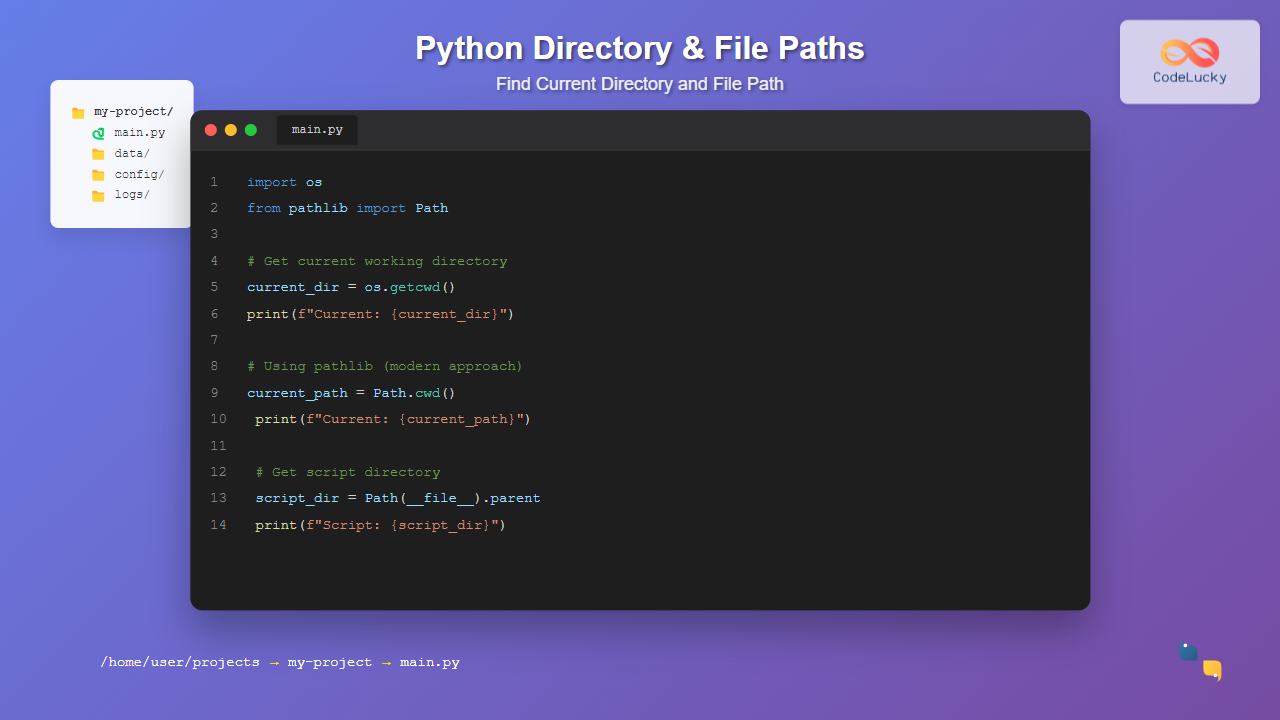
Working with file paths and directories is a fundamental skill in Python programming. Whether you’re building a web application, automating file operations, or creating data processing scripts, knowing how to find the current directory and file paths is essential for robust code.
This comprehensive guide covers all the methods Python offers to work with directories and file paths, from basic techniques to advanced practices that will make your code more portable and maintainable.
Understanding Python’s Approach to File Paths
Python provides multiple ways to work with file paths and directories, each with its own strengths and use cases. The main approaches include:
- os module: Traditional approach with platform-specific handling
- pathlib module: Modern, object-oriented path handling (Python 3.4+)
- __file__ attribute: Script-specific path information
- sys module: System-specific path operations
Method 1: Using the os Module
The os module is the traditional way to handle file system operations in Python. It provides several functions to work with directories and paths.
Getting the Current Working Directory
The most straightforward way to get the current directory is using os.getcwd():
import os

# Get current working directory
current_dir = os.getcwd()
print(f"Current directory: {current_dir}")

# Example output (will vary based on your system):
# Current directory: /Users/username/Documents/python-projects
Getting the Script’s Directory
To find the directory where your Python script is located, use os.path.dirname() with __file__:
import os

# Get the directory of the current script
script_dir = os.path.dirname(os.path.abspath(__file__))
print(f"Script directory: {script_dir}")

# Get just the filename
script_name = os.path.basename(__file__)
print(f"Script name: {script_name}")

# Example output:
# Script directory: /Users/username/Documents/python-projects/my-app
# Script name: main.py
Advanced os Module Operations
import os

def explore_paths():
    # Current working directory
    cwd = os.getcwd()
    print(f"Current working directory: {cwd}")

    # Parent directory
    parent_dir = os.path.dirname(cwd)
    print(f"Parent directory: {parent_dir}")

    # Join paths safely
    new_path = os.path.join(cwd, "data", "files")
    print(f"Joined path: {new_path}")

    # Check if path exists
    exists = os.path.exists(new_path)
    print(f"Path exists: {exists}")

    # Split path into components
    head, tail = os.path.split(cwd)
    print(f"Path head: {head}")
    print(f"Path tail: {tail}")

explore_paths()
Method 2: Using pathlib (Recommended)
The pathlib module, introduced in Python 3.4, provides a more intuitive and object-oriented approach to handling file paths. It’s the recommended method for modern Python applications.
Basic pathlib Operations
from pathlib import Path

# Get current working directory
current_dir = Path.cwd()
print(f"Current directory: {current_dir}")

# Get the script's directory
script_dir = Path(__file__).parent.resolve()
print(f"Script directory: {script_dir}")

# Get the script's full path
script_path = Path(__file__).resolve()
print(f"Script path: {script_path}")

# Example output:
# Current directory: /Users/username/Documents/python-projects
# Script directory: /Users/username/Documents/python-projects/my-app
# Script path: /Users/username/Documents/python-projects/my-app/main.py
Advanced pathlib Features
from pathlib import Path

def demonstrate_pathlib():
    # Create Path object
    current_path = Path.cwd()

    # Navigate directories
    parent = current_path.parent
    grandparent = current_path.parent.parent

    print(f"Current: {current_path}")
    print(f"Parent: {parent}")
    print(f"Grandparent: {grandparent}")

    # Create new paths
    data_dir = current_path / "data" / "processed"
    print(f"Data directory: {data_dir}")

    # Path properties
    print(f"Path name: {current_path.name}")
    print(f"Path suffix: {Path(__file__).suffix}")
    print(f"Path stem: {Path(__file__).stem}")

    # Check path properties
    print(f"Is directory: {current_path.is_dir()}")
    print(f"Is file: {current_path.is_file()}")
    print(f"Exists: {current_path.exists()}")

    # Get all parts of the path
    print(f"Path parts: {current_path.parts}")

demonstrate_pathlib()
Method 3: Using __file__ Attribute
The __file__ attribute contains the path to the current Python file. This is particularly useful when you need to reference files relative to your script’s location.
import os
from pathlib import Path

def file_attribute_examples():
    print("=== Using __file__ with os module ===")

    # Raw __file__ value
    print(f"__file__: {__file__}")

    # Absolute path of the script
    abs_path = os.path.abspath(__file__)
    print(f"Absolute path: {abs_path}")

    # Directory of the script
    script_dir = os.path.dirname(abs_path)
    print(f"Script directory: {script_dir}")

    print("\n=== Using __file__ with pathlib ===")

    # pathlib approach
    script_path = Path(__file__)
    print(f"Script path: {script_path}")
    print(f"Script directory: {script_path.parent}")
    print(f"Script name: {script_path.name}")
    print(f"Script stem: {script_path.stem}")

# Note: __file__ is not available in interactive Python sessions
# This code works when run from a .py file
file_attribute_examples()
Method 4: Using sys Module
The sys module provides access to system-specific parameters and functions, including path-related information.
import sys
import os

def sys_module_examples():
    print("=== System Path Information ===")

    # Python executable path
    print(f"Python executable: {sys.executable}")

    # Script arguments (first is script path)
    if len(sys.argv) > 0:
        script_path = sys.argv[0]
        print(f"Script path from argv: {script_path}")
        print(f"Script directory: {os.path.dirname(os.path.abspath(script_path))}")

    # Python path (module search directories)
    print(f"\nPython path (first 3 entries):")
    for i, path in enumerate(sys.path[:3]):
        print(f"  {i}: {path}")

    # Platform information
    print(f"\nPlatform: {sys.platform}")
    print(f"Python version: {sys.version_info}")

sys_module_examples()
Practical Examples and Use Cases
Creating a File Path Helper Class
from pathlib import Path
import os

class PathHelper:
    """A helper class for common path operations"""

    def __init__(self, reference_file=None):
        if reference_file:
            self.base_dir = Path(reference_file).parent.resolve()
        else:
            self.base_dir = Path.cwd()

    def get_data_dir(self):
        """Get the data directory relative to base directory"""
        return self.base_dir / "data"

    def get_config_file(self):
        """Get the config file path"""
        return self.base_dir / "config" / "settings.json"

    def get_log_dir(self):
        """Get the logs directory"""
        return self.base_dir / "logs"

    def ensure_directories(self):
        """Create necessary directories if they don't exist"""
        directories = [
            self.get_data_dir(),
            self.get_log_dir(),
            self.base_dir / "config"
        ]

        for directory in directories:
            directory.mkdir(parents=True, exist_ok=True)
            print(f"Ensured directory exists: {directory}")

    def get_relative_path(self, target_path):
        """Get relative path from base directory to target"""
        target = Path(target_path).resolve()
        try:
            return target.relative_to(self.base_dir)
        except ValueError:
            return target  # Return absolute path if not relative

    def display_info(self):
        """Display path information"""
        print(f"Base directory: {self.base_dir}")
        print(f"Data directory: {self.get_data_dir()}")
        print(f"Config file: {self.get_config_file()}")
        print(f"Log directory: {self.get_log_dir()}")

# Usage example
path_helper = PathHelper(__file__)
path_helper.display_info()
path_helper.ensure_directories()
Cross-Platform Path Handling
import os
from pathlib import Path
import sys

def cross_platform_paths():
    """Demonstrate cross-platform path handling"""

    print(f"Operating System: {os.name}")
    print(f"Platform: {sys.platform}")

    # Using os.path.join for cross-platform compatibility
    config_path_os = os.path.join(os.getcwd(), "config", "app.ini")
    print(f"Config path (os): {config_path_os}")

    # Using pathlib (automatically cross-platform)
    config_path_pathlib = Path.cwd() / "config" / "app.ini"
    print(f"Config path (pathlib): {config_path_pathlib}")

    # Path separators
    print(f"OS path separator: '{os.sep}'")
    print(f"Alternative separator: '{os.altsep}'")

    # Convert between path formats
    windows_path = "C:\\Users\\John\\Documents\\file.txt"
    unix_path = "/home/john/documents/file.txt"

    # pathlib handles conversion automatically
    path_obj = Path(windows_path if os.name == 'nt' else unix_path)
    print(f"Normalized path: {path_obj}")

cross_platform_paths()
Error Handling and Best Practices
Robust Path Operations
from pathlib import Path
import os
import sys

def safe_path_operations():
    """Demonstrate safe path operations with error handling"""

    try:
        # Safe current directory access
        current_dir = Path.cwd()
        print(f"Current directory: {current_dir}")

        # Handle __file__ not being available (e.g., in REPL)
        try:
            script_path = Path(__file__).resolve()
            print(f"Script path: {script_path}")
        except NameError:
            print("__file__ not available (running in interactive mode)")
            script_path = current_dir / "unknown_script.py"

        # Safe path existence checking
        test_paths = [
            current_dir / "data",
            current_dir / "config" / "settings.json",
            script_path.parent / "requirements.txt"
        ]

        for path in test_paths:
            if path.exists():
                if path.is_file():
                    print(f"✓ File exists: {path}")
                elif path.is_dir():
                    print(f"✓ Directory exists: {path}")
            else:
                print(f"✗ Does not exist: {path}")

        # Safe directory creation
        new_dir = current_dir / "temp" / "processing"
        try:
            new_dir.mkdir(parents=True, exist_ok=True)
            print(f"✓ Created directory: {new_dir}")
        except PermissionError:
            print(f"✗ Permission denied creating: {new_dir}")
        except OSError as e:
            print(f"✗ OS error creating directory: {e}")

    except Exception as e:
        print(f"Error in path operations: {e}")

safe_path_operations()
Performance Considerations
from pathlib import Path
import os
import time

def performance_comparison():
    """Compare performance of different path operations"""

    iterations = 10000

    # Test os.getcwd()
    start_time = time.time()
    for _ in range(iterations):
        current = os.getcwd()
    os_time = time.time() - start_time

    # Test Path.cwd()
    start_time = time.time()
    for _ in range(iterations):
        current = Path.cwd()
    pathlib_time = time.time() - start_time

    print(f"Performance comparison ({iterations} iterations):")
    print(f"os.getcwd(): {os_time:.4f} seconds")
    print(f"Path.cwd(): {pathlib_time:.4f} seconds")
    print(f"Ratio: {pathlib_time/os_time:.2f}x")

    # Test path joining
    start_time = time.time()
    for _ in range(iterations):
        path = os.path.join("home", "user", "documents", "file.txt")
    os_join_time = time.time() - start_time

    start_time = time.time()
    for _ in range(iterations):
        path = Path("home") / "user" / "documents" / "file.txt"
    pathlib_join_time = time.time() - start_time

    print(f"\nPath joining comparison:")
    print(f"os.path.join(): {os_join_time:.4f} seconds")
    print(f"pathlib /: {pathlib_join_time:.4f} seconds")
    print(f"Ratio: {pathlib_join_time/os_join_time:.2f}x")

performance_comparison()

Advanced Techniques
Context Managers for Directory Operations
import os
from contextlib import contextmanager
from pathlib import Path

@contextmanager
def change_directory(new_dir):
    """Context manager to temporarily change directory"""
    old_dir = os.getcwd()
    try:
        os.chdir(new_dir)
        yield Path.cwd()
    finally:
        os.chdir(old_dir)

def demonstrate_context_manager():
    original_dir = Path.cwd()
    print(f"Original directory: {original_dir}")

    # Create a temporary directory for demonstration
    temp_dir = original_dir / "temp_demo"
    temp_dir.mkdir(exist_ok=True)

    # Use context manager to change directory temporarily
    with change_directory(temp_dir) as current:
        print(f"Inside context manager: {current}")
        # Do operations in the new directory
        test_file = Path("test.txt")
        test_file.write_text("Hello from temp directory!")
        print(f"Created file: {test_file.resolve()}")

    print(f"Back to original: {Path.cwd()}")

    # Cleanup
    if temp_dir.exists():
        for file in temp_dir.iterdir():
            file.unlink()
        temp_dir.rmdir()

demonstrate_context_manager()
Path Validation and Security
from pathlib import Path
import os

class SecurePathHandler:
    """Handle paths securely to prevent directory traversal attacks"""

    def __init__(self, base_directory):
        self.base_dir = Path(base_directory).resolve()

    def is_safe_path(self, path):
        """Check if path is within the base directory"""
        try:
            full_path = (self.base_dir / path).resolve()
            return str(full_path).startswith(str(self.base_dir))
        except (OSError, ValueError):
            return False

    def safe_join(self, *parts):
        """Safely join path parts and validate"""
        try:
            path = Path(*parts)
            if self.is_safe_path(path):
                return self.base_dir / path
            else:
                raise ValueError(f"Path '{path}' is outside base directory")
        except Exception as e:
            raise ValueError(f"Invalid path: {e}")

    def get_safe_path(self, user_input):
        """Get a safe path from user input"""
        # Remove dangerous characters and patterns
        cleaned = user_input.replace('..', '').replace('//', '/').strip('/')

        if self.is_safe_path(cleaned):
            return self.base_dir / cleaned
        else:
            raise ValueError("Invalid or unsafe path")

# Example usage
def demonstrate_security():
    handler = SecurePathHandler(Path.cwd() / "safe_area")

    # Create safe area directory
    handler.base_dir.mkdir(exist_ok=True)

    # Test safe paths
    safe_inputs = ["data/file.txt", "config/app.json"]
    for input_path in safe_inputs:
        try:
            safe_path = handler.get_safe_path(input_path)
            print(f"✓ Safe path: {input_path} -> {safe_path}")
        except ValueError as e:
            print(f"✗ Unsafe path: {input_path} -> {e}")

    # Test unsafe paths
    unsafe_inputs = ["../../../etc/passwd", "..\\windows\\system32", "/etc/shadow"]
    for input_path in unsafe_inputs:
        try:
            safe_path = handler.get_safe_path(input_path)
            print(f"? Unexpected safe path: {input_path} -> {safe_path}")
        except ValueError as e:
            print(f"✓ Correctly blocked: {input_path} -> {e}")

demonstrate_security()
Common Pitfalls and Solutions
Handling Different Operating Systems
import os
from pathlib import Path
import sys

def common_pitfalls_and_solutions():
    """Demonstrate common path-related pitfalls and their solutions"""

    print("=== Common Pitfalls and Solutions ===\n")

    # Pitfall 1: Hard-coded path separators
    print("1. Path Separators:")
    bad_path = "data\\files\\config.json"  # Wrong on Unix
    good_path = Path("data") / "files" / "config.json"  # Cross-platform

    print(f"Bad (Windows-specific): {bad_path}")
    print(f"Good (cross-platform): {good_path}")

    # Pitfall 2: Assuming __file__ is always available
    print("\n2. __file__ Availability:")
    try:
        script_dir = Path(__file__).parent
        print(f"Script directory: {script_dir}")
    except NameError:
        print("__file__ not available - using current directory")
        script_dir = Path.cwd()

    # Pitfall 3: Not handling relative vs absolute paths
    print("\n3. Relative vs Absolute Paths:")
    relative = Path("data/file.txt")
    absolute = relative.resolve()

    print(f"Relative: {relative}")
    print(f"Absolute: {absolute}")
    print(f"Is absolute: {absolute.is_absolute()}")

    # Pitfall 4: Path existence assumptions
    print("\n4. Safe Path Operations:")
    test_path = Path("might_not_exist.txt")

    # Wrong way (might raise exception)
    # with open(test_path, 'r') as f:  # Could fail

    # Right way
    if test_path.exists() and test_path.is_file():
        print(f"File exists: {test_path}")
    else:
        print(f"File does not exist: {test_path}")
        # Create it or handle the case

    # Pitfall 5: Case sensitivity issues
    print("\n5. Case Sensitivity:")
    if sys.platform.startswith('win'):
        print("Windows: Case-insensitive filesystem")
    else:
        print("Unix-like: Case-sensitive filesystem")

    # Always use exact case or normalize
    path1 = Path("MyFile.txt")
    path2 = Path("myfile.txt")
    print(f"Paths equal on case-insensitive FS: {path1.name.lower() == path2.name.lower()}")

common_pitfalls_and_solutions()
Integration with Popular Libraries
Working with Configuration Files
import json
from pathlib import Path
from configparser import ConfigParser

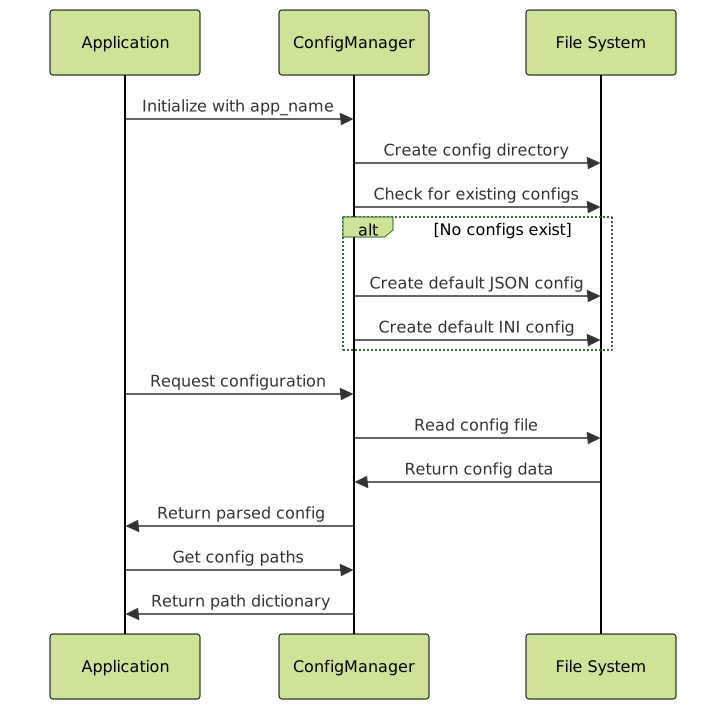
class ConfigManager:
    """Manage configuration files with proper path handling"""

    def __init__(self, app_name="myapp"):
        # Use script directory as base
        try:
            self.base_dir = Path(__file__).parent
        except NameError:
            self.base_dir = Path.cwd()

        self.config_dir = self.base_dir / "config"
        self.config_dir.mkdir(exist_ok=True)

        self.json_config = self.config_dir / f"{app_name}.json"
        self.ini_config = self.config_dir / f"{app_name}.ini"

    def create_default_configs(self):
        """Create default configuration files"""

        # JSON configuration
        default_json = {
            "app": {
                "name": "MyApplication",
                "version": "1.0.0",
                "debug": False
            },
            "paths": {
                "data_dir": str(self.base_dir / "data"),
                "log_dir": str(self.base_dir / "logs"),
                "temp_dir": str(self.base_dir / "temp")
            },
            "database": {
                "host": "localhost",
                "port": 5432,
                "name": "myapp_db"
            }
        }

        with open(self.json_config, 'w') as f:
            json.dump(default_json, f, indent=2)

        # INI configuration
        config = ConfigParser()
        config['APP'] = {
            'name': 'MyApplication',
            'version': '1.0.0',
            'debug': 'False'
        }
        config['PATHS'] = {
            'data_dir': str(self.base_dir / "data"),
            'log_dir': str(self.base_dir / "logs"),
            'temp_dir': str(self.base_dir / "temp")
        }

        with open(self.ini_config, 'w') as f:
            config.write(f)

    def load_json_config(self):
        """Load JSON configuration"""
        if self.json_config.exists():
            with open(self.json_config, 'r') as f:
                return json.load(f)
        return None

    def get_config_paths(self):
        """Get all configuration-related paths"""
        return {
            'base_dir': self.base_dir,
            'config_dir': self.config_dir,
            'json_config': self.json_config,
            'ini_config': self.ini_config
        }

# Usage example
config_manager = ConfigManager()
config_manager.create_default_configs()

paths = config_manager.get_config_paths()
for name, path in paths.items():
    print(f"{name}: {path}")

# Load and display configuration
config_data = config_manager.load_json_config()
if config_data:
    print(f"\nApplication: {config_data['app']['name']}")
    print(f"Data directory: {config_data['paths']['data_dir']}")
Testing Path Operations
import unittest
from pathlib import Path
import tempfile
import os

class TestPathOperations(unittest.TestCase):
    """Test suite for path operations"""

    def setUp(self):
        """Set up test environment"""
        self.test_dir = Path(tempfile.mkdtemp())
        self.original_cwd = Path.cwd()

    def tearDown(self):
        """Clean up test environment"""
        # Remove test directory and contents
        for item in self.test_dir.rglob('*'):
            if item.is_file():
                item.unlink()

        for item in sorted(self.test_dir.rglob('*'), reverse=True):
            if item.is_dir():
                item.rmdir()

        self.test_dir.rmdir()

        # Restore original directory
        os.chdir(self.original_cwd)

    def test_current_directory_operations(self):
        """Test current directory operations"""
        # Test getting current directory
        current_os = os.getcwd()
        current_pathlib = str(Path.cwd())

        self.assertEqual(current_os, current_pathlib)
        self.assertTrue(Path(current_os).exists())

    def test_path_creation_and_validation(self):
        """Test path creation and validation"""
        # Create test paths
        test_file = self.test_dir / "test.txt"
        test_subdir = self.test_dir / "subdir"

        # Test path properties before creation
        self.assertFalse(test_file.exists())
        self.assertFalse(test_subdir.exists())

        # Create and test
        test_file.write_text("test content")
        test_subdir.mkdir()

        self.assertTrue(test_file.exists())
        self.assertTrue(test_file.is_file())
        self.assertTrue(test_subdir.exists())
        self.assertTrue(test_subdir.is_dir())

    def test_path_resolution(self):
        """Test path resolution"""
        # Test relative path resolution
        relative_path = Path(".")
        absolute_path = relative_path.resolve()

        self.assertTrue(absolute_path.is_absolute())
        self.assertEqual(absolute_path, Path.cwd())

    def test_cross_platform_paths(self):
        """Test cross-platform path handling"""
        # Test path joining
        path_parts = ["dir1", "dir2", "file.txt"]

        # Using pathlib
        pathlib_path = Path(*path_parts)

        # Using os.path
        os_path = os.path.join(*path_parts)

        # Both should create valid paths (may differ in separator)
        self.assertEqual(str(pathlib_path), os_path)

def run_tests():
    """Run the test suite"""
    unittest.main(argv=[''], exit=False, verbosity=2)

# Uncomment to run tests
# run_tests()
Best Practices Summary
Based on the comprehensive examples and techniques covered in this guide, here are the key best practices for working with directories and file paths in Python:
✅ Do’s
- Use pathlib for new projects: It’s more readable, cross-platform, and feature-rich
- Always use Path.resolve() when you need absolute paths
- Handle path existence explicitly: Check if files/directories exist before operations
- Use context managers for temporary directory changes
- Validate user-provided paths to prevent security issues
- Create parent directories with
parents=True, exist_ok=True - Use relative paths from script location for portable applications
❌ Don’ts
- Don’t hard-code path separators: Avoid using
\or/directly - Don’t assume __file__ is available: It’s not available in REPL/interactive mode
- Don’t ignore exceptions: Always handle
FileNotFoundErrorandPermissionError - Don’t concatenate paths with strings: Use proper joining methods
- Don’t forget case sensitivity: Different OS handle case differently
Performance Tips
- Cache frequently accessed paths in variables
- Use
Path.iterdir()instead ofos.listdir()for directory iteration - Consider using
osmodule for performance-critical applications - Batch file operations when possible
Understanding these concepts and techniques will help you write more robust, maintainable, and cross-platform Python applications. Whether you’re building web applications, data processing pipelines, or desktop software, proper path handling is essential for reliable file operations.
Remember that pathlib is the modern, recommended approach for most use cases, while the os module remains valuable for performance-critical operations and legacy compatibility. Choose the right tool for your specific needs and always prioritize code clarity and maintainability.





