
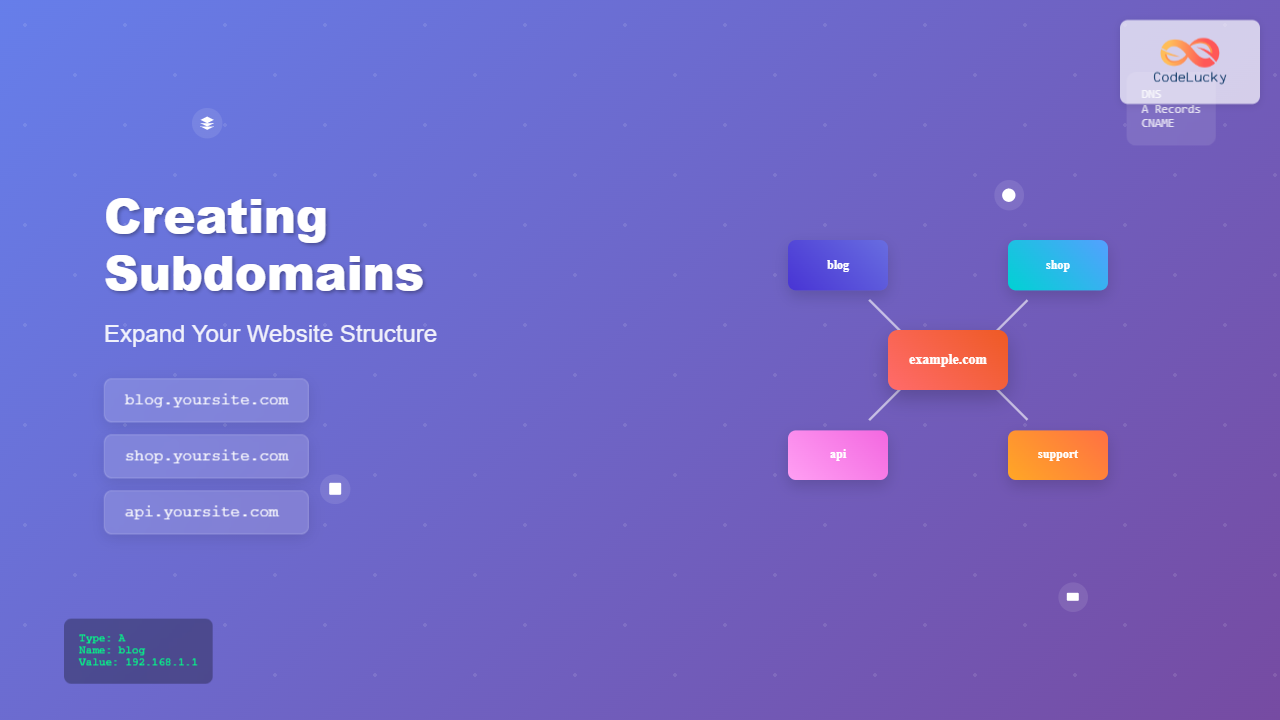
Subdomains are powerful tools that allow you to organize and expand your website structure effectively. They function as separate sections of your main domain while maintaining brand consistency and SEO benefits. Whether you’re looking to create a blog, set up an online store, or organize different services, subdomains provide the flexibility you need.
What Are Subdomains?
A subdomain is a prefix added to your main domain name, separated by a dot. It creates a distinct section of your website that can serve different content or purposes while remaining part of your primary domain structure.

In the structure above, example.com is the root domain, while blog, shop, support, and api are subdomains that can host entirely different content or applications.
Benefits of Using Subdomains
Improved Organization
Subdomains help you organize different aspects of your business or website functionality. You can separate your blog from your main website, create distinct areas for customer support, or maintain separate environments for testing.
SEO Advantages
Search engines treat subdomains as separate entities, which can be beneficial for targeting different keywords or audiences. However, they still benefit from the authority of your main domain.
Technical Flexibility
Each subdomain can run on different servers, use different technologies, or have unique configurations without affecting your main website.
Enhanced User Experience
Users can easily understand and navigate to different sections of your website using intuitive subdomain names.
Common Subdomain Use Cases
Content Organization
- blog.yoursite.com – For company blog or news
- news.yoursite.com – For news and updates
- docs.yoursite.com – For documentation
- wiki.yoursite.com – For knowledge base
Business Functions
- shop.yoursite.com – For e-commerce store
- support.yoursite.com – For customer support
- portal.yoursite.com – For customer portal
- careers.yoursite.com – For job listings
Technical Applications
- api.yoursite.com – For API endpoints
- cdn.yoursite.com – For content delivery
- staging.yoursite.com – For testing environment
- dev.yoursite.com – For development environment
How to Create Subdomains
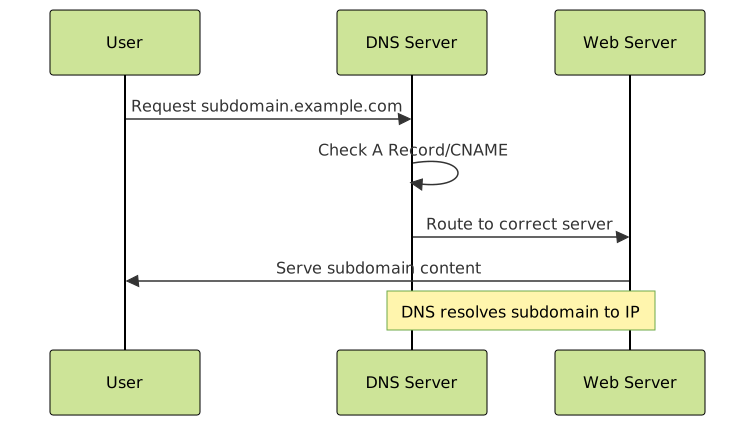
Creating subdomains involves two main steps: DNS configuration and web server setup. The process varies depending on your hosting provider and DNS management system.
Step 1: DNS Configuration
The first step is to configure your DNS records to point the subdomain to the correct server or location.
Using A Records
Type: A
Name: blog
Value: 192.168.1.100
TTL: 3600
This creates blog.yourdomain.com pointing to the IP address 192.168.1.100.
Using CNAME Records
Type: CNAME
Name: shop
Value: yourdomain.com
TTL: 3600
This creates shop.yourdomain.com as an alias to your main domain.
Step 2: Web Server Configuration
After DNS setup, configure your web server to handle the subdomain requests.
Apache Virtual Host Example
<VirtualHost *:80>
    ServerName blog.example.com
    DocumentRoot /var/www/blog
    ErrorLog ${APACHE_LOG_DIR}/blog_error.log
    CustomLog ${APACHE_LOG_DIR}/blog_access.log combined
</VirtualHost>
Nginx Server Block Example
server {
    listen 80;
    server_name blog.example.com;
    root /var/www/blog;
    index index.html index.php;

    location / {
        try_files $uri $uri/ =404;
    }
}
Creating Subdomains with Popular Hosting Providers
cPanel Method
- Log into your cPanel account
- Navigate to “Subdomains” in the Domains section
- Enter your desired subdomain name
- Select the domain from the dropdown
- Specify the document root (or use default)
- Click “Create” to generate the subdomain

Cloudflare Method
- Access your Cloudflare dashboard
- Select your domain
- Go to DNS settings
- Add a new DNS record
- Choose A or CNAME record type
- Enter subdomain name and target
- Save the configuration
WordPress Multisite with Subdomains
For WordPress users, you can create a multisite network using subdomains:
// wp-config.php
define('WP_ALLOW_MULTISITE', true);
define('MULTISITE', true);
define('SUBDOMAIN_INSTALL', true);
define('DOMAIN_CURRENT_SITE', 'example.com');
define('PATH_CURRENT_SITE', '/');
define('SITE_ID_CURRENT_SITE', 1);
define('BLOG_ID_CURRENT_SITE', 1);
Subdomain vs Subdirectory: When to Use Each
| Aspect | Subdomain (blog.site.com) | Subdirectory (site.com/blog) |
|---|---|---|
| SEO Authority | Separate entity, builds own authority | Inherits main domain authority |
| Technical Setup | Requires DNS configuration | Simple folder structure |
| Server Resources | Can use separate servers | Uses same server resources |
| Branding | Distinct identity possible | Unified brand experience |
| Analytics | Separate tracking needed | Unified analytics setup |
Best Practices for Subdomain Management
Naming Conventions
- Keep subdomain names short and descriptive
- Use hyphens instead of underscores if needed
- Avoid numbers unless absolutely necessary
- Maintain consistency across your subdomain structure
SSL Certificate Configuration
Ensure each subdomain has proper SSL certificates. You can use:
- Wildcard SSL – Covers all subdomains (*.example.com)
- Multi-domain SSL – Covers specific subdomains
- Individual certificates – Separate certificate for each subdomain
Performance Optimization
- Use CDN for static content subdomains
- Implement caching strategies
- Monitor subdomain performance separately
- Optimize for mobile devices

Common Issues and Troubleshooting
DNS Propagation Delays
DNS changes can take 24-48 hours to propagate globally. Use DNS checking tools to monitor propagation status.
Mixed Content Warnings
Ensure all resources (images, scripts, stylesheets) on HTTPS subdomains are also served over HTTPS.
Cross-Domain Issues
Implement proper CORS headers when subdomains need to communicate:
// Express.js example
app.use((req, res, next) => {
    res.header('Access-Control-Allow-Origin', '*.example.com');
    res.header('Access-Control-Allow-Headers', 'Origin, X-Requested-With, Content-Type, Accept');
    next();
});
Session Management
Configure cookie domains to work across subdomains:
// PHP example
setcookie('session_id', $value, time() + 3600, '/', '.example.com');
Advanced Subdomain Strategies
Geographic Subdomains
Create region-specific subdomains for international businesses:
- us.example.com – United States content
- uk.example.com – United Kingdom content
- ca.example.com – Canada content
Language-Based Subdomains
Organize content by language while maintaining domain authority:
- en.example.com – English content
- es.example.com – Spanish content
- fr.example.com – French content
Dynamic Subdomains
Create user-specific or dynamic subdomains for SaaS applications:
- user123.example.com – User-specific dashboard
- company-abc.example.com – Company-specific portal

Security Considerations
Wildcard Certificates
Implement wildcard SSL certificates to secure all subdomains automatically.
Access Control
Configure proper access controls for each subdomain based on its purpose:
# .htaccess example for staging subdomain
AuthType Basic
AuthName "Staging Area"
AuthUserFile /path/to/.htpasswd
Require valid-user
Firewall Rules
Set up specific firewall rules for different subdomain purposes, especially for API or admin subdomains.
Monitoring and Analytics
Google Analytics Setup
Configure cross-domain tracking to monitor user behavior across subdomains:
// Google Analytics 4 example
gtag('config', 'GA_MEASUREMENT_ID', {
    'linker': {
        'domains': ['example.com', 'blog.example.com', 'shop.example.com']
    }
});
Performance Monitoring
- Set up separate uptime monitoring for critical subdomains
- Monitor response times and availability
- Track subdomain-specific error rates
- Implement logging strategies for debugging
Future-Proofing Your Subdomain Strategy
As your website grows, consider these factors for long-term success:
- Scalability – Plan for increased traffic and content
- Flexibility – Design systems that can adapt to changing needs
- Maintenance – Establish processes for ongoing management
- Documentation – Keep detailed records of subdomain purposes and configurations
Subdomains offer tremendous flexibility for organizing and expanding your web presence. By following the strategies and best practices outlined in this guide, you can create a robust subdomain structure that enhances user experience, improves SEO performance, and provides the technical foundation for future growth. Remember to plan your subdomain strategy carefully, implement proper security measures, and monitor performance regularly to ensure optimal results.





