
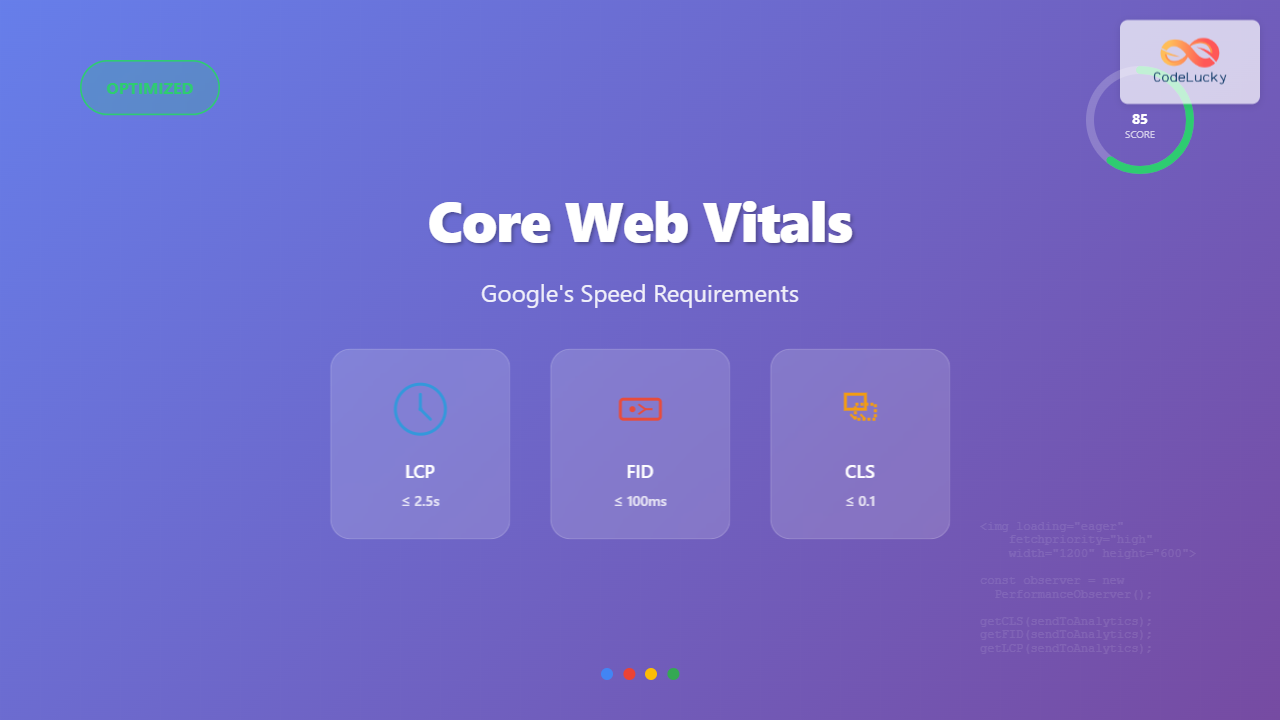
Core Web Vitals have become a critical ranking factor in Google’s search algorithm, directly impacting your website’s visibility and user experience. These three essential metrics measure real-world user experience and can make or break your site’s performance in search results.
What Are Core Web Vitals?
Core Web Vitals are a set of specific factors that Google considers important in a webpage’s overall user experience. They consist of three main metrics:
- Largest Contentful Paint (LCP) – Measures loading performance
- First Input Delay (FID) – Measures interactivity
- Cumulative Layout Shift (CLS) – Measures visual stability

Understanding Largest Contentful Paint (LCP)
LCP measures how long it takes for the largest content element to become visible within the viewport. This could be an image, video, or large text block.
LCP Optimization Techniques
1. Image Optimization
<!-- Poor LCP - Large unoptimized image -->
<img src="hero-image-5mb.jpg" alt="Hero Image">

<!-- Optimized LCP -->
<img src="hero-image-compressed.webp"
     alt="Hero Image"
     width="1200"
     height="600"
     loading="eager"
     fetchpriority="high">
2. Preload Critical Resources
<!-- Preload critical images -->
<link rel="preload" as="image" href="hero-image.webp">

<!-- Preload critical fonts -->
<link rel="preload" as="font" type="font/woff2"
      href="font.woff2" crossorigin>
3. Server-Side Optimizations
// Enable compression
app.use(compression());

// Set proper cache headers
app.use((req, res, next) => {
  if (req.url.match(/\.(css|js|png|jpg|jpeg|gif|webp)$/)) {
    res.setHeader('Cache-Control', 'public, max-age=31536000');
  }
  next();
});
First Input Delay (FID) Optimization
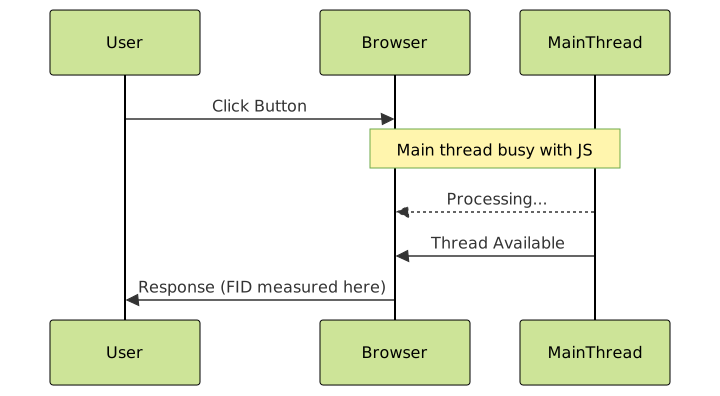
FID measures the time from when a user first interacts with your page until the browser responds to that interaction.
FID Improvement Strategies
1. Minimize JavaScript Execution Time
// Poor: Blocking main thread
function processLargeData() {
  const data = getLargeDataset();
  for (let i = 0; i < 1000000; i++) {
    // Heavy computation
  }
}

// Better: Use Web Workers
const worker = new Worker('data-processor.js');
worker.postMessage(largeDataset);
worker.onmessage = (e) => {
  console.log('Processing complete:', e.data);
};
2. Code Splitting and Lazy Loading
// Dynamic imports for better FID
const loadFeature = async () => {
  const { heavyFeature } = await import('./heavy-feature.js');
  heavyFeature.init();
};

// Intersection Observer for lazy loading
const observer = new IntersectionObserver((entries) => {
  entries.forEach(entry => {
    if (entry.isIntersecting) {
      loadFeature();
      observer.unobserve(entry.target);
    }
  });
});
3. Optimize Event Handlers
// Poor: Heavy event handler
button.addEventListener('click', () => {
  heavyCalculation();
  updateUI();
});

// Better: Debounced and optimized
const debouncedHandler = debounce(() => {
  requestIdleCallback(() => {
    heavyCalculation();
  });
  updateUI();
}, 100);

button.addEventListener('click', debouncedHandler);
Cumulative Layout Shift (CLS) Prevention
CLS measures visual stability by quantifying how much visible content shifts during page load.
Common CLS Causes and Solutions
1. Images Without Dimensions
<!-- Causes CLS -->
<img src="photo.jpg" alt="Photo">

<!-- Prevents CLS -->
<img src="photo.jpg" alt="Photo" width="400" height="300">

<!-- Modern responsive approach -->
<img src="photo.jpg" alt="Photo"
     style="aspect-ratio: 4/3; width: 100%; height: auto;">
2. Dynamic Content Insertion
/* Reserve space for ads */
.ad-container {
  min-height: 250px;
  background: #f0f0f0;
  display: flex;
  align-items: center;
  justify-content: center;
}

.ad-container::before {
  content: "Advertisement";
  color: #999;
}
3. Web Font Loading
/* Prevent font swap CLS */
@font-face {
  font-family: 'CustomFont';
  src: url('font.woff2') format('woff2');
  font-display: fallback; /* or optional */
}

/* Size-adjust for fallback fonts */
@font-face {
  font-family: 'fallback-font';
  size-adjust: 95%; /* Match custom font metrics */
  src: local('Arial');
}
Advanced Optimization Techniques
1. Critical CSS Inlining
<style>
/* Critical CSS - Above the fold styles */
.header { background: #fff; height: 60px; }
.hero { min-height: 400px; background: #f5f5f5; }
</style>

<!-- Non-critical CSS loaded asynchronously -->
<link rel="preload" href="styles.css" as="style" onload="this.onload=null;this.rel='stylesheet'">
<noscript><link rel="stylesheet" href="styles.css"></noscript>
2. Resource Hints Implementation
<!-- DNS prefetch for external domains -->
<link rel="dns-prefetch" href="//fonts.googleapis.com">
<link rel="dns-prefetch" href="//api.example.com">

<!-- Preconnect for critical third-parties -->
<link rel="preconnect" href="https://fonts.gstatic.com" crossorigin>

<!-- Prefetch next page resources -->
<link rel="prefetch" href="/next-page.html">
3. Service Worker for Performance
// service-worker.js
const CACHE_NAME = 'v1';
const CRITICAL_RESOURCES = [
  '/',
  '/styles.css',
  '/app.js',
  '/hero-image.webp'
];

self.addEventListener('install', event => {
  event.waitUntil(
    caches.open(CACHE_NAME)
      .then(cache => cache.addAll(CRITICAL_RESOURCES))
  );
});

self.addEventListener('fetch', event => {
  event.respondWith(
    caches.match(event.request)
      .then(response => response || fetch(event.request))
  );
});
Measuring Core Web Vitals

Real User Monitoring Implementation
// Web Vitals library implementation
import {getCLS, getFID, getFCP, getLCP, getTTFB} from 'web-vitals';

function sendToAnalytics(metric) {
  // Send to your analytics service
  gtag('event', metric.name, {
    value: Math.round(metric.value),
    metric_id: metric.id,
    custom_parameter: metric.value
  });
}

getCLS(sendToAnalytics);
getFID(sendToAnalytics);
getLCP(sendToAnalytics);
Performance Monitoring Dashboard
// Custom performance monitoring
class CoreWebVitalsMonitor {
  constructor() {
    this.metrics = {};
    this.thresholds = {
      LCP: 2500,
      FID: 100,
      CLS: 0.1
    };
  }

  measureLCP() {
    new PerformanceObserver((entryList) => {
      const entries = entryList.getEntries();
      const lastEntry = entries[entries.length - 1];
      this.metrics.LCP = lastEntry.startTime;
      this.checkThreshold('LCP', lastEntry.startTime);
    }).observe({entryTypes: ['largest-contentful-paint']});
  }

  checkThreshold(metric, value) {
    const status = value <= this.thresholds[metric] ? 'good' : 'poor';
    console.log(`${metric}: ${value}ms - ${status}`);
  }
}
Mobile-First Optimization
Mobile devices often have limited processing power and network connectivity, making Core Web Vitals optimization even more critical.
Mobile-Specific Techniques
/* Responsive images for better LCP */
.hero-image {
  width: 100%;
  height: auto;
}

@media (max-width: 768px) {
  .hero-image {
    content: url('hero-mobile.webp');
  }
}

@media (min-width: 769px) {
  .hero-image {
    content: url('hero-desktop.webp');
  }
}
Touch Optimization for FID
/* Improve touch targets */
.button {
  min-height: 44px;
  min-width: 44px;
  padding: 12px 24px;
  touch-action: manipulation; /* Prevent zoom delay */
}

/* Reduce paint complexity */
.card {
  will-change: transform;
  transform: translateZ(0); /* Force GPU layer */
}
Common Pitfalls and Solutions
Third-Party Script Management
<!-- Poor: Blocking third-party scripts -->
<script src="https://analytics.example.com/script.js"></script>

<!-- Better: Async loading with error handling -->
<script>
(function() {
  const script = document.createElement('script');
  script.src = 'https://analytics.example.com/script.js';
  script.async = true;
  script.defer = true;

  script.onerror = function() {
    console.log('Third-party script failed to load');
  };

  document.head.appendChild(script);
})();
</script>
Progressive Enhancement
// Load features progressively
if ('IntersectionObserver' in window) {
  // Use Intersection Observer
  lazyLoadImages();
} else {
  // Fallback for older browsers
  loadAllImages();
}

// Feature detection for modern APIs
if ('loading' in HTMLImageElement.prototype) {
  // Native lazy loading
  images.forEach(img => img.loading = 'lazy');
} else {
  // Polyfill or alternative approach
  loadLazyLoadingPolyfill();
}
Testing and Validation

Automated Testing Setup
{
  "scripts": {
    "lighthouse": "lighthouse --chrome-flags='--headless' --output=html --output-path=./report.html",
    "performance-budget": "lighthouse --budget-path=budget.json --chrome-flags='--headless'"
  },
  "budget": {
    "resourceSizes": [
      {"resourceType": "script", "budget": 300},
      {"resourceType": "image", "budget": 500}
    ],
    "timings": [
      {"metric": "first-contentful-paint", "budget": 2000},
      {"metric": "largest-contentful-paint", "budget": 2500}
    ]
  }
}
Conclusion
Optimizing Core Web Vitals requires a comprehensive approach that addresses loading performance, interactivity, and visual stability. By implementing the techniques outlined in this guide—from image optimization and code splitting to careful resource management and performance monitoring—you can significantly improve your website’s user experience and search engine rankings.
Remember that Core Web Vitals optimization is an ongoing process. Regular monitoring, testing, and refinement are essential to maintain optimal performance as your website evolves. Start with the most impactful optimizations for your specific use case, and gradually implement more advanced techniques as needed.
The investment in Core Web Vitals optimization pays dividends not only in search rankings but also in user satisfaction, conversion rates, and overall business success. Make performance a priority from the beginning of your development process, and your users—and Google—will thank you for it.





