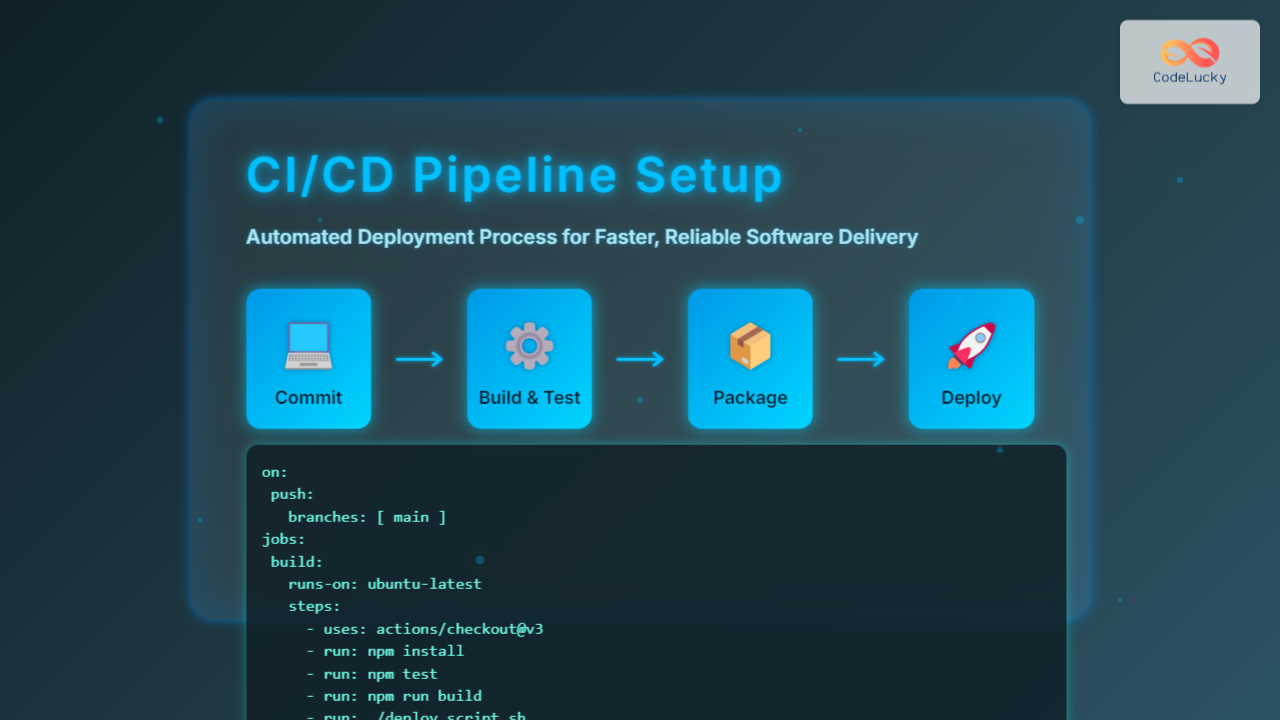
In modern software development, CI/CD pipeline setup is critical for automating the deployment process, enabling faster, reliable, and repeatable software releases. This article covers how to implement a robust CI/CD pipeline from scratch, detailing every stage of the automation flow, with practical examples and clear visual diagrams. Whether you are a developer, DevOps engineer, or technical learner, this guide will equip you with the knowledge to build efficient pipelines that streamline your software delivery.
What is a CI/CD Pipeline?
CI/CD stands for Continuous Integration and Continuous Deployment (or Delivery). It is a practice where developers frequently integrate code into a shared repository, triggering automated builds, tests, and deployments. This pipeline reduces integration issues, improves code quality, and accelerates delivery to production.
Key Components of a CI/CD Pipeline
- Source Control Management (SCM): Repository like GitHub, GitLab, or Bitbucket holds the codebase.
- Continuous Integration: Automatically builds and runs tests on each code change.
- Artifact Repository: Stores built packages or container images for deployment.
- Continuous Deployment: Automated release of approved builds to staging or production environments.
- Monitoring & Feedback: Observes deployment health and feeds data back to developers.

Step-by-Step CI/CD Pipeline Setup
1. Set up Source Control
Choose a Git-based version control platform like GitHub. Create a repository and configure branching policies to enforce code reviews and pull requests. This ensures only validated code enters the main branch triggering the pipeline.
2. Continuous Integration Configuration
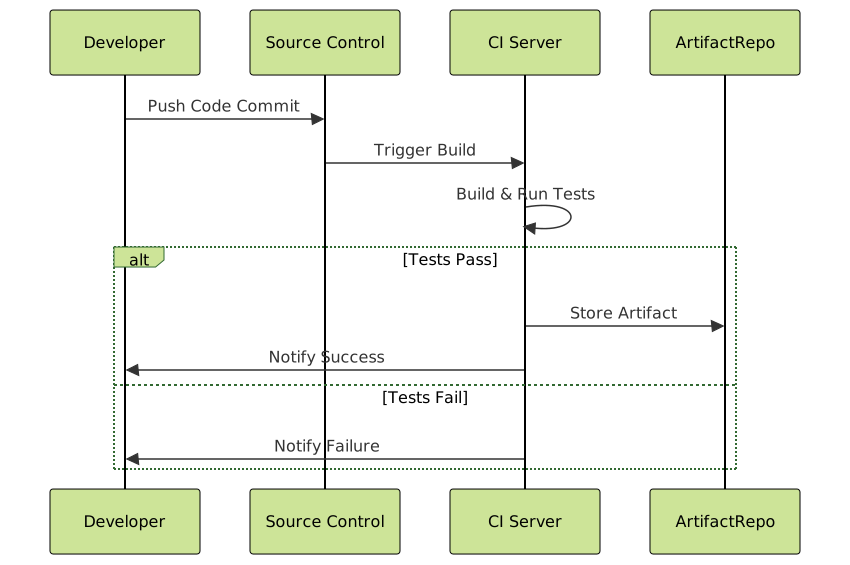
Integrate a CI tool like Jenkins, GitHub Actions, GitLab CI, or CircleCI. Define pipeline steps in the platform’s configuration files (e.g., Jenkinsfile, .github/workflows/ci.yml) to include:
- Checkout code from SCM
- Compile/build project
- Run unit and integration tests
- Publish build artifacts on success
3. Artifact Repository Setup
Use an artifact repository manager like Nexus or JFrog Artifactory, or container registries like Docker Hub or Amazon ECR for containerized apps, to store build outputs. This allows version control of deployable packages.
4. Continuous Deployment Pipeline
Extend the CI pipeline to deploy the stable builds automatically. Use deployment tools or scripts triggered after successful CI stages to:
- Deploy to a staging environment for QA
- Run automated acceptance tests
- Upon approval, deploy to production
This deployment can be automated fully or gated for manual approvals as needed.

5. Monitoring and Feedback
Implement monitoring tools like Prometheus, Grafana, or ELK stack to track deployment success, performance metrics, and error rates. Use alerts to notify teams quickly on failures for fast rollback or fixes.
Example: Basic CI/CD Pipeline with GitHub Actions
This example shows a simple YAML workflow for a Node.js app using GitHub Actions to automate build, test, and deploy to a cloud service after merging to main branch.
name: Node.js CI/CD Pipeline

on:
  push:
    branches: [ main ]

jobs:
  build_test_deploy:
    runs-on: ubuntu-latest

    steps:
      - name: Checkout Code
        uses: actions/checkout@v3

      - name: Setup Node.js
        uses: actions/setup-node@v3
        with:
          node-version: '18'

      - name: Install Dependencies
        run: npm install

      - name: Run Tests
        run: npm test

      - name: Build
        run: npm run build

      - name: Deploy to Cloud
        if: success()
        env:
          API_TOKEN: ${{ secrets.CLOUD_API_TOKEN }}
        run: |
          echo "Deploying to cloud..."
          ./deploy_script.sh
Best Practices for a Reliable CI/CD Pipeline
- Pipeline as Code: Maintain pipeline configuration in code repositories for versioning and collaboration.
- Fail Fast: Design pipelines to catch errors early during build or tests.
- Automate Tests: Include unit, integration, and acceptance tests in pipeline.
- Use Containerization: Deploy using containers for consistency across environments.
- Incremental Rollouts: Use blue/green or canary deployments for safer releases.
- Secure Secrets: Use secure vaults or platform secrets management to handle sensitive data.
Conclusion
Setting up an automated CI/CD pipeline transforms software development by reducing manual efforts, improving deployment frequency, and increasing product quality. By systematically integrating build, test, artifact management, and deployment stages, teams can deliver features faster and with confidence. The combination of visual pipeline understanding and implementation examples here can help teams of all sizes adopt CI/CD best practices.