
What is a CDN and Why Your Website Needs One
A Content Delivery Network (CDN) is a geographically distributed network of servers that cache and deliver web content to users from the closest server location. This strategic distribution dramatically reduces latency, improves loading speeds, and enhances user experience across the globe.
Key Benefits of CDN Implementation:
- Faster Loading Times: Content served from nearby servers reduces round-trip time
- Reduced Server Load: Distributes traffic across multiple edge servers
- Enhanced Security: DDoS protection and SSL/TLS encryption
- Global Scalability: Handle traffic spikes and international users efficiently
- Improved SEO: Page speed is a crucial ranking factor

Choosing the Right CDN Provider
Selecting the optimal CDN provider depends on your specific requirements, budget, and target audience geographic distribution.
Popular CDN Providers Comparison
| Provider | Global PoPs | Pricing Model | Best For | Key Features |
|---|---|---|---|---|
| Cloudflare | 300+ | Free/Premium | Small to Enterprise | DDoS protection, Analytics, Workers |
| AWS CloudFront | 400+ | Pay-as-you-go | AWS ecosystem | Lambda@Edge, Deep AWS integration |
| Google Cloud CDN | 200+ | Usage-based | Google Cloud users | Global load balancing, Cache invalidation |
| KeyCDN | 100+ | Pay-as-you-use | Developers | Real-time analytics, Image processing |
| MaxCDN (StackPath) | 200+ | Monthly plans | WordPress sites | WordPress optimization, WAF |
Step-by-Step CDN Setup Process
1. Account Registration and Domain Verification
For Cloudflare (Free Tier Example):
- Visit Cloudflare.com and create an account
- Add your domain name
- Cloudflare scans existing DNS records
- Review and confirm DNS record accuracy
- Update nameservers at your domain registrar
# Example nameserver update
# Replace your domain's nameservers with:
ns1.cloudflare.com
ns2.cloudflare.com
2. DNS Configuration
Configure your DNS records properly to ensure all content routes through the CDN:
# A Records (IPv4)
@ IN A 203.0.113.10
www IN A 203.0.113.10

# AAAA Records (IPv6)
@ IN AAAA 2001:db8::1
www IN AAAA 2001:db8::1

# CNAME Records
blog IN CNAME example.com
shop IN CNAME example.com
3. SSL/TLS Certificate Setup
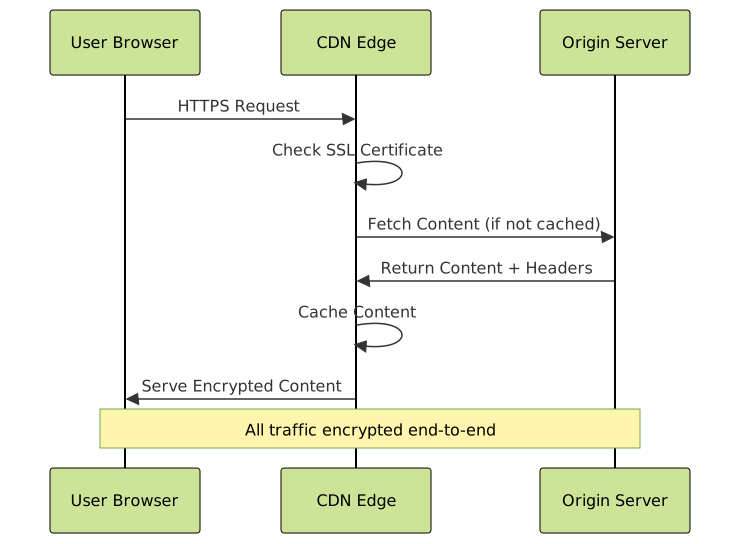
Enable HTTPS encryption for secure content delivery:
- Automatic SSL: Most CDNs provide free SSL certificates
- Custom SSL: Upload your own certificate for branded domains
- End-to-end encryption: Configure origin server SSL
// Force HTTPS redirect example
if (location.protocol !== 'https:') {
    location.replace('https:' + window.location.href.substring(window.location.protocol.length));
}
Advanced CDN Configuration
Cache Settings Optimization
Proper cache configuration is crucial for optimal performance:
# .htaccess cache control example
<IfModule mod_expires.c>
    ExpiresActive On

    # Images
    ExpiresByType image/jpg "access plus 1 year"
    ExpiresByType image/jpeg "access plus 1 year"
    ExpiresByType image/gif "access plus 1 year"
    ExpiresByType image/png "access plus 1 year"
    ExpiresByType image/webp "access plus 1 year"

    # CSS and JavaScript
    ExpiresByType text/css "access plus 1 month"
    ExpiresByType application/javascript "access plus 1 month"

    # HTML
    ExpiresByType text/html "access plus 1 hour"
</IfModule>
Custom Cache Rules
Configure specific caching behavior for different content types:
# Cloudflare Page Rules example
rules:
  - pattern: "*.example.com/api/*"
    actions:
      cache_level: "bypass"

  - pattern: "*.example.com/assets/*"
    actions:
      cache_level: "cache_everything"
      edge_cache_ttl: 31536000  # 1 year

  - pattern: "example.com/blog/*"
    actions:
      cache_level: "standard"
      browser_cache_ttl: 14400   # 4 hours
Origin Server Configuration
Optimize your origin server to work efficiently with CDN:
<?php
// PHP cache headers example
function setCacheHeaders($type, $maxAge) {
    header('Cache-Control: public, max-age=' . $maxAge);
    header('Expires: ' . gmdate('D, d M Y H:i:s', time() + $maxAge) . ' GMT');

    if ($type === 'static') {
        header('Pragma: cache');
        header('Vary: Accept-Encoding');
    }
}

// For static assets
setCacheHeaders('static', 31536000); // 1 year

// For dynamic content
setCacheHeaders('dynamic', 3600); // 1 hour
?>
CDN Integration Methods
Method 1: DNS-Based CDN (Full Site)
Route all traffic through CDN by changing nameservers:
<!-- All resources automatically served through CDN -->
<link rel="stylesheet" href="/css/style.css">
<script src="/js/app.js"></script>
<img src="/images/hero.jpg" alt="Hero Image">
Method 2: Subdomain CDN (Assets Only)
Use a CDN subdomain for static assets:
<!-- Static assets served from CDN subdomain -->
<link rel="stylesheet" href="//cdn.example.com/css/style.css">
<script src="//cdn.example.com/js/app.js"></script>
<img src="//cdn.example.com/images/hero.jpg" alt="Hero Image">
Method 3: Pull Zone Configuration
Configure CDN to pull content from your origin server:
// Dynamic asset URL generation
function getCDNUrl(assetPath) {
    const cdnDomain = 'https://cdn.example.com';
    return cdnDomain + assetPath;
}

// Usage in templates
const cssUrl = getCDNUrl('/css/style.css');
const jsUrl = getCDNUrl('/js/app.js');

Performance Monitoring and Analytics
Key Performance Metrics
Monitor these essential metrics to evaluate CDN performance:
- Cache Hit Ratio: Percentage of requests served from cache (aim for 85%+)
- Time to First Byte (TTFB): Server response time measurement
- Total Page Load Time: Complete page rendering time
- Bandwidth Usage: Data transfer monitoring and cost optimization
- Error Rates: 4xx and 5xx HTTP status codes tracking
Implementation of Performance Tracking
// Performance monitoring with Navigation Timing API
function trackCDNPerformance() {
    if (performance && performance.timing) {
        const timing = performance.timing;

        const metrics = {
            dns: timing.domainLookupEnd - timing.domainLookupStart,
            connection: timing.connectEnd - timing.connectStart,
            ttfb: timing.responseStart - timing.navigationStart,
            download: timing.responseEnd - timing.responseStart,
            domReady: timing.domContentLoadedEventStart - timing.navigationStart,
            loadComplete: timing.loadEventEnd - timing.navigationStart
        };

        // Send metrics to analytics
        console.log('CDN Performance Metrics:', metrics);

        // Optional: Send to Google Analytics
        if (typeof gtag !== 'undefined') {
            gtag('event', 'timing_complete', {
                name: 'CDN_Load_Time',
                value: metrics.loadComplete
            });
        }
    }
}

// Execute after page load
window.addEventListener('load', trackCDNPerformance);
Common CDN Issues and Troubleshooting
Cache Invalidation
When content updates, you need to clear CDN cache:
# Cloudflare API cache purge example
curl -X POST "https://api.cloudflare.com/client/v4/zones/ZONE_ID/purge_cache" \
     -H "X-Auth-Email: [email protected]" \
     -H "X-Auth-Key: your-api-key" \
     -H "Content-Type: application/json" \
     --data '{"purge_everything":true}'

# Selective purge
curl -X POST "https://api.cloudflare.com/client/v4/zones/ZONE_ID/purge_cache" \
     -H "X-Auth-Email: [email protected]" \
     -H "X-Auth-Key: your-api-key" \
     -H "Content-Type: application/json" \
     --data '{"files":["https://example.com/css/style.css","https://example.com/js/app.js"]}'
Mixed Content Issues
Resolve HTTP/HTTPS mixed content problems:
<!-- Use protocol-relative URLs -->
<script src="//cdn.example.com/js/app.js"></script>

<!-- Or force HTTPS -->
<script src="https://cdn.example.com/js/app.js"></script>

<!-- Content Security Policy header -->
<meta http-equiv="Content-Security-Policy"
      content="upgrade-insecure-requests">
CORS Configuration
Configure Cross-Origin Resource Sharing for web fonts and APIs:
# .htaccess CORS configuration
<IfModule mod_headers.c>
    # Web fonts
    <FilesMatch "\.(ttf|ttc|otf|eot|woff|woff2)$">
        Header set Access-Control-Allow-Origin "*"
    </FilesMatch>

    # API endpoints
    <Files "api.php">
        Header set Access-Control-Allow-Origin "https://yourdomain.com"
        Header set Access-Control-Allow-Methods "GET, POST, OPTIONS"
        Header set Access-Control-Allow-Headers "Content-Type, Authorization"
    </Files>
</IfModule>

WordPress CDN Integration
Plugin-Based Setup
Popular WordPress CDN plugins for easy integration:
// Manual CDN URL replacement in functions.php
function replace_cdn_urls($content) {
    $cdn_url = 'https://cdn.example.com';
    $site_url = get_site_url();

    // Replace image URLs
    $content = str_replace($site_url . '/wp-content/uploads/',
                          $cdn_url . '/wp-content/uploads/',
                          $content);

    // Replace asset URLs
    $content = str_replace($site_url . '/wp-content/themes/',
                          $cdn_url . '/wp-content/themes/',
                          $content);

    return $content;
}

// Apply to post content and widgets
add_filter('the_content', 'replace_cdn_urls');
add_filter('widget_text', 'replace_cdn_urls');
Theme Integration
// wp-config.php CDN constant
define('WP_CDN_URL', 'https://cdn.example.com');

// Theme functions.php
function get_cdn_url($path) {
    if (defined('WP_CDN_URL')) {
        return WP_CDN_URL . $path;
    }
    return get_template_directory_uri() . $path;
}

// Usage in templates
<link rel="stylesheet" href="<?php echo get_cdn_url('/css/style.css'); ?>">
<script src="<?php echo get_cdn_url('/js/script.js'); ?>"></script>
Security Considerations
DDoS Protection
CDNs provide inherent DDoS protection through traffic distribution:
# Cloudflare security settings example
security:
  level: "medium"  # under_attack, high, medium, low, essentially_off

  browser_check: true
  challenge_ttl: 1800

  # Rate limiting
  rate_limiting:
    threshold: 10
    period: 60
    action: "challenge"  # block, challenge, js_challenge
WAF (Web Application Firewall)
Configure firewall rules to protect your application:
// Custom security headers via CDN
const securityHeaders = {
    'X-Frame-Options': 'DENY',
    'X-Content-Type-Options': 'nosniff',
    'X-XSS-Protection': '1; mode=block',
    'Referrer-Policy': 'strict-origin-when-cross-origin',
    'Content-Security-Policy': "default-src 'self'; script-src 'self' 'unsafe-inline'"
};

Cost Optimization Strategies
Bandwidth Management
- Image Optimization: Use WebP, AVIF formats and responsive images
- Compression: Enable Gzip/Brotli compression for text-based assets
- Selective Caching: Cache only necessary content types
- Geographic Restrictions: Limit CDN usage to target regions
// Adaptive image loading
function loadOptimizedImage(element) {
    const supportsWebP = checkWebPSupport();
    const supportsAVIF = checkAVIFSupport();

    let imagePath = element.dataset.src;

    if (supportsAVIF) {
        imagePath = imagePath.replace(/\.(jpg|jpeg|png)$/i, '.avif');
    } else if (supportsWebP) {
        imagePath = imagePath.replace(/\.(jpg|jpeg|png)$/i, '.webp');
    }

    element.src = 'https://cdn.example.com' + imagePath;
}

function checkWebPSupport() {
    const elem = document.createElement('canvas');
    return !!(elem.getContext && elem.getContext('2d')) &&
           elem.toDataURL('image/webp').indexOf('webp') !== -1;
}
Testing and Validation
Performance Testing Tools
- GTmetrix: Comprehensive performance analysis
- Pingdom: Global load time testing
- WebPageTest: Detailed waterfall analysis
- Google PageSpeed Insights: Core Web Vitals assessment
CDN Verification Commands
# Check CDN response headers
curl -I https://cdn.example.com/css/style.css

# Verify cache hit/miss
curl -H "Cache-Control: no-cache" -I https://cdn.example.com/css/style.css

# Test from different locations
curl -H "CF-IPCountry: US" -I https://cdn.example.com/css/style.css
curl -H "CF-IPCountry: GB" -I https://cdn.example.com/css/style.css
Future-Proofing Your CDN Strategy
HTTP/3 and QUIC Protocol
Modern CDNs support next-generation protocols for enhanced performance:
- HTTP/3: Improved connection establishment and multiplexing
- QUIC: Reduced latency and better packet loss recovery
- Server Push: Proactive resource delivery
- Early Hints: 103 status codes for faster resource loading
Edge Computing Integration
// Cloudflare Workers example for edge computing
addEventListener('fetch', event => {
  event.respondWith(handleRequest(event.request))
})

async function handleRequest(request) {
  // Process request at the edge
  const response = await fetch(request)

  // Modify response headers
  const newResponse = new Response(response.body, response)
  newResponse.headers.set('X-Processed-At-Edge', 'true')

  return newResponse
}
Implementing a CDN transforms your website’s global performance, providing faster loading times, enhanced security, and improved scalability. By following this comprehensive setup guide, configuring proper caching strategies, and continuously monitoring performance metrics, you’ll deliver an optimal user experience worldwide while reducing server load and operational costs.
Remember to regularly review your CDN configuration, update security settings, and optimize for emerging web technologies to maintain peak performance as your website grows and evolves.





