
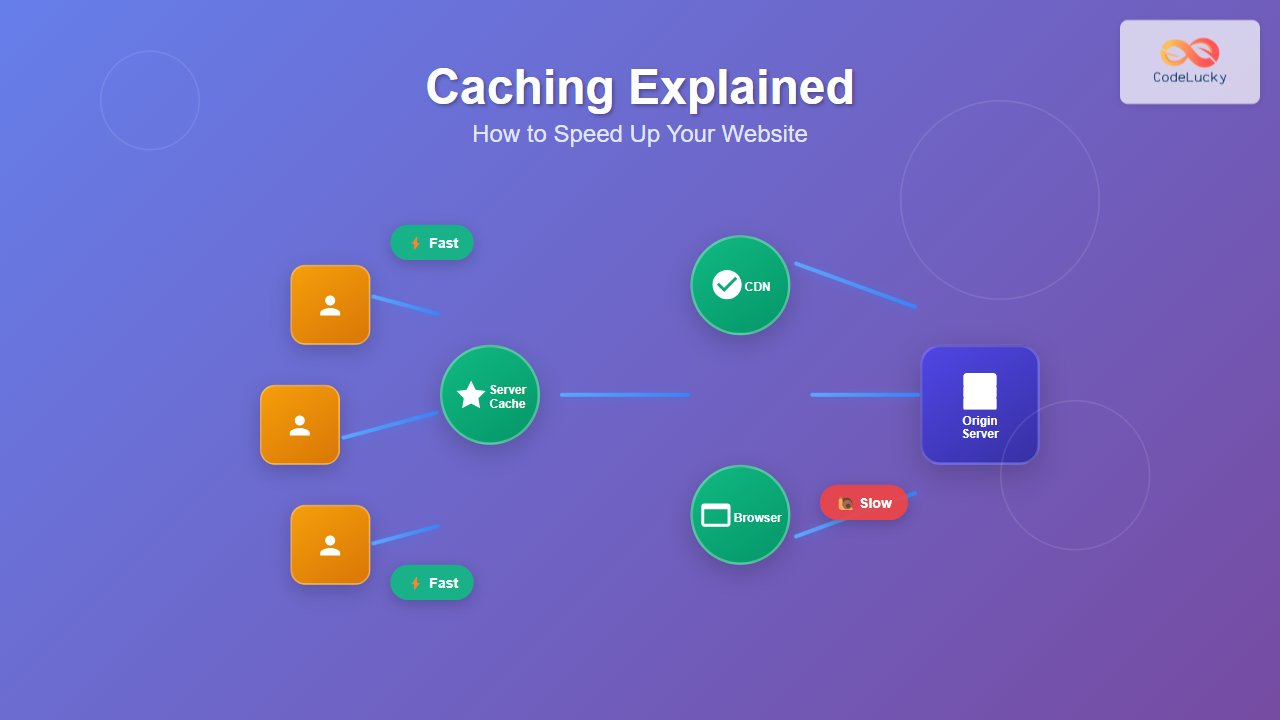
Website speed is crucial for user experience and SEO rankings. Caching is one of the most effective techniques to dramatically improve your website’s performance by storing frequently accessed data in faster, more accessible locations.
This comprehensive guide will walk you through different caching strategies, implementation techniques, and real-world examples to help you optimize your website’s performance.
What is Caching?
Caching is a technique that stores copies of data in temporary storage locations (called caches) so that future requests for that data can be served faster. Instead of generating or fetching the same data repeatedly, the system retrieves it from the cache.

Key Benefits of Caching
- Reduced Load Times: Cached content loads significantly faster than generating it from scratch
- Lower Server Load: Fewer requests reach your origin server, reducing computational overhead
- Better User Experience: Faster page loads lead to higher user satisfaction and engagement
- Cost Savings: Reduced bandwidth usage and server resources lower operational costs
- Improved SEO: Search engines favor faster-loading websites in their rankings
Types of Caching
1. Browser Caching
Browser caching stores website resources locally on the user’s device. When a user revisits your site, their browser can load cached resources instead of downloading them again.
Implementation Example
Set cache headers in your server configuration:
# Apache .htaccess
<IfModule mod_expires.c>
    ExpiresActive On
    ExpiresByType text/css "access plus 1 year"
    ExpiresByType application/javascript "access plus 1 year"
    ExpiresByType image/png "access plus 1 year"
    ExpiresByType image/jpg "access plus 1 year"
    ExpiresByType image/jpeg "access plus 1 year"
</IfModule>
# Nginx configuration
location ~* \.(css|js|png|jpg|jpeg|gif|ico|svg)$ {
expires 1y;
add_header Cache-Control "public, immutable";
}Cache-Control Headers
Different cache directives provide fine-grained control:
public: Can be cached by browsers and intermediate cachesprivate: Only cached by the user’s browserno-cache: Must revalidate with server before using cached versionno-store: Never cache this resourcemax-age=3600: Cache for 3600 seconds (1 hour)
2. Server-Side Caching
Server-side caching stores processed data or rendered pages on the server to avoid expensive operations for subsequent requests.
Application-Level Caching
Here’s a PHP example using Redis for caching database queries:
<?php
class ProductCache {
    private $redis;

    public function __construct() {
        $this->redis = new Redis();
        $this->redis->connect('127.0.0.1', 6379);
    }

    public function getProduct($id) {
        $cacheKey = "product:$id";
        $cached = $this->redis->get($cacheKey);

        if ($cached) {
            return json_decode($cached, true);
        }

        // Fetch from database if not cached
        $product = $this->fetchFromDatabase($id);

        // Cache for 1 hour
        $this->redis->setex($cacheKey, 3600, json_encode($product));

        return $product;
    }

    private function fetchFromDatabase($id) {
        // Database query logic here
        return $productData;
    }
}
Full-Page Caching
Store entire rendered HTML pages:
// Node.js Express example
const cache = new Map();

app.get('/products/:id', (req, res) => {
    const cacheKey = `product-page-${req.params.id}`;

    if (cache.has(cacheKey)) {
        return res.send(cache.get(cacheKey));
    }

    const html = renderProductPage(req.params.id);
    cache.set(cacheKey, html);

    // Set cache expiration
    setTimeout(() => cache.delete(cacheKey), 300000); // 5 minutes

    res.send(html);
});
3. Content Delivery Network (CDN) Caching
CDNs cache your content at multiple geographic locations, serving users from the nearest server.

CDN Configuration Example
Configure Cloudflare page rules for optimal caching:
// Cloudflare Page Rule example
{
    "targets": [
        {
            "target": "url",
            "constraint": {
                "operator": "matches",
                "value": "example.com/api/*"
            }
        }
    ],
    "actions": [
        {
            "id": "cache_level",
            "value": "cache_everything"
        },
        {
            "id": "edge_cache_ttl",
            "value": 86400
        }
    ]
}
4. Database Caching
Cache frequently accessed database queries to reduce database load.
Query Result Caching
# Python with Redis example
import redis
import json
import hashlib

class DatabaseCache:
    def __init__(self):
        self.redis_client = redis.Redis(host='localhost', port=6379, db=0)

    def get_cached_query(self, query, params=None):
        # Create unique cache key
        cache_key = self._generate_cache_key(query, params)

        # Try to get from cache
        cached_result = self.redis_client.get(cache_key)
        if cached_result:
            return json.loads(cached_result)

        # Execute query if not cached
        result = self._execute_query(query, params)

        # Cache result for 10 minutes
        self.redis_client.setex(
            cache_key,
            600,
            json.dumps(result, default=str)
        )

        return result

    def _generate_cache_key(self, query, params):
        key_string = f"{query}:{str(params)}"
        return hashlib.md5(key_string.encode()).hexdigest()
Cache Invalidation Strategies
Cache invalidation ensures that stale data doesn’t persist when the underlying data changes.

Time-Based Expiration (TTL)
// Set cache with TTL
cache.set('user-data', userData, {
    ttl: 300 // 5 minutes
});

// Or using Redis
redis.setex('session:12345', 1800, sessionData); // 30 minutes
Tag-Based Invalidation
<?php
// Cache with tags
$cache->set('product:123', $productData, ['product', 'category:electronics']);

// Invalidate all products
$cache->invalidateTag('product');

// Invalidate specific category
$cache->invalidateTag('category:electronics');
?>
Advanced Caching Patterns
Cache-Aside Pattern
The application manages the cache directly:
public Product getProduct(int id) {
    // Try cache first
    Product product = cache.get("product:" + id);

    if (product == null) {
        // Cache miss - fetch from database
        product = database.findProduct(id);

        // Store in cache
        cache.put("product:" + id, product);
    }

    return product;
}
Write-Through Caching
async function updateProduct(id, data) {
    // Update database first
    await database.updateProduct(id, data);

    // Update cache
    cache.set(`product:${id}`, data);

    return data;
}
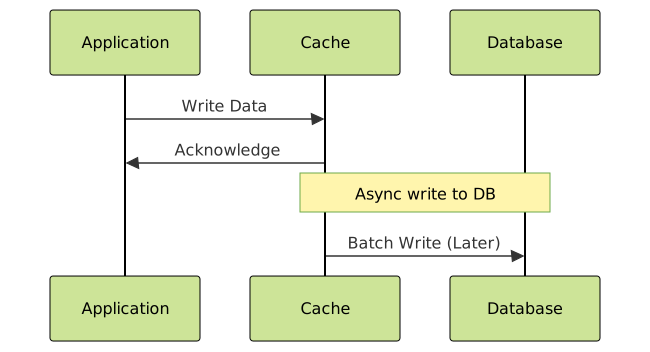
Write-Behind (Write-Back) Caching
Performance Monitoring and Optimization
Cache Hit Ratio Calculation
class CacheMetrics {
    constructor() {
        this.hits = 0;
        this.misses = 0;
    }

    recordHit() {
        this.hits++;
    }

    recordMiss() {
        this.misses++;
    }

    getHitRatio() {
        const total = this.hits + this.misses;
        return total > 0 ? (this.hits / total) * 100 : 0;
    }

    resetMetrics() {
        this.hits = 0;
        this.misses = 0;
    }
}
Cache Performance Testing
# Performance testing script
import time
import requests

def test_cache_performance():
    url = "https://yoursite.com/api/products/123"

    # First request (cache miss)
    start_time = time.time()
    response1 = requests.get(url)
    first_request_time = time.time() - start_time

    # Second request (cache hit)
    start_time = time.time()
    response2 = requests.get(url)
    second_request_time = time.time() - start_time

    print(f"First request (miss): {first_request_time:.3f}s")
    print(f"Second request (hit): {second_request_time:.3f}s")
    print(f"Speed improvement: {first_request_time/second_request_time:.1f}x")

    return {
        'cache_miss_time': first_request_time,
        'cache_hit_time': second_request_time,
        'improvement_factor': first_request_time/second_request_time
    }
Best Practices and Common Pitfalls
Cache Key Design
Design clear, hierarchical cache keys:
// Good cache key patterns
const cacheKeys = {
    user: (id) => `user:${id}`,
    userPosts: (userId) => `user:${userId}:posts`,
    postComments: (postId) => `post:${postId}:comments`,
    categoryProducts: (category, page) => `category:${category}:products:page:${page}`
};

// Usage
const userData = cache.get(cacheKeys.user(123));
const userPosts = cache.get(cacheKeys.userPosts(123));
Avoiding Cache Stampede
Prevent multiple processes from regenerating the same cached data simultaneously:
import threading
import time

class CacheManager:
    def __init__(self):
        self.cache = {}
        self.locks = {}
        self.lock_manager = threading.Lock()

    def get_or_compute(self, key, compute_func, ttl=300):
        # Check cache first
        if key in self.cache:
            data, expiry = self.cache[key]
            if time.time() < expiry:
                return data

        # Acquire lock for this key
        with self.lock_manager:
            if key not in self.locks:
                self.locks[key] = threading.Lock()
            key_lock = self.locks[key]

        with key_lock:
            # Double-check cache after acquiring lock
            if key in self.cache:
                data, expiry = self.cache[key]
                if time.time() < expiry:
                    return data

            # Compute new value
            data = compute_func()
            self.cache[key] = (data, time.time() + ttl)
            return data
Memory Management
Implement cache size limits to prevent memory issues:
class LRUCache {
    constructor(maxSize = 1000) {
        this.maxSize = maxSize;
        this.cache = new Map();
    }

    get(key) {
        if (this.cache.has(key)) {
            const value = this.cache.get(key);
            // Move to end (most recently used)
            this.cache.delete(key);
            this.cache.set(key, value);
            return value;
        }
        return null;
    }

    set(key, value) {
        if (this.cache.has(key)) {
            this.cache.delete(key);
        } else if (this.cache.size >= this.maxSize) {
            // Remove least recently used item
            const firstKey = this.cache.keys().next().value;
            this.cache.delete(firstKey);
        }

        this.cache.set(key, value);
    }
}
Real-World Implementation Example
Here’s a complete caching implementation for a blog website:
class BlogCacheManager {
    constructor() {
        this.memoryCache = new Map();
        this.redis = require('redis').createClient();
    }

    async getPost(slug) {
        const cacheKey = `post:${slug}`;

        // Level 1: Memory cache
        if (this.memoryCache.has(cacheKey)) {
            console.log('Memory cache hit');
            return this.memoryCache.get(cacheKey);
        }

        // Level 2: Redis cache
        const redisData = await this.redis.get(cacheKey);
        if (redisData) {
            console.log('Redis cache hit');
            const post = JSON.parse(redisData);
            this.memoryCache.set(cacheKey, post);
            return post;
        }

        // Level 3: Database
        console.log('Database query');
        const post = await this.fetchPostFromDB(slug);

        // Cache at all levels
        this.memoryCache.set(cacheKey, post);
        await this.redis.setex(cacheKey, 3600, JSON.stringify(post));

        return post;
    }

    async invalidatePost(slug) {
        const cacheKey = `post:${slug}`;

        // Clear from all cache levels
        this.memoryCache.delete(cacheKey);
        await this.redis.del(cacheKey);

        console.log(`Invalidated cache for post: ${slug}`);
    }
}
Measuring Success
Track these key metrics to evaluate your caching implementation:
- Cache Hit Ratio: Aim for 80%+ for frequently accessed data
- Average Response Time: Should show significant improvement
- Server Load: CPU and memory usage should decrease
- Bandwidth Usage: Reduced data transfer costs
- User Experience Metrics: Page load times, bounce rates
Implementation Checklist
Before deploying caching solutions:
- ✅ Identify your most frequently accessed data
- ✅ Choose appropriate cache storage solutions
- ✅ Implement proper cache invalidation strategies
- ✅ Set up monitoring and alerting
- ✅ Test cache behavior under load
- ✅ Plan for cache failures and fallbacks
- ✅ Document your caching strategy for the team
Effective caching can reduce your website’s load times by 50-90% while significantly decreasing server costs. Start with browser caching and CDN implementation for immediate benefits, then gradually add more sophisticated server-side caching as your application grows.
Remember that caching is not a one-size-fits-all solution. The key to successful caching is understanding your application’s data access patterns and choosing the right combination of caching strategies for your specific use case.





