Searching through data is one of the most fundamental tasks in computer science. While linear search examines each element one by one, Binary Search Algorithm allows us to find elements in a sorted array with exceptional efficiency. By dividing the search space in half at every step, binary search reduces the time complexity from O(n) to O(log n), making it one of the most widely used algorithms in the real world.
What is Binary Search?
Binary search is a divide-and-conquer algorithm applied on sorted arrays or sorted lists. It repeatedly checks the middle element of the current search interval and decides whether the search should continue on the left half or the right half. If the middle element matches the target, the search stops.
How Binary Search Works
Step-by-Step Example
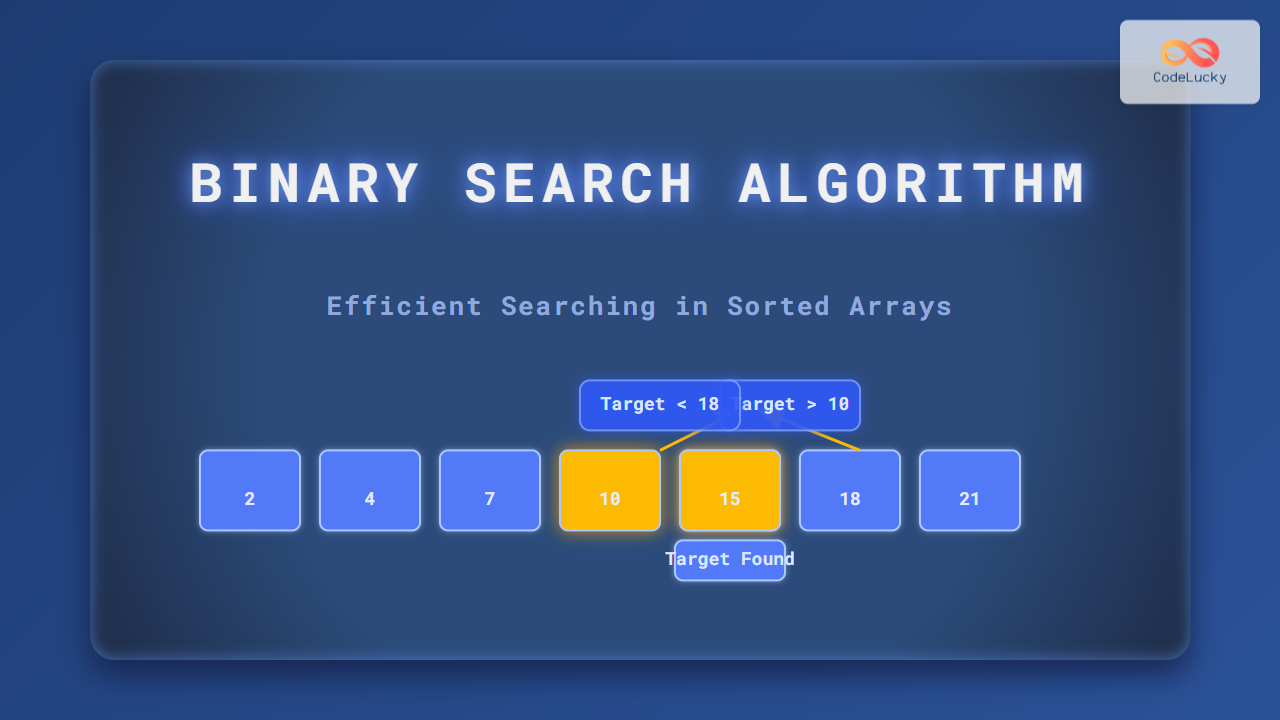
Consider the sorted array:
[2, 4, 7, 10, 15, 18, 21]We want to find 15 using binary search:
- Low = 0, High = 6 → Mid = 3 → Element at index 3 is 10 → Target is greater → Discard left half including 10.
- Low = 4, High = 6 → Mid = 5 → Element is 18 → Target is smaller → Move to left half.
- Low = 4, High = 4 → Mid = 4 → Element is 15 → Found at index 4.

Binary Search in Python (Iterative)
def binary_search(arr, target):
    low, high = 0, len(arr) - 1

    while low <= high:
        mid = (low + high) // 2
        if arr[mid] == target:
            return mid
        elif arr[mid] < target:
            low = mid + 1
        else:
            high = mid - 1
    return -1

# Example usage
arr = [2, 4, 7, 10, 15, 18, 21]
print(binary_search(arr, 15))  # Output: 4
Binary Search in Python (Recursive)
def binary_search_recursive(arr, target, low, high):
    if low > high:
        return -1

    mid = (low + high) // 2
    if arr[mid] == target:
        return mid
    elif arr[mid] < target:
        return binary_search_recursive(arr, target, mid + 1, high)
    else:
        return binary_search_recursive(arr, target, low, mid - 1)

# Example usage
arr = [2, 4, 7, 10, 15, 18, 21]
print(binary_search_recursive(arr, 15, 0, len(arr)-1))  # Output: 4
Visual Walkthrough of Recursive Search
Complexity Analysis
- Time Complexity:
O(log n)in the best, average, and worst case. - Space Complexity:
- Iterative version:
O(1) - Recursive version:
O(log n)(due to call stack)
- Iterative version:
When to Use Binary Search?
- When the data is sorted in ascending or descending order.
- When frequent searches are required, making preprocessing worthwhile.
- When efficiency is critical, e.g., searching in databases, dictionaries, or system libraries.
Advantages of Binary Search
- Highly efficient on sorted data.
- Logarithmic time complexity provides significant speed-up over linear search.
- Easy to implement both iteratively and recursively.
Limitations of Binary Search
- Requires sorted data, which may add preprocessing overhead.
- Not suitable for linked lists due to lack of direct index access.
- Less efficient for very small datasets compared to linear search.
Interactive Exercise (Try it Yourself!)
Copy the following snippet and run it in Python. Change the target value and see how the output changes.
arr = [2, 4, 7, 10, 15, 18, 21]
target = int(input("Enter a number to search: "))

index = binary_search(arr, target)
if index != -1:
    print(f"Target {target} found at index {index}")
else:
    print(f"Target {target} not found in array")
Conclusion
The Binary Search Algorithm is one of the most elegant and efficient techniques for searching in sorted datasets. With a logarithmic time complexity, it is exponentially faster than linear search and plays a crucial role in data-intensive applications like machine learning, databases, and real-time systems. By mastering binary search, you not only gain algorithmic intuition but also prepare yourself for solving more advanced problems in computer science.