Starting your first website can feel overwhelming, especially when choosing the right web hosting provider. With hundreds of hosting companies claiming to be “beginner-friendly,” how do you know which one truly offers the easiest setup experience? This comprehensive guide breaks down the best web hosting options for beginners in 2025, focusing on simplicity, affordability, and reliable support.
What Makes Web Hosting Beginner-Friendly?
Before diving into specific providers, let’s understand what separates beginner-friendly hosting from complex enterprise solutions:
- One-Click Installations: Ability to install WordPress, Joomla, or other CMS platforms with a single click
- Intuitive Control Panel: Easy-to-navigate dashboard for managing domains, emails, and files
- 24/7 Customer Support: Accessible help via live chat, phone, or tickets
- Automatic Backups: Built-in backup solutions to protect your data
- Free SSL Certificates: Security features included without additional cost
- Website Builders: Drag-and-drop tools for creating sites without coding

Top 5 Best Web Hosting Providers for Beginners
1. Bluehost – Best Overall for WordPress Beginners
Starting Price: $2.95/month
Best For: WordPress websites, first-time website owners
Bluehost stands out as the most beginner-friendly hosting provider, officially recommended by WordPress.org. Their custom dashboard simplifies the entire website creation process.
Key Features:
- Free domain for the first year
- One-click WordPress installation
- Custom Bluehost WordPress dashboard
- Free SSL certificate and CDN
- 24/7 customer support via chat and phone
- 30-day money-back guarantee
Setup Process:
- Visit Bluehost.com and click “Get Started”
- Choose your hosting plan (Basic plan sufficient for beginners)
- Select or register your domain name
- Complete account information and payment
- Access your custom WordPress dashboard
- Choose a theme and start customizing
2. HostGator – Best for Drag-and-Drop Website Building
Starting Price: $2.75/month
Best For: Users who prefer visual website builders
HostGator’s Gator Website Builder makes it incredibly easy to create professional-looking websites without any technical knowledge.
Key Features:
- Gator drag-and-drop website builder
- Free domain and SSL certificate
- Unmetered bandwidth and storage
- Mobile-responsive templates
- 45-day money-back guarantee
- cPanel control panel
3. SiteGround – Best Customer Support
Starting Price: $3.99/month
Best For: Users who prioritize excellent support
SiteGround is renowned for exceptional customer service and fast loading speeds, making it perfect for beginners who want reliable support.
Key Features:
- Custom Site Tools control panel
- Free website migration
- Daily automatic backups
- Free Cloudflare CDN
- WordPress auto-updates
- Google Cloud infrastructure
4. DreamHost – Best for Privacy-Conscious Beginners
Starting Price: $2.59/month
Best For: Users who value privacy and transparency
DreamHost offers straightforward pricing without hidden fees and includes domain privacy protection at no extra cost.
Key Features:
- Custom control panel
- Free domain privacy protection
- Unlimited bandwidth and storage
- 97-day money-back guarantee
- One-click WordPress installation
- Free automated WordPress migrations
5. A2 Hosting – Best for Speed-Focused Beginners
Starting Price: $2.99/month
Best For: Users who want fast loading websites
A2 Hosting’s Turbo servers provide up to 20x faster page loads, making it ideal for beginners who understand the importance of website speed.
Key Features:
- Turbo servers for faster speeds
- Free site migration
- Anytime money-back guarantee
- Free SSL certificates
- cPanel control panel
- HackScan protection
Types of Web Hosting for Beginners

Shared Hosting
The most popular choice for beginners, shared hosting means your website shares server resources with other sites. It’s affordable and perfect for new websites with moderate traffic.
Pros:
- Most affordable option ($2-5/month)
- No technical management required
- Suitable for most beginner websites
Cons:
- Limited resources
- Performance can be affected by other sites
- Less control over server settings
Managed WordPress Hosting
Specifically optimized for WordPress websites, these plans include automatic updates, security, and WordPress-specific support.
Best For: WordPress beginners who want hands-off maintenance
Essential Features to Look For
Control Panel Comparison
| Control Panel | Ease of Use | Features | Learning Curve |
|---|---|---|---|
| cPanel | High | Comprehensive | Low |
| Custom Dashboards | Very High | Streamlined | Very Low |
| Plesk | Medium | Advanced | Medium |
Free vs. Paid Add-ons
Understanding what’s included versus what costs extra can save you money:
- Usually Free: SSL certificates, basic email accounts, one-click installations
- Often Paid: Domain privacy, premium backups, advanced security, site migrations
- Sometimes Free: Domains (first year), website builders, CDN services
Step-by-Step Setup Guide

Phase 1: Pre-Purchase Research
- Define Your Needs:
- Type of website (blog, business, portfolio)
- Expected traffic volume
- Technical skill level
- Budget constraints
- Compare Providers: Use the comparison table above to evaluate options
- Read Recent Reviews: Check current user experiences and uptime statistics
Phase 2: Account Setup
- Choose Your Plan: Start with the basic shared hosting plan
- Domain Selection:
- Use existing domain or register new one
- Consider domain privacy protection
- Check domain renewal costs
- Account Creation: Provide accurate contact information for support
Phase 3: Website Installation
Most beginner-friendly hosts offer one-click installations:
- Log into your hosting control panel
- Find “One-Click Install” or “App Installer” section
- Select WordPress (or your preferred platform)
- Choose your domain and directory
- Set admin username and password
- Click “Install” and wait for completion
Common Beginner Mistakes to Avoid
Pricing and Billing Traps
- Introductory vs. Renewal Rates: Always check what you’ll pay after the promotional period
- Long-term Contracts: Don’t commit to 3+ years initially; start with annual plans
- Hidden Add-on Costs: Decline unnecessary extras during checkout
- Auto-renewal Settings: Set calendar reminders before renewal dates
Technical Setup Errors
- Skipping Backups: Set up automated backups immediately
- Weak Passwords: Use strong, unique passwords for all accounts
- Ignoring Updates: Keep your CMS and plugins updated
- No SSL Certificate: Ensure HTTPS is enabled for security and SEO
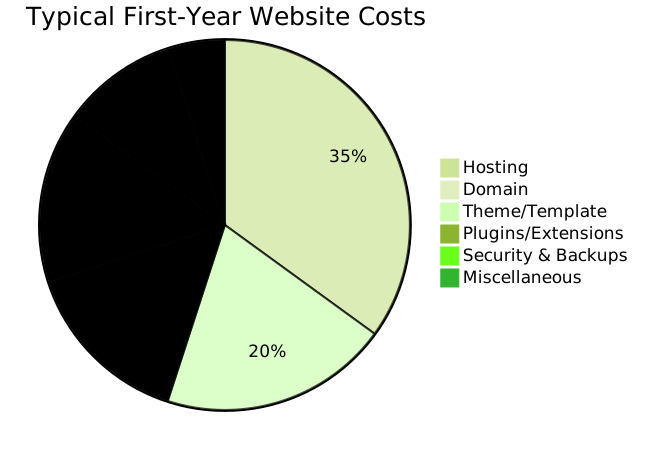
Budget Planning for Beginners
Essential vs. Optional Expenses
| Item | Annual Cost | Priority | Notes |
|---|---|---|---|
| Hosting Plan | $35-60 | Essential | Start with basic shared hosting |
| Domain Name | $10-15 | Essential | Often free first year with hosting |
| SSL Certificate | $0-50 | Essential | Usually included free |
| Premium Theme | $30-100 | Optional | Free themes available |
| Backup Service | $20-60 | Recommended | Some hosts include basic backups |
Performance and Security Basics
Speed Optimization for Beginners
Even beginners can implement these simple speed improvements:
- Choose Fast Hosting: Provider’s server speed impacts your site significantly
- Optimize Images: Compress images before uploading (use tools like TinyPNG)
- Use Caching: Install caching plugins (W3 Total Cache, WP Rocket)
- Select Lightweight Themes: Avoid overly complex themes with excessive features
- Limit Plugins: Only install necessary plugins and keep them updated
Basic Security Measures
- Strong Passwords: Use password managers to create unique passwords
- Two-Factor Authentication: Enable 2FA on hosting and admin accounts
- Regular Updates: Keep WordPress core, themes, and plugins updated
- Security Plugins: Install Wordfence or similar security plugins
- Regular Backups: Schedule automatic daily or weekly backups
Getting Help: Support Resources
When to Contact Support
Don’t hesitate to contact support for:
- Technical issues you can’t resolve
- Account setup problems
- Email configuration questions
- Performance concerns
- Billing inquiries
Self-Help Resources
- Knowledge Bases: Most hosts provide comprehensive documentation
- Video Tutorials: Step-by-step visual guides for common tasks
- Community Forums: Connect with other users experiencing similar issues
- WordPress.org Documentation: Official WordPress guides and tutorials
Migration and Scalability
When to Consider Upgrading
Signs you’ve outgrown shared hosting:
- Website loading slowly consistently
- Receiving “resource limit exceeded” errors
- Traffic exceeding 10,000+ monthly visitors
- Need for custom server configurations
- Requiring guaranteed resources
Scaling Path for Growing Websites
- Shared Hosting: Perfect for starting out (0-10K visitors/month)
- VPS Hosting: More resources and control (10K-100K visitors/month)
- Dedicated Hosting: Full server control (100K+ visitors/month)
- Cloud Hosting: Scalable resources based on demand
Conclusion
Choosing the right web hosting provider as a beginner doesn’t have to be complicated. Focus on providers that offer intuitive interfaces, reliable support, and transparent pricing. Bluehost remains the top choice for WordPress beginners, while HostGator excels for those preferring drag-and-drop builders.
Remember that you can always upgrade your hosting as your website grows. Start with a basic shared hosting plan, learn the fundamentals, and scale up when your traffic and technical needs demand it. The most important step is getting started – you can always refine and optimize along the way.
Take advantage of money-back guarantees to test different providers risk-free, and don’t hesitate to contact support when you need help. Every expert was once a beginner, and with the right hosting foundation, you’ll be well on your way to building a successful online presence.