
Backing up data is an essential part of any data management and IT security strategy. But a frequent question arises: How often should you backup? The answer isn’t one-size-fits-all—it depends on your data dynamics, business needs, and risk tolerance. This detailed guide explores the principles of backup scheduling, best practices, and practical examples to help you create an efficient backup schedule that protects your valuable data without overburdening your system resources.
Why Backup Scheduling is Critical
Data losses can occur unexpectedly due to hardware failure, accidental deletion, cyberattacks, or natural disasters. Regular backup scheduling mitigates risks by ensuring you have recent copies of your data to restore. A poorly timed or infrequent backup schedule can cause loss of critical recent data or cause unnecessary costs due to redundant backups.
Factors Influencing Backup Frequency
You should consider these key factors when determining how often to backup:
- Data Change Rate: How frequently your data changes. High-change environments require more frequent backups.
- Data Criticality: The importance of the data for business or personal use.
- Risk Tolerance: How much data loss is acceptable before disruption occurs.
- Backup Method: Full, incremental, or differential backup types affect scheduling.
- Storage and Cost Constraints: Budget and available storage can limit how often backups happen.
Common Backup Frequency Strategies

Continuous Backup
Continuous Backup, also called real-time backup, captures every change instantly. This is ideal for critical environments where even a minute of data loss is costly, such as financial systems or active project files.
Daily Backup
Backing up once a day suits most business needs where data doesn’t change dramatically within hours. For example, daily backups at midnight capture the day’s changes securely.
Weekly Backup
This is often used for archival of static or less critical data, balancing backup overhead and data protection.
Monthly Backup
Typically for compliance, archival, or historical records, monthly backups ensure long-term preservation.
Backup Types: Their Role in Scheduling
Understanding backup types helps optimize how frequently you backup:
- Full Backup: Copies all selected data. Usually done weekly or monthly due to resource intensity.
- Incremental Backup: Copies only data changed since the last backup (full or incremental), enabling daily or more frequent backups.
- Differential Backup: Copies data changed since the last full backup, balancing speed and restore times.
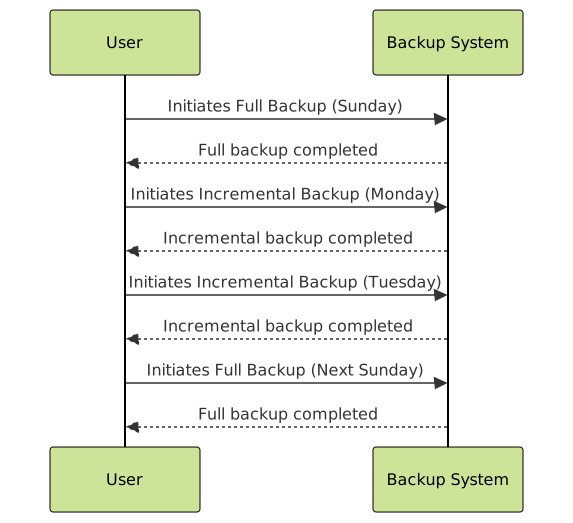
Example Backup Schedule for Small Business
Consider a small business with moderate daily transaction data plus a large set of static files.
| Day | Backup Type | Data Included |
|---|---|---|
| Sunday | Full Backup | All Data |
| Monday to Friday | Incremental Backup | Changes since Last Backup |
| Saturday | Skipped | Downtime for Maintenance |
Visualizing Backup Workflow

Interactive Example: Backup Frequency Decision
Choose your data change rate and criticality level in the below interactive scenario to get a recommended backup frequency:
Best Practices for Backup Scheduling
- Test backups regularly: Verify that your backups are working and data can be restored.
- Use multiple backup methods: Combine on-site and off-site backups for disaster protection.
- Automate backups: Reduce human error and ensure consistency with automation tools.
- Maintain backup logs: For audit trails and troubleshooting.
- Adjust schedule as needed: Periodically reevaluate based on changing data or business needs.
Summary
Scheduling backups effectively requires understanding data dynamics, criticality, and acceptable risk. Using a mix of full, incremental, and differential backups tailored to your needs ensures data safety without excessive resource use. Automate and regularly test your backup system for best results.





