
The 504 Gateway Timeout error is one of the most frustrating HTTP status codes that can bring your web application to a halt. Unlike simple client-side errors, this server-side issue indicates a breakdown in communication between servers in your infrastructure chain. Understanding its causes and implementing proper fixes is crucial for maintaining reliable web services.
What is a 504 Gateway Timeout Error?
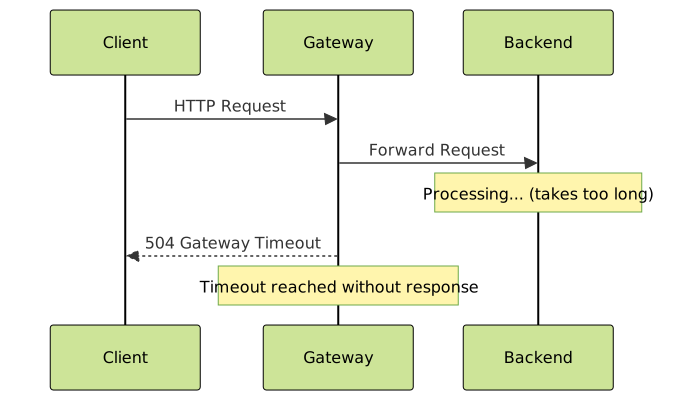
A 504 Gateway Timeout error occurs when a server acting as a gateway or proxy doesn’t receive a timely response from an upstream server it needs to fulfill the request. The gateway server waits for a predetermined timeout period and, when no response arrives, returns the 504 status code to the client.
HTTP 504 vs Other Server Errors
| Status Code | Meaning | Key Difference |
|---|---|---|
| 502 Bad Gateway | Invalid response from upstream | Server responds but with invalid data |
| 503 Service Unavailable | Server temporarily unavailable | Server is overloaded or down for maintenance |
| 504 Gateway Timeout | No response within timeout period | Server doesn’t respond at all within time limit |
Common Causes of 504 Gateway Timeout Errors
1. Slow Database Queries
Database operations that take too long are the leading cause of 504 errors. Complex queries, missing indexes, or locked tables can cause requests to hang indefinitely.
-- Example of a slow query that might cause timeouts
SELECT u.*, p.*, c.comment_text
FROM users u
JOIN posts p ON u.id = p.user_id
JOIN comments c ON p.id = c.post_id
WHERE u.created_at > '2023-01-01'
ORDER BY p.created_at DESC;

-- Optimized version with proper indexing
SELECT u.username, p.title, c.comment_text
FROM users u
JOIN posts p ON u.id = p.user_id
JOIN comments c ON p.id = c.post_id
WHERE u.created_at > '2023-01-01'
  AND u.status = 'active'
ORDER BY p.created_at DESC
LIMIT 100;
2. Resource-Intensive Operations
CPU-heavy computations, large file uploads, or complex data processing can exceed timeout thresholds. Consider this example of a resource-intensive operation:
# Problematic: Processing large dataset synchronously
def process_large_dataset(data):
    results = []
    for item in data:  # Millions of items
        # Complex calculation taking 10ms each
        processed_item = complex_calculation(item)
        results.append(processed_item)
    return results

# Better: Implement pagination and async processing
async def process_dataset_batch(data_batch):
    tasks = [process_item_async(item) for item in data_batch]
    return await asyncio.gather(*tasks)

def paginated_processing(data, batch_size=1000):
    for i in range(0, len(data), batch_size):
        batch = data[i:i + batch_size]
        yield process_dataset_batch(batch)
3. Network Connectivity Issues
Poor network conditions between servers, DNS resolution problems, or firewall blocking can cause communication failures.

4. Insufficient Server Resources
When servers run out of memory, CPU, or disk I/O capacity, they may fail to respond within timeout limits. Monitor these key metrics:
- Memory Usage: High RAM consumption leading to swapping
- CPU Load: Sustained high CPU usage above 80%
- Disk I/O: Storage bottlenecks affecting read/write operations
- Connection Limits: Exhausted database or network connection pools
Diagnosing 504 Gateway Timeout Errors
Server Log Analysis
Start by examining logs from different components in your stack:
# Nginx access logs
tail -f /var/log/nginx/access.log | grep "504"

# Nginx error logs
tail -f /var/log/nginx/error.log

# Application logs (example for Node.js)
tail -f /var/log/myapp/error.log | grep -i timeout

# Database slow query logs (MySQL)
tail -f /var/log/mysql/slow.log
Performance Monitoring
Use monitoring tools to identify bottlenecks:
# Check system resources
top -p $(pgrep nginx)
iostat -x 1
free -h

# Database performance (MySQL)
mysql -e "SHOW PROCESSLIST;"
mysql -e "SHOW ENGINE INNODB STATUS;"

# Network connectivity testing
curl -w "time_total: %{time_total}\n" -o /dev/null -s https://yourapi.com/endpoint
ping -c 10 your-backend-server.com
Fixing 504 Gateway Timeout Errors
1. Adjust Timeout Settings
Configure appropriate timeout values across your infrastructure stack:
# Nginx configuration
server {
    # Increase proxy timeout values
    proxy_connect_timeout 60s;
    proxy_send_timeout 60s;
    proxy_read_timeout 60s;

    # For FastCGI (PHP-FPM)
    fastcgi_connect_timeout 60s;
    fastcgi_send_timeout 60s;
    fastcgi_read_timeout 60s;

    location /api/ {
        proxy_pass http://backend;
        proxy_timeout 120s;  # Longer timeout for API endpoints
    }
}
# Apache configuration (.htaccess or virtual host)
TimeOut 300
ProxyTimeout 300
# For specific locations
ProxyPass http://backend:8080/api/
ProxyPassReverse http://backend:8080/api/
ProxyTimeout 120
2. Database Optimization
Implement database performance improvements:
-- Add proper indexes for slow queries
CREATE INDEX idx_users_created_status ON users(created_at, status);
CREATE INDEX idx_posts_user_created ON posts(user_id, created_at);

-- Optimize MySQL configuration
-- In my.cnf
[mysqld]
innodb_buffer_pool_size = 2G
query_cache_size = 256M
max_connections = 500
wait_timeout = 600
interactive_timeout = 600
3. Application-Level Solutions
Implement caching and asynchronous processing:
// Node.js example with Redis caching
const redis = require('redis');
const client = redis.createClient();

async function getCachedData(key) {
    try {
        const cached = await client.get(key);
        if (cached) {
            return JSON.parse(cached);
        }

        // Fetch from database with timeout
        const data = await Promise.race([
            fetchFromDatabase(key),
            new Promise((_, reject) =>
                setTimeout(() => reject(new Error('Database timeout')), 30000)
            )
        ]);

        // Cache for 5 minutes
        await client.setex(key, 300, JSON.stringify(data));
        return data;
    } catch (error) {
        console.error('Error fetching data:', error);
        throw error;
    }
}
4. Load Balancing and Scaling

# Docker Compose example for scaling
version: '3.8'
services:
  nginx:
    image: nginx:alpine
    ports:
      - "80:80"
    volumes:
      - ./nginx.conf:/etc/nginx/nginx.conf
    depends_on:
      - app

  app:
    image: myapp:latest
    deploy:
      replicas: 3  # Scale to 3 instances
    environment:
      - DB_HOST=database
      - REDIS_HOST=redis
    depends_on:
      - database
      - redis

  database:
    image: mysql:8.0
    environment:
      MYSQL_ROOT_PASSWORD: secretpassword
    volumes:
      - db_data:/var/lib/mysql

  redis:
    image: redis:alpine
    command: redis-server --maxmemory 256mb

volumes:
  db_data:
Prevention Strategies
1. Implement Health Checks
// Express.js health check endpoint
app.get('/health', async (req, res) => {
    const checks = {
        database: false,
        redis: false,
        diskSpace: false
    };

    try {
        // Database connectivity check
        await db.query('SELECT 1');
        checks.database = true;

        // Redis connectivity check
        await redis.ping();
        checks.redis = true;

        // Disk space check
        const stats = await fs.promises.statfs('/');
        const freeSpace = (stats.free / stats.size) * 100;
        checks.diskSpace = freeSpace > 10; // At least 10% free

        const allHealthy = Object.values(checks).every(check => check);

        res.status(allHealthy ? 200 : 503).json({
            status: allHealthy ? 'healthy' : 'unhealthy',
            checks,
            timestamp: new Date().toISOString()
        });
    } catch (error) {
        res.status(503).json({
            status: 'unhealthy',
            error: error.message,
            checks
        });
    }
});
2. Circuit Breaker Pattern
import time
from enum import Enum

class CircuitBreakerState(Enum):
    CLOSED = "closed"
    OPEN = "open"
    HALF_OPEN = "half_open"

class CircuitBreaker:
    def __init__(self, failure_threshold=5, timeout=60):
        self.failure_threshold = failure_threshold
        self.timeout = timeout
        self.failure_count = 0
        self.state = CircuitBreakerState.CLOSED
        self.last_failure_time = None

    def call(self, func, *args, **kwargs):
        if self.state == CircuitBreakerState.OPEN:
            if time.time() - self.last_failure_time > self.timeout:
                self.state = CircuitBreakerState.HALF_OPEN
            else:
                raise Exception("Circuit breaker is OPEN")

        try:
            result = func(*args, **kwargs)
            self.on_success()
            return result
        except Exception as e:
            self.on_failure()
            raise e

    def on_success(self):
        self.failure_count = 0
        self.state = CircuitBreakerState.CLOSED

    def on_failure(self):
        self.failure_count += 1
        self.last_failure_time = time.time()

        if self.failure_count >= self.failure_threshold:
            self.state = CircuitBreakerState.OPEN
3. Monitoring and Alerting
Set up comprehensive monitoring to catch issues before they cause 504 errors:
# Prometheus alert rules
groups:
- name: gateway_timeout_alerts
  rules:
  - alert: HighGatewayTimeoutRate
    expr: rate(http_requests_total{status="504"}[5m]) > 0.1
    for: 2m
    labels:
      severity: warning
    annotations:
      summary: "High rate of 504 Gateway Timeout errors"

  - alert: SlowResponseTime
    expr: histogram_quantile(0.95, rate(http_request_duration_seconds_bucket[5m])) > 30
    for: 5m
    labels:
      severity: critical
    annotations:
      summary: "95th percentile response time is above 30 seconds"
Testing and Validation
Load Testing
Use tools like Apache Bench or k6 to simulate high load and identify timeout thresholds:
# Apache Bench test
ab -n 1000 -c 50 -t 60 https://yoursite.com/api/endpoint

# k6 load test script
import http from 'k6/http';
import { check, sleep } from 'k6';

export let options = {
    stages: [
        { duration: '5m', target: 100 },
        { duration: '10m', target: 100 },
        { duration: '5m', target: 0 },
    ],
    thresholds: {
        http_req_duration: ['p(95)<30000'], // 95% requests under 30s
        http_req_failed: ['rate<0.05'],     // Error rate under 5%
    },
};

export default function() {
    let response = http.get('https://yoursite.com/api/endpoint');
    check(response, {
        'status is 200': (r) => r.status === 200,
        'response time OK': (r) => r.timings.duration < 30000,
    });
    sleep(1);
}
Best Practices Summary
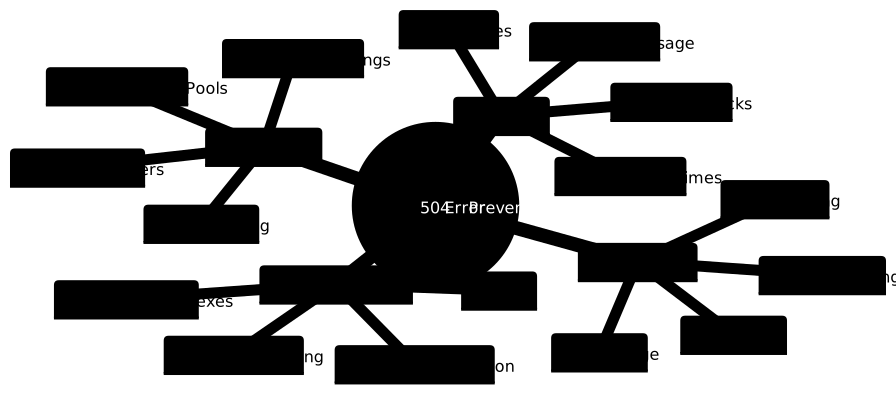
- Proactive Monitoring: Implement comprehensive monitoring and alerting for response times, error rates, and system resources
- Gradual Timeout Increases: Don’t just increase timeouts indefinitely; identify and fix the root cause
- Caching Strategy: Implement multiple layers of caching to reduce backend load
- Graceful Degradation: Design systems to degrade gracefully under high load rather than failing completely
- Regular Performance Testing: Conduct load testing to identify breaking points before they affect users
- Database Maintenance: Regular index optimization, query analysis, and connection pool tuning
The 504 Gateway Timeout error is a complex issue that requires systematic diagnosis and multi-layered solutions. By understanding the underlying causes, implementing proper monitoring, and following these prevention strategies, you can significantly reduce the occurrence of these errors and maintain reliable web services. Remember that fixing 504 errors often involves optimizing the entire request flow from client to database, not just adjusting timeout values.





